Azure Cloud Account Assets Count
Prerequisites
- Resource-graph extension for azure-cli
- JQ should be installed
Bash script to get Assets Count
#!/bin/bash
X1=$(az graph query -q "resources| where type=~ 'Microsoft.Compute/disks'| count" | jq -r '.data[].Count')
X2=$(az graph query -q "resources| where type=~ 'Microsoft.Compute/virtualMachines'| count" | jq -r '.data[].Count')
X3=$(az graph query -q "resources| where type=~ 'Microsoft.ContainerService/managedClusters'| count" | jq -r '.data[].Count')
X4=$(az graph query -q "resources| where type=~ 'Microsoft.Network/loadBalancers'| count" | jq -r '.data[].Count')
X5=$(az graph query -q "resources| where type=~ 'Microsoft.Network/networkInterfaces'| count" | jq -r '.data[].Count')
X6=$(az graph query -q "resources| where type=~ 'Microsoft.Network/publicIPAddresses'| count" | jq -r '.data[].Count')
X7=$(az graph query -q "resources| where type=~ 'Microsoft.Network/routeTables'| count" | jq -r '.data[].Count')
X8=$(az graph query -q "resources| where type=~ 'Microsoft.Network/virtualNetworks'| count" | jq -r '.data[].Count')
X9=$(az graph query -q "resources| where type == 'microsoft.network/virtualnetworks'| extend subnets = properties.subnets| mv-expand subnets| project name, subnets.name, subnets.properties.addressPrefix, location, resourceGroup, subscriptionId| count" | jq -r '.data[].Count')
(( SUM=X1+X2+X3+X4+X5+X6+X7+X8+X9 ))
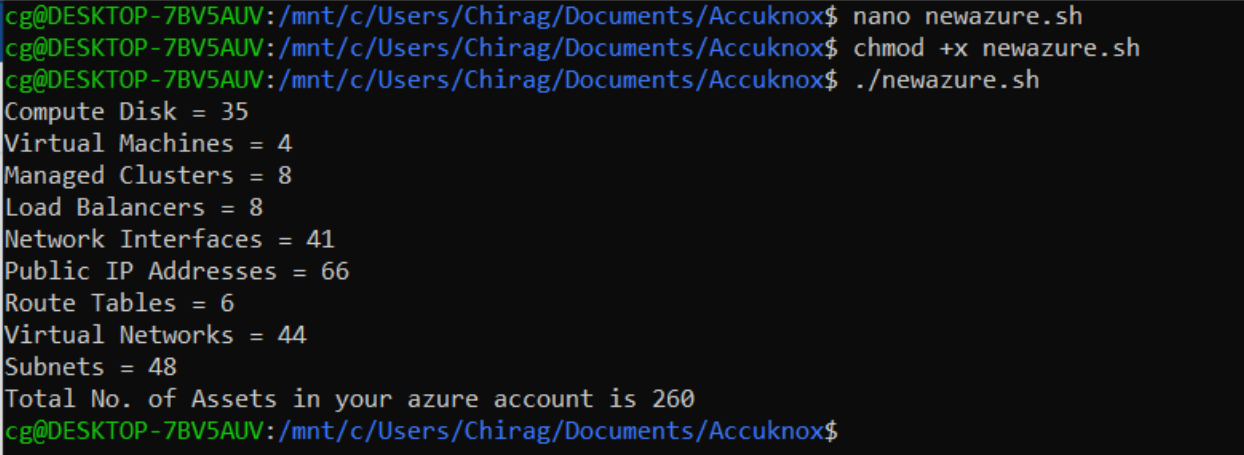
echo "Compute Disk = $X1"
echo "Virtual Machines = $X2"
echo "Managed Clusters = $X3"
echo "Load Balancers = $X4"
echo "Network Interfaces = $X5"
echo "Public IP Addresses = $X6"
echo "Route Tables = $X7"
echo "Virtual Networks = $X8"
echo "Subnets = $X9"
echo "Total No. of Assets in your azure account is $SUM"
Sample Output