Integrating SAST with AccuKnox in a GitHub CI/CD Pipeline
Overview
This guide explains how to use the AccuKnox SAST GitHub Action for integrating Static Application Security Testing (SAST) into a GitHub CI/CD pipeline. The process leverages SonarQube for scanning source code and uploads the results to AccuKnox CSPM for comprehensive vulnerability analysis and remediation.
Prerequisites
-
GitHub Repository Access: Ensure you have access to your repository where the workflow will be implemented.
-
SonarQube Access: Obtain API tokens and project details for SAST scanning.
-
AccuKnox Platform Access: Access your AccuKnox CSPM dashboard and generate an API token for integrations.
Steps for Integration
Step 1: Log in to AccuKnox. Navigate to Settings → Tokens to create an AccuKnox token for forwarding scan results to SaaS. For details on generating tokens, refer to How to Create Tokens
Step 2: Define GitHub Secrets
To securely store sensitive values, define the following secrets in your GitHub repository settings:
Secret Configuration Table
| Secret Name | Description |
|---|---|
SONAR_TOKEN |
API token for authenticating with SonarQube. |
SONAR_HOST_URL |
URL of your SonarQube server. |
SONAR_PROJECT_KEY |
Project key for identifying your project in SonarQube |
SONAR_ORG_ID |
Organization ID for SonarQube. Cloud users only |
ACCUKNOX_TOKEN |
API token for authenticating with AccuKnox. |
ACCUKNOX_ENDPOINT |
URL of the AccuKnox CSPM API. |
ACCUKNOX_LABEL |
The label for your scan. |
Step 3: Create GitHub Workflow
Add a new workflow file (.github/workflows/sast.yml) to your repository with the following configuration:
name: AccuKnox SAST Workflow
on:
  push:
    branches:
      - main

jobs:
  sast-scan:
    runs-on: ubuntu-latest
    steps:
      - name: Checkout code
        uses: actions/checkout@v4

      - name: Run AccuKnox SAST
        uses: accuknox/sast-scan-action@latest
        with:
          skip_sonar_scan: false
          sonar_project_key: ${{ secrets.SONAR_PROJECT_KEY }}
          sonar_token: ${{ secrets.SONAR_TOKEN }}
          sonar_host_url: ${{ secrets.SONAR_HOST_URL }}
          sonar_organization_id: ${{ secrets.SONAR_ORG_ID }}
          accuknox_endpoint: ${{ secrets.ACCUKNOX_ENDPOINT }}
          accuknox_token: ${{ secrets.ACCUKNOX_TOKEN }}
          accuknox_label: ${{ secrets.ACCUKNOX_LABEL }}
          soft_fail: false
Inputs for AccuKnox SAST Action
| Input Name | Description | Required | Default |
|---|---|---|---|
sonar_token |
Personal access token for authenticating with SonarQube. | Yes | None |
sonar_host_url |
URL of the SonarQube server for SAST. | Yes | None |
sonar_project_key |
Project key in SonarQube for identifying the project. | Yes | None |
sonar_organization_id |
Organization ID for SonarQube. Cloud users only. | No | None |
accuknox_endpoint |
URL of AccuKnox API to upload results. | Yes | None |
accuknox_token |
Token for authenticating with the AccuKnox API. | Yes | None |
accuknox_label |
Label for tagging results in AccuKnox SaaS. | Yes | None |
skip_sonar_scan |
Skip SonarQube scan, for advanced users | No | false |
soft_fail |
Fail the pipeline if secrets are found. | Optional | false |
How It Works
-
Checkout Code: The workflow pulls the latest code from the repository.
-
SonarQube SAST Scan: Runs a SAST scan on the code using SonarQube.
-
Upload Results to AccuKnox: The scan results are uploaded to the AccuKnox CSPM platform for analysis and centralized monitoring.
-
Quality Gate Check: Ensures the project meets the quality standards defined in SonarQube.
Viewing Results in AccuKnox SaaS
View Results in AccuKnox SaaS
Step 1: After the workflow completes, navigate to the AccuKnox SaaS dashboard.
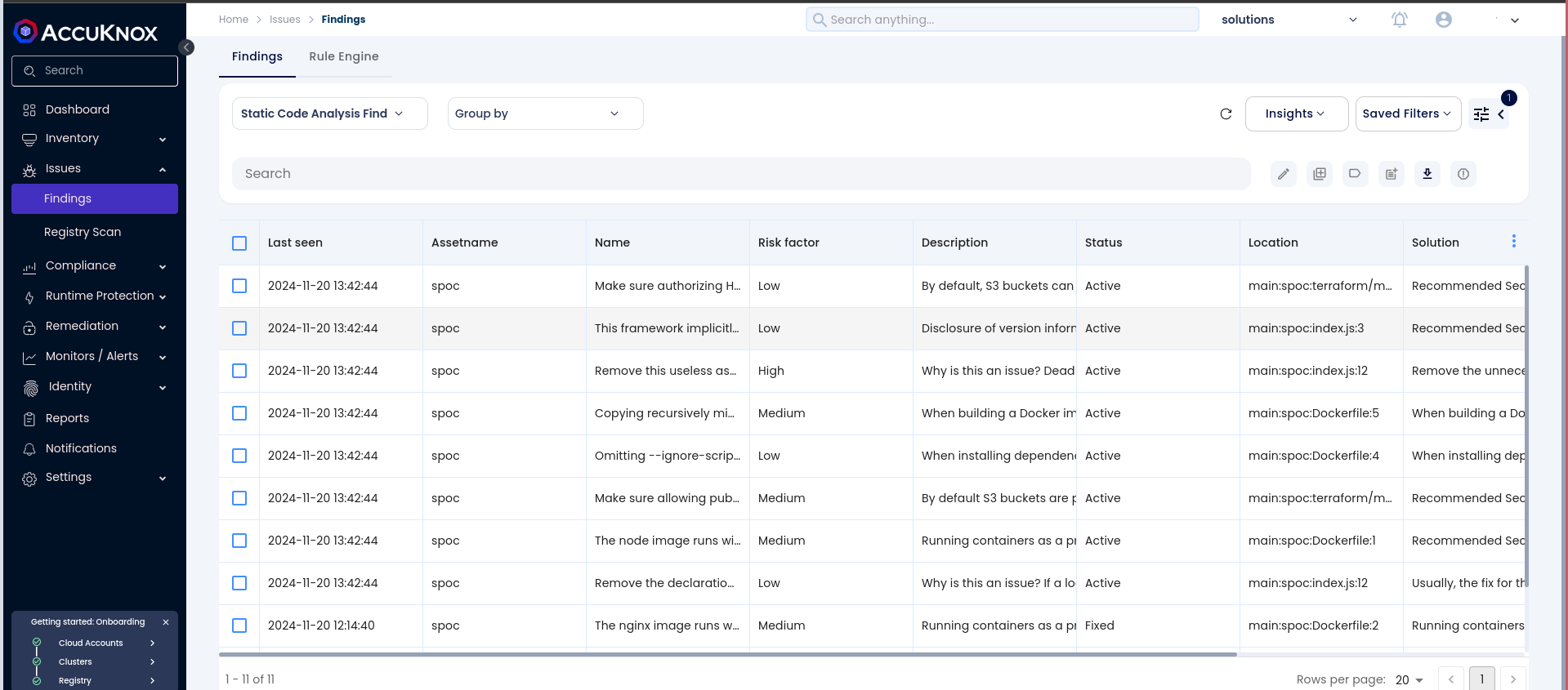
Step 2: Go to Issues > Findings and select Static Code Analysis Findings to see identified vulnerabilities.
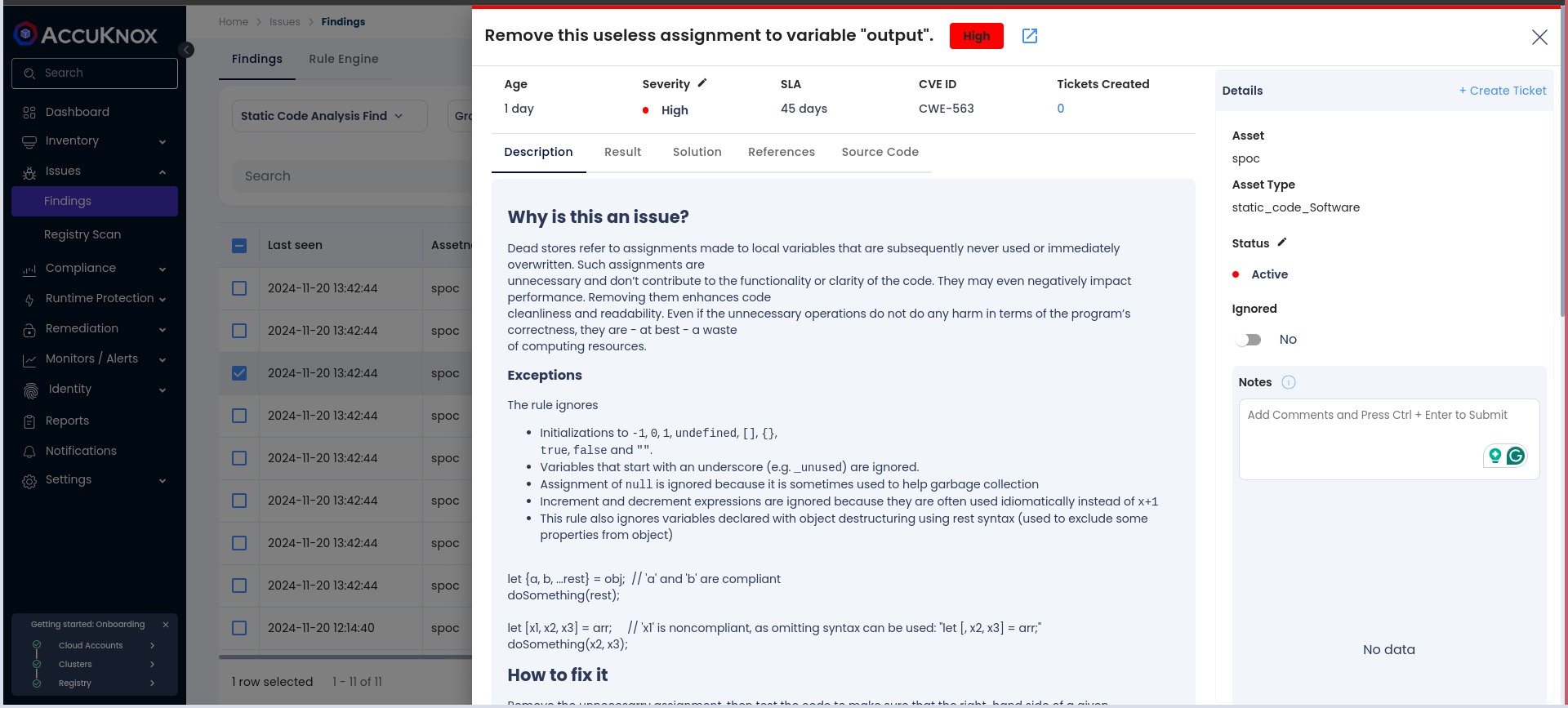
Step 3: Click on a vulnerability to view more details.
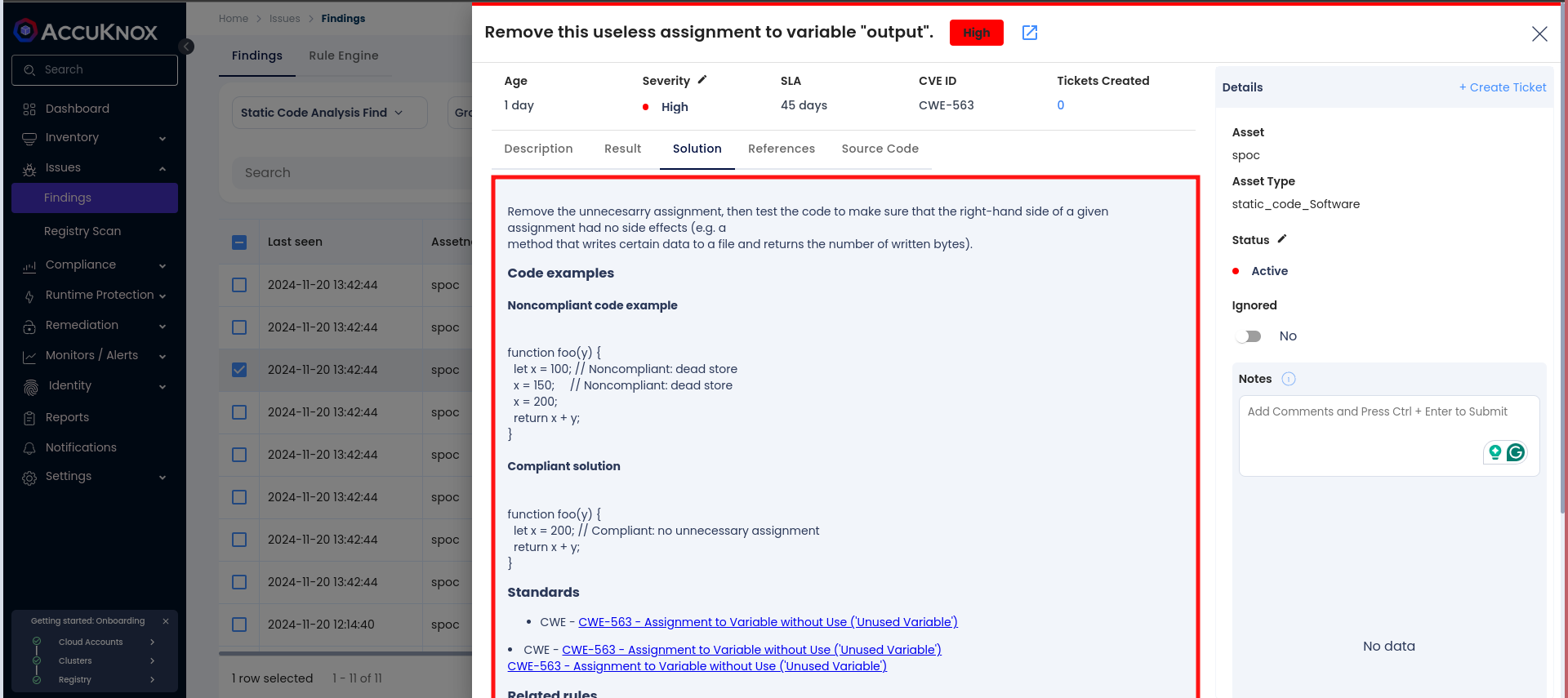
Step 4: Fix the Vulnerability
Follow the instructions in the Solutions tab or use ASK AI to fix the vulnerability
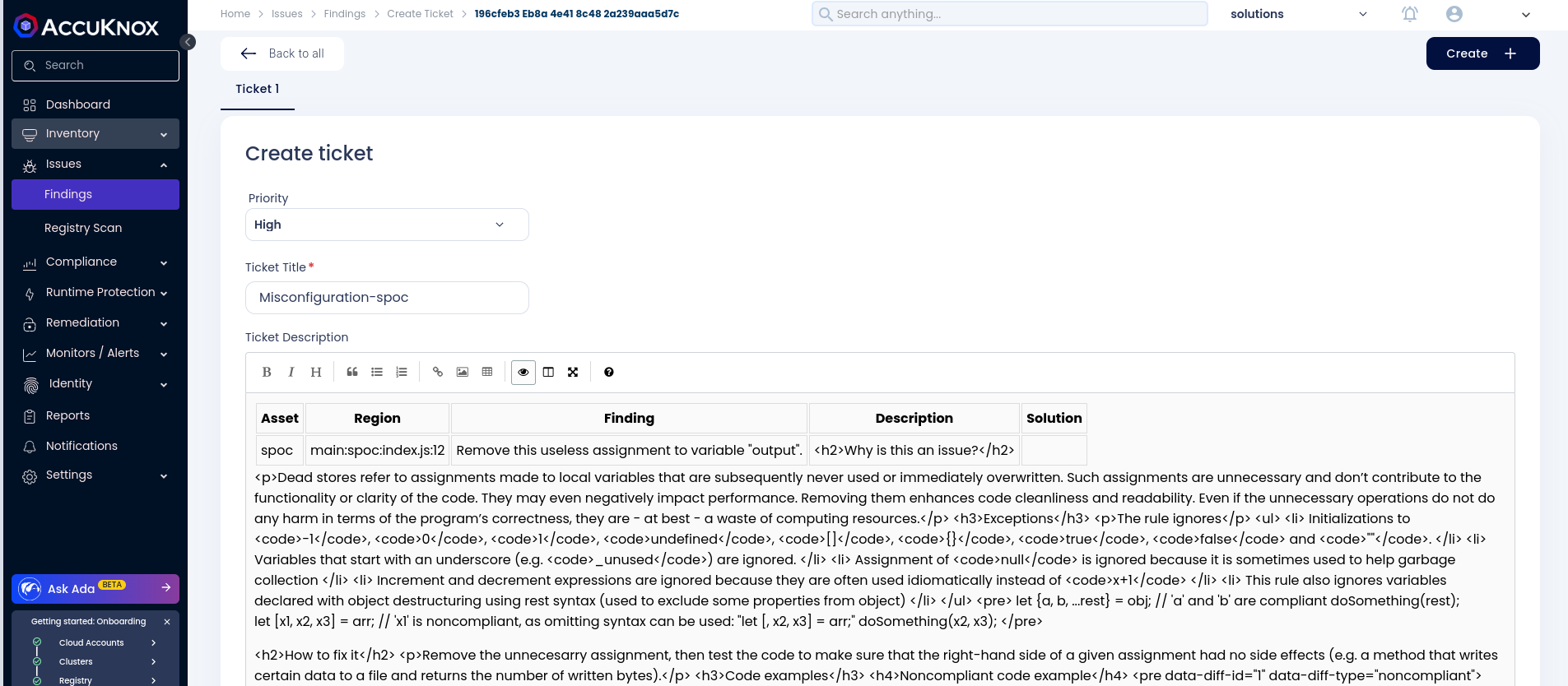
Step 5: Create a Ticket for Fixing the Vulnerability
Create a ticket in your issue-tracking system to address the identified vulnerability.
Step 6: Review Updated Results
-
After fixing the vulnerability, rerun the GitLab CI/CD pipeline.
-
Navigate to the AccuKnox SaaS dashboard and verify that the vulnerability has been resolved.
Benefits of Integration
-
Centralized monitoring and reporting of vulnerabilities.
-
Early detection of issues during the development lifecycle.
-
Actionable remediation guidance to improve code quality.
-
Easy integration into existing GitHub pipelines.
By integrating SonarQube SAST with AccuKnox in a GitHub Actions workflow, you ensure a secure development pipeline while leveraging the best practices in vulnerability management.