AccuKnox v3.5 Release Notes
Release Date: May 2026
v3.5 expands AccuKnox across the supply chain, the Rule Engine, AI workloads, and cloud governance. Headline additions are the Pipeline Auditor collector for GitHub Actions, managed AI agent visibility covering Copilot Studio, Microsoft 365 agents, and Bedrock AgentCore, parent-child smart ticketing, auto-tagging of internet-facing cloud assets, an AI-driven widget builder on Dashboard V3, and the unified xBOM framework spanning SBOM, CBOM, and AIBOM.
At a Glance
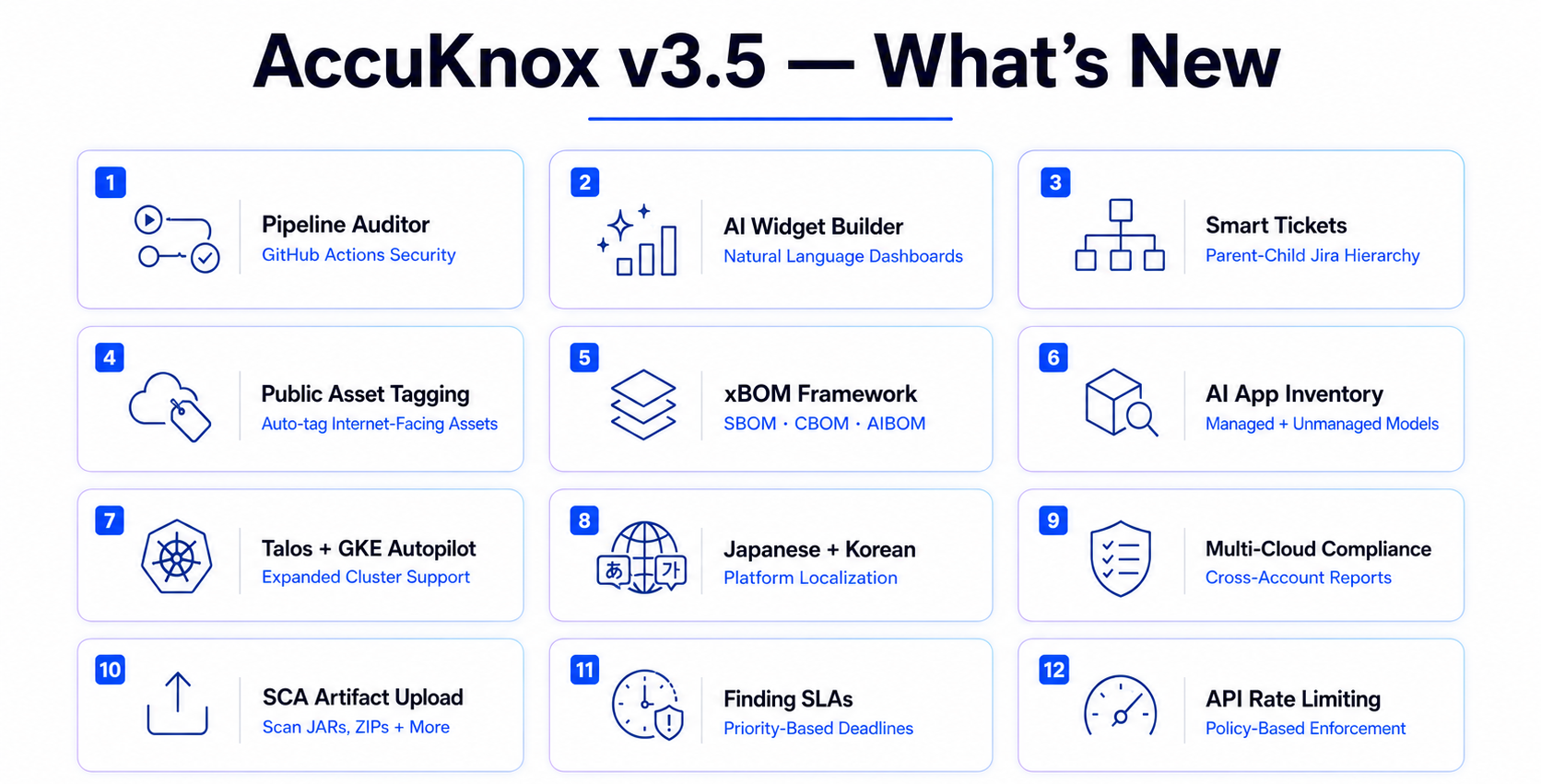
Application & Supply Chain Security
- Pipeline Auditor Scan for GitHub Actions
- SCA Artifact Upload Collector
- xBOM: SBOM, CBOM, AIBOM
- SBOM Enhancements
Cloud Security & Compliance
AI Security
- Prompt Firewall Browser Plugin
- Red Teaming Custom Models via Collector
- AI App Inventory: Managed Agents, Models, and Unmanaged Assets
Runtime & Kubernetes (CWPP)
- Talos Linux Support
- GKE Autopilot Support
- Container Image Findings Grouped by Cluster
- Bulk Updates for Auto-Discovered Policies
- KIEM Finding Detail
- KubeArmor: Per-Node CRI Auto-Detection
- KubeArmor PTS Rule Support
- KubeArmor Network Enforcement
Rule Engine & Findings Workflow
- Smart Tickets with Parent-Child Hierarchy
- Not Seen In Condition
- Custom Finding Statuses
- Finding SLAs
- Tags Page Revamp
API Security
Platform
- Ad-hoc Trigger for Every Collector
- AI Widget Builder on Dashboard V3
- Japanese and Korean Localization
What's New in v3.5
Pipeline Auditor Scan for GitHub Actions
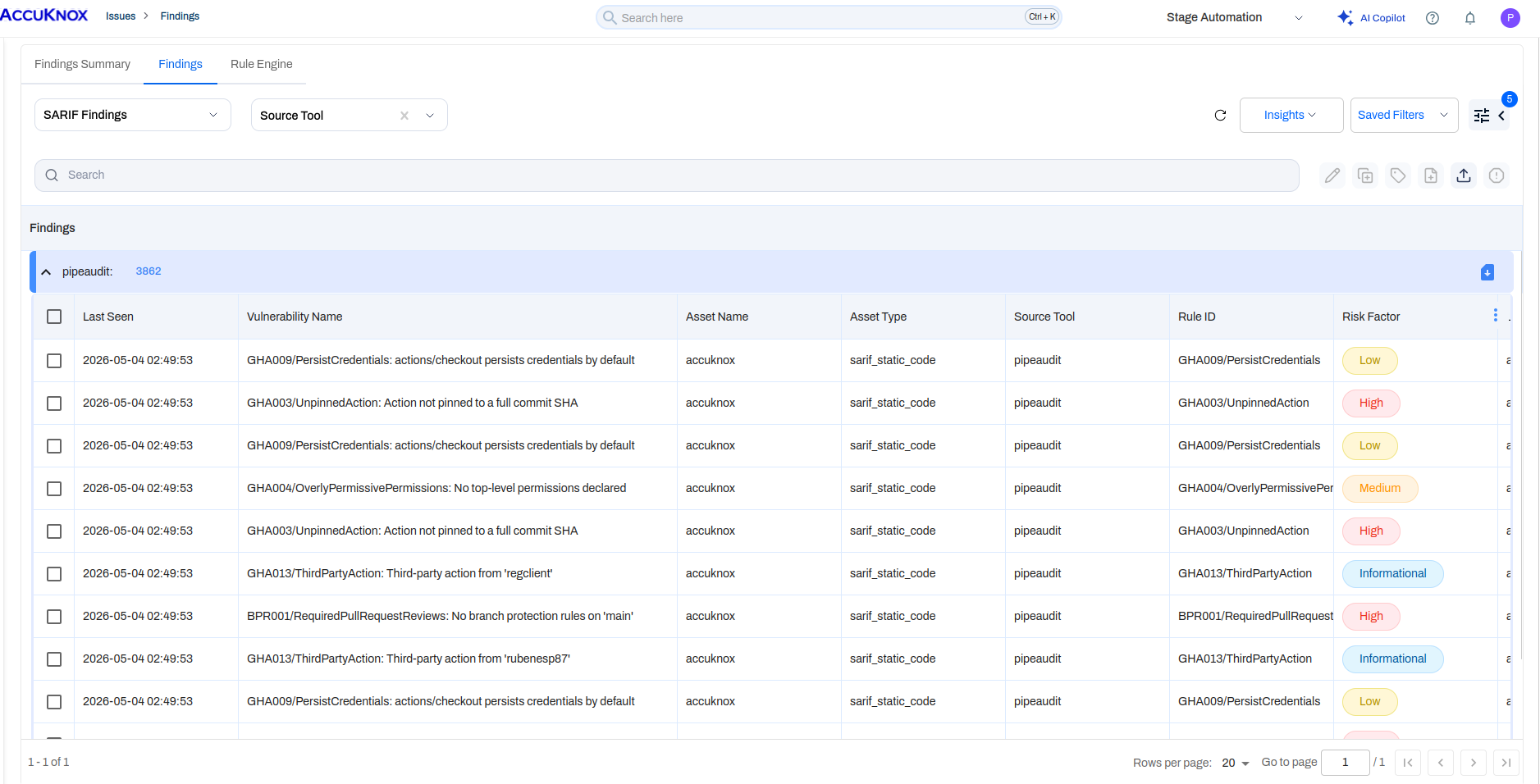
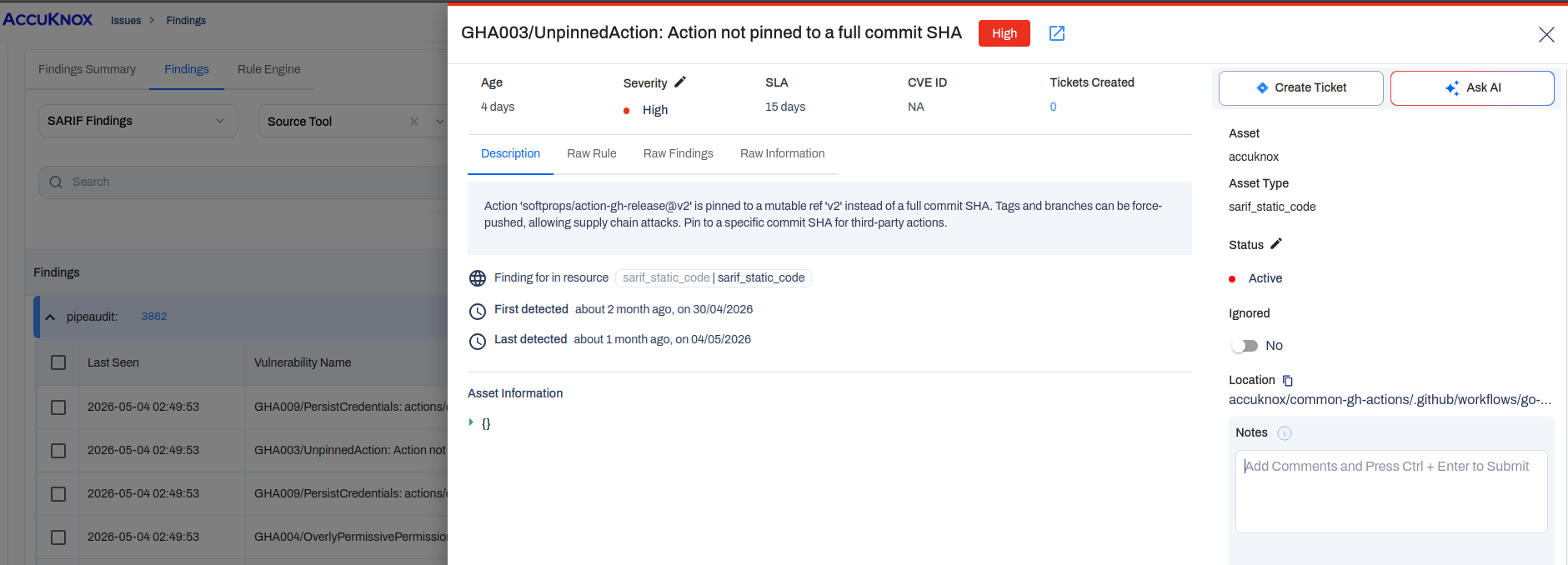
A new collector audits the entire GitHub Actions pipeline of an organization. It surfaces gaps that neither GitHub nor standard SAST tooling reports, including unpinned third-party actions, persisted credentials, overly permissive GITHUB_TOKEN scopes, missing branch protection, and supply chain risks introduced by mutable refs.
Add it from Settings → Collectors → Pipeline Auditor Scan, supply the organization ID and a fine-grained personal access token scoped to that organization with the permissions documented in the PipelineAudit project. Findings post into the standard Findings flow with pipeaudit as the source tool, grouped by repository and rule ID so a single workflow with many unpinned actions reads as a clean drill-down.
Note
GitHub is production-ready in v3.5. GitLab and Azure DevOps adapters exist but remain in active development; production rollout is scheduled for v3.6.
SCA Artifact Upload Collector
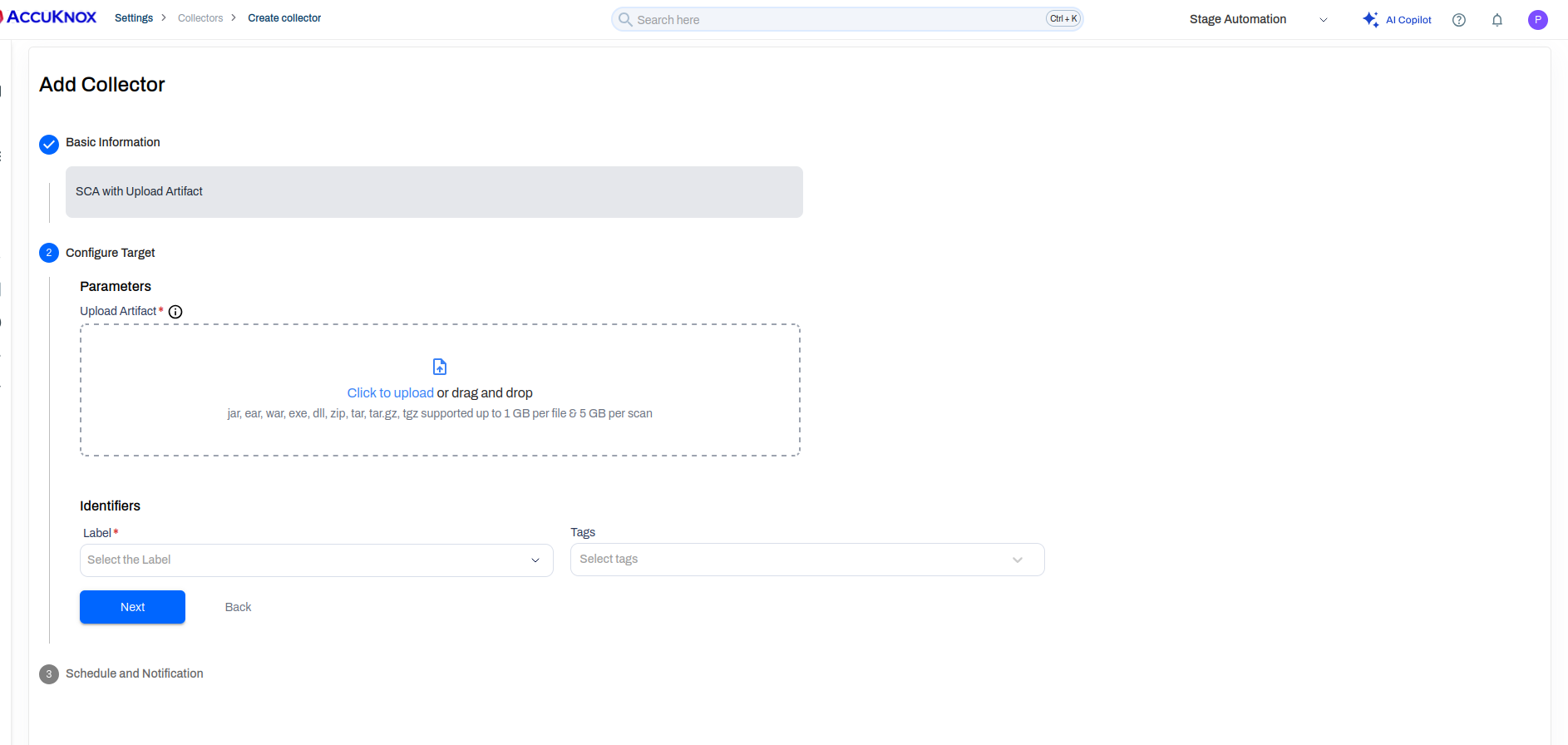
Software Composition Analysis now accepts pre-built artifacts as a direct upload. Drop jar, ear, war, exe, dll, zip, tar, tar.gz, or tgz files (up to 1 GB per file and 5 GB per scan) and AccuKnox runs the full SCA pipeline against them, no repository connection required.
This unblocks teams that build artifacts in air-gapped or third-party CI environments and want findings inside AccuKnox without exposing source. Supports both ad-hoc uploads and recurring scheduled scans, so an artifact uploaded once keeps re-scanning against an updated CVE database without re-upload.
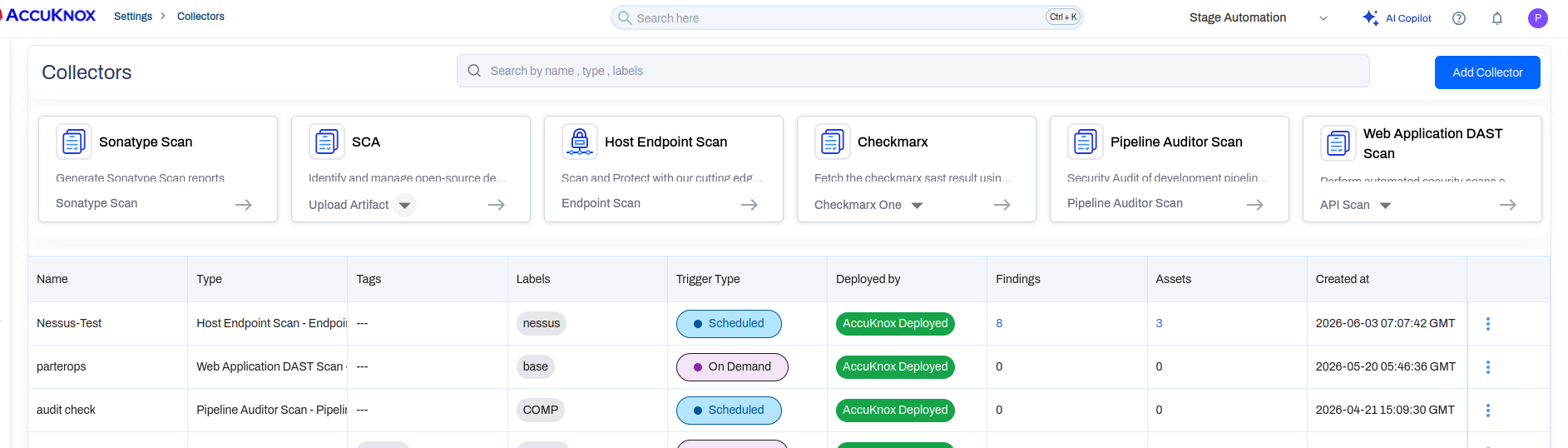
Ad-hoc Trigger for Every Collector
Every collector row now carries a Trigger Scan action alongside the existing on-demand and scheduled modes. Use it for one-off runs that should not disturb the configured schedule.
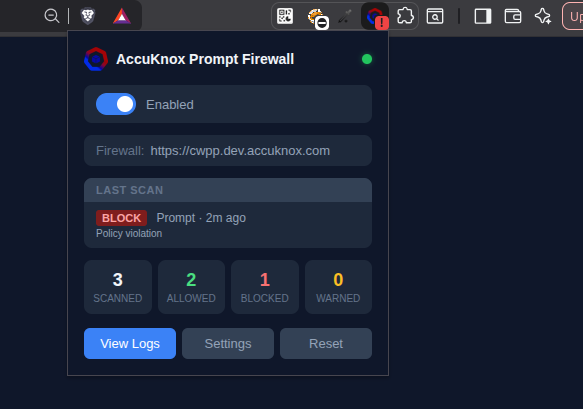
Prompt Firewall Browser Plugin: Chrome, Firefox, Safari, Brave, and Edge
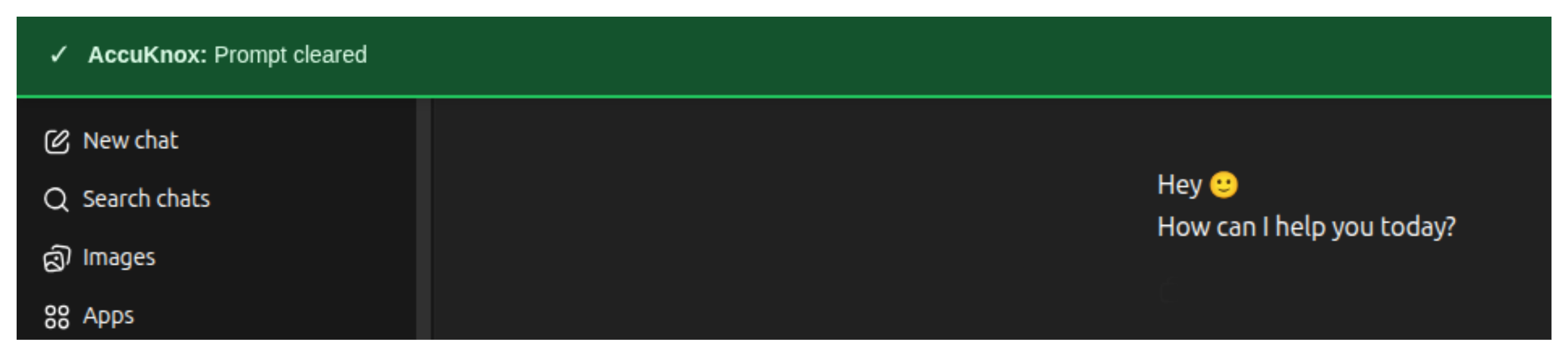
The AccuKnox Prompt Firewall is now available as a browser extension for Chrome, Firefox, Safari, Brave, and Edge. The plugin sits between your browser and ChatGPT, intercepting every prompt and response before it travels to or from the model. If a prompt trips an active policy, a red banner appears inline. Prompts that clear all policies pass through silently with a green confirmation.
This gives organizations direct control over how employees interact with public AI assistants, without requiring any application-level SDK integration or proxy changes. Install it, paste your integration token from AI Security > Integrations, and policies you have already configured in AccuKnox apply immediately.
A blocked prompt surfaces a red banner inline in ChatGPT, and an allowed prompt shows a brief green clearance — both without leaving the browser tab.

Every intercepted prompt and response is logged under AI Security > Request Log with timestamp, direction (PROMPT or RESPONSE), verdict (ALLOW or BLOCK), content preview, and latency. The log is searchable, filterable by verdict or direction, and exportable as JSON.
Installation guides:
Firefox and Safari installation
Firefox loads the extension as a temporary add-on via about:debugging. Safari requires Developer Mode enabled and loads the extension as an unsigned package. Both unload when the browser restarts. Contact AccuKnox support if you need a permanent deployment option.
Red Teaming Custom Models via Collector
AccuKnox supports cloud-based onboarding to scan and red team every model deployed across an AWS Bedrock account. The Collector method is a lighter alternative for targeting a specific model on Bedrock without onboarding the entire cloud account or organization.
- Targeted scope: Red team a single Bedrock model instead of every model in the account.
- No account onboarding needed: Works directly against the model's inference endpoint using a Bedrock API key.
- Fast setup: A single Custom Model collector covers the connection, prompts, and schedule.
- Flexible: The same flow works for any LLM exposed over an HTTP endpoint, not just Bedrock.
Set up red teaming for a custom model →
AI App Inventory: Managed Agents, Models, and Unmanaged Assets
AI/ML inventory now covers three layers: cloud-managed AI agents, managed foundation models, and unmanaged assets discovered across your environment.
Managed AI Agents
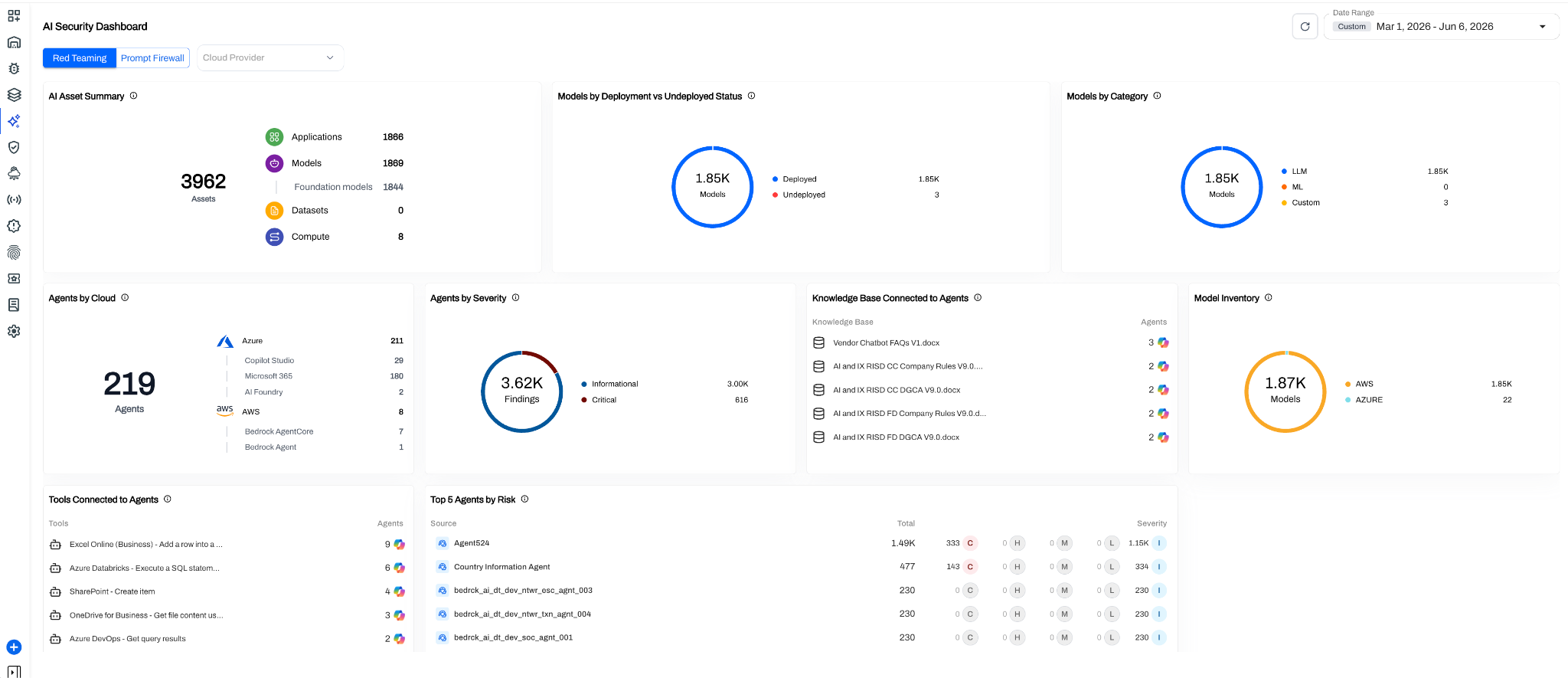
AccuKnox is the first platform to give security teams direct visibility into cloud-managed AI agents. Supported sources in v3.5 are Microsoft Copilot Studio, Microsoft 365 Agents, Azure AI Foundry, AWS Bedrock AgentCore, and AWS Bedrock Agent. These agents are provisioned and run by the cloud provider but typically carry broad tool access, connected knowledge bases, and significant permissions, which makes discovery the first step toward governance.
The AI Security Dashboard aggregates the full agent footprint across clouds: total agent count by provider, severity-weighted findings, knowledge bases and tools connected to agents, and foundation model inventory.
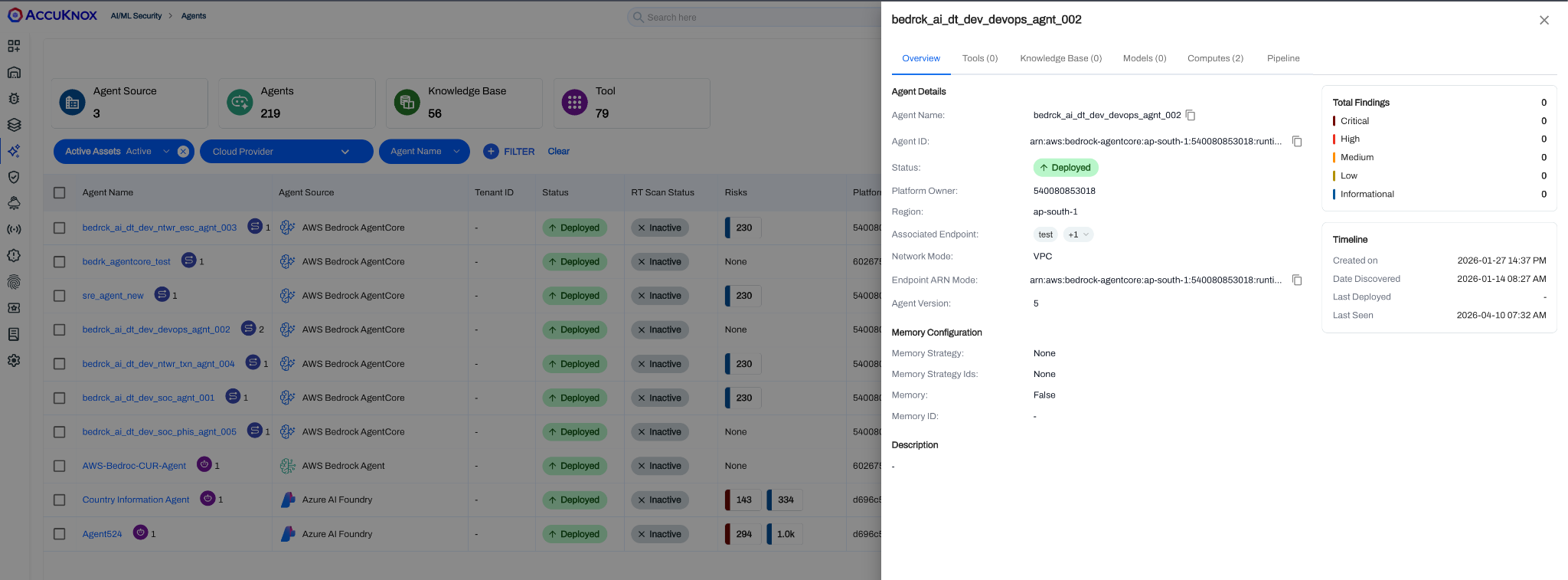
The Managed Agents view lists every discovered agent with its source cloud, deployment status, and finding counts. Select any agent to open a detail pane that shows memory configuration, deployment timeline, IAM role, and attached knowledge bases.
Managed AI Models
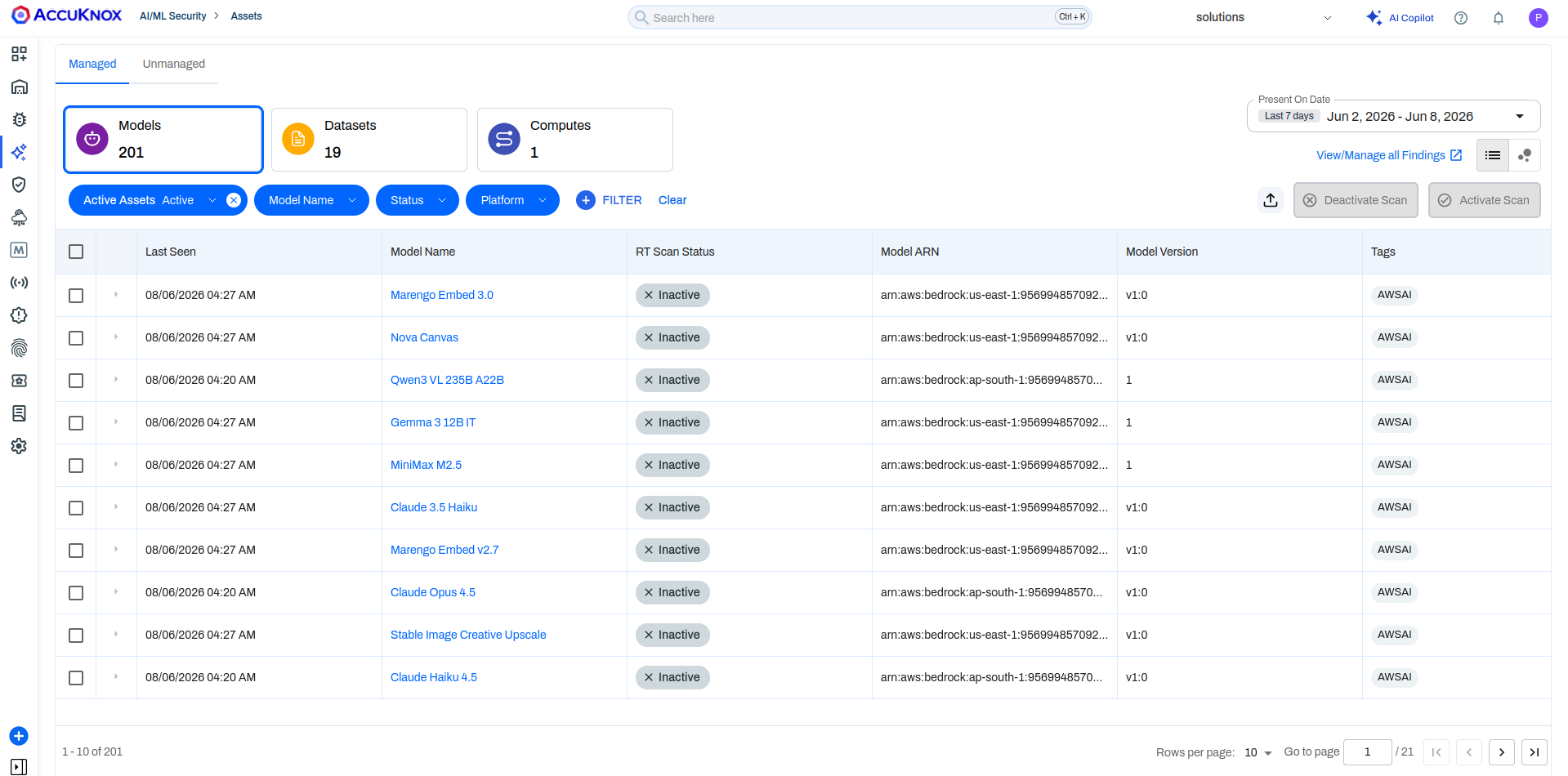
The Managed Models tab surfaces FT scan status, model ARN, version, and tags for foundation models across Bedrock and other managed deployments.
Unmanaged Assets
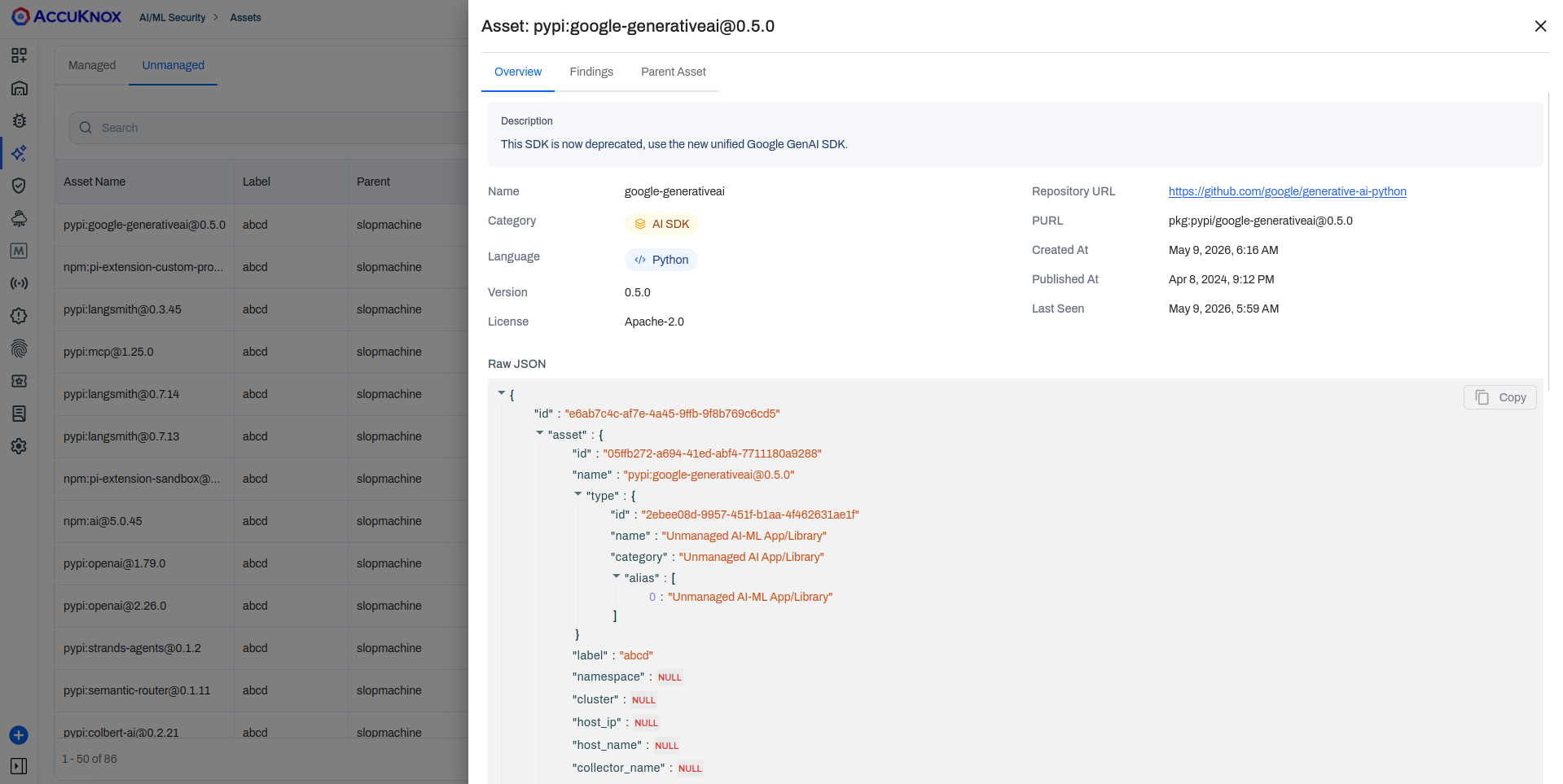
The Unmanaged tab discovers shadow AI: packages, libraries, and servers running inside your VMs, containers, or pipelines that were not provisioned through a cloud provider. Assets are grouped into six categories:
| Category | What it covers |
|---|---|
| AI Agent | Self-hosted agent frameworks and orchestration runtimes |
| AI Gateway | Proxy and routing layers that sit in front of models |
| AI Inference Engine | Serving runtimes such as vLLM, Ollama, and Triton |
| AI-ML | General ML libraries, frameworks, and model files |
| AI SDK | Client SDKs used to call LLM APIs |
| MCP | Model Context Protocol servers and packages |
Each category shows asset count and aggregated findings. Expand any category to see individual packages with language, version, license, and PURL identifiers.
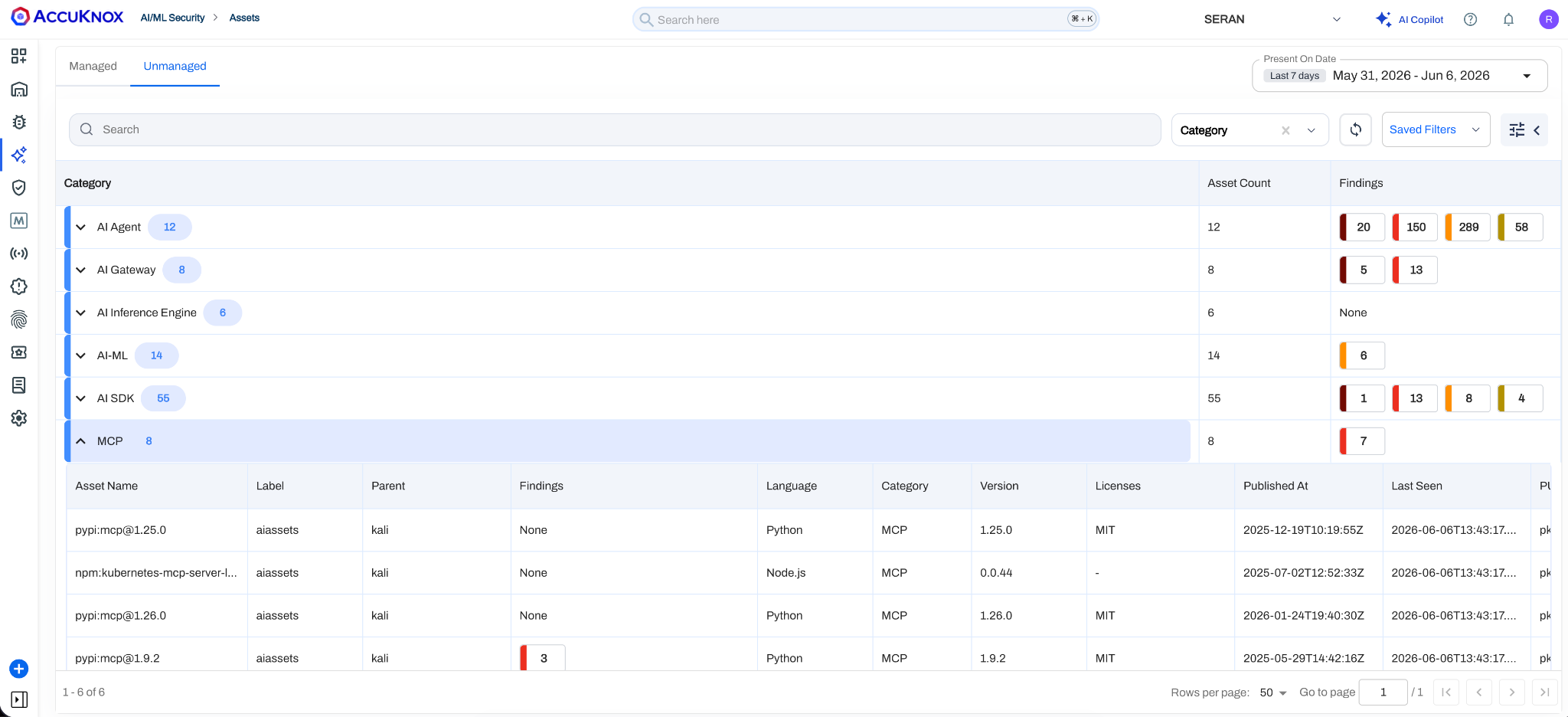
This view is inventory and discovery, not enforcement. MCP security policies ship in v3.6.
Click any asset to see its raw JSON, repository URL, and dependency chain.
Auto-Tagging of Public Cloud Assets
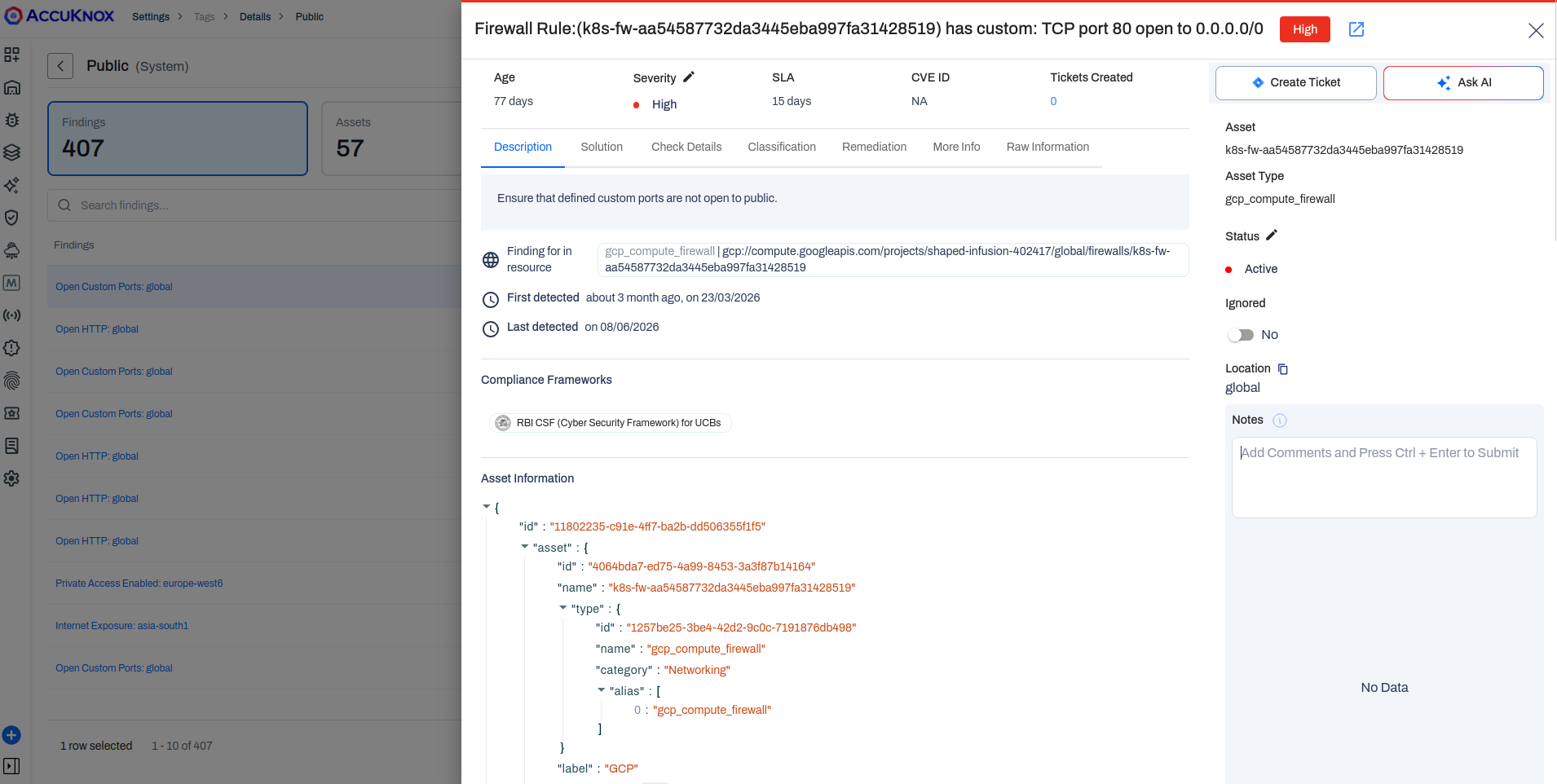
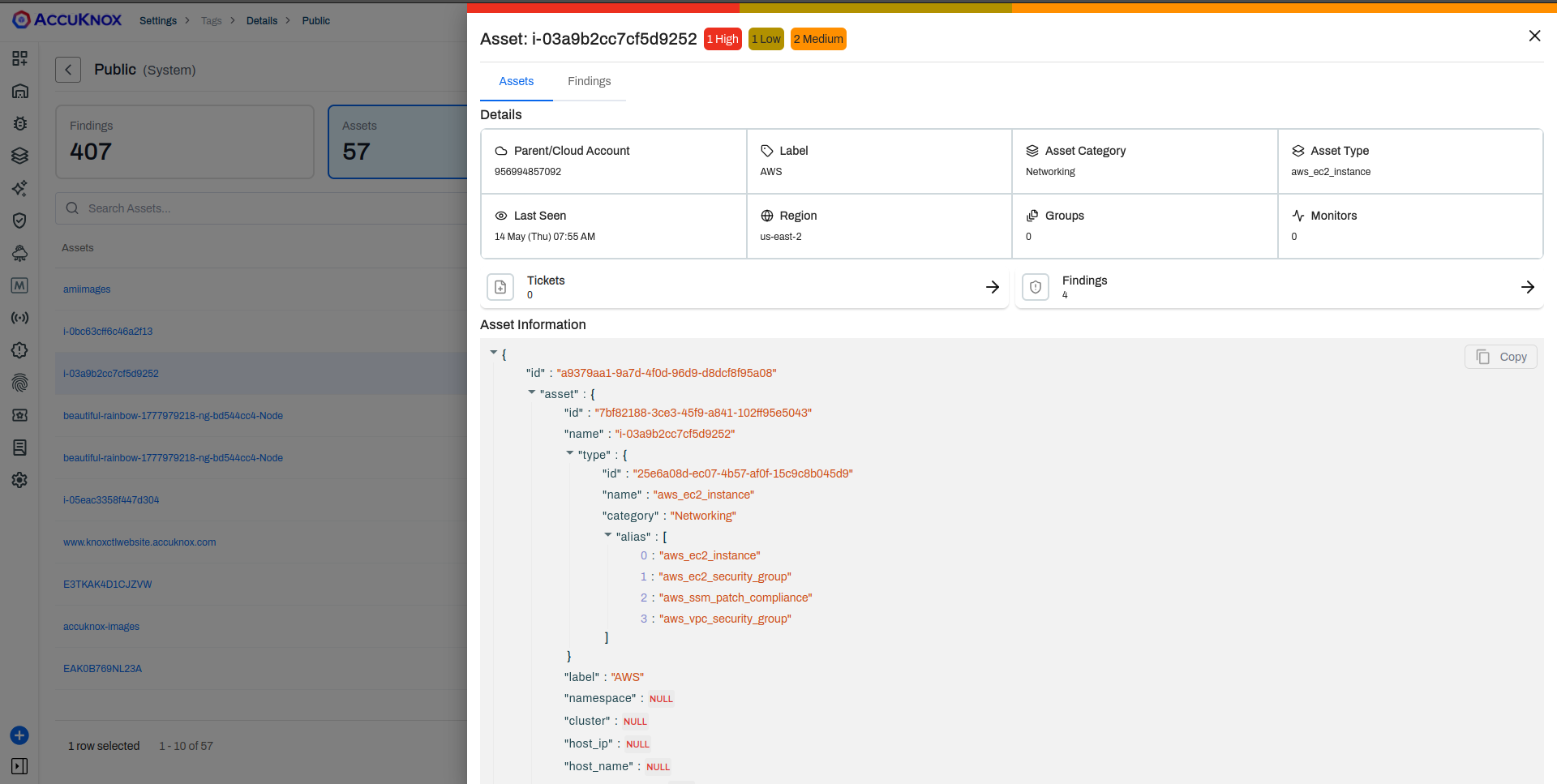
CSPM auto-tags any AWS or Azure asset that either accepts inbound traffic from the public internet or has egress to a public network. The tag, Public, is applied by the discovery engine and flows downstream into Findings, Assets, and the Rule Engine.
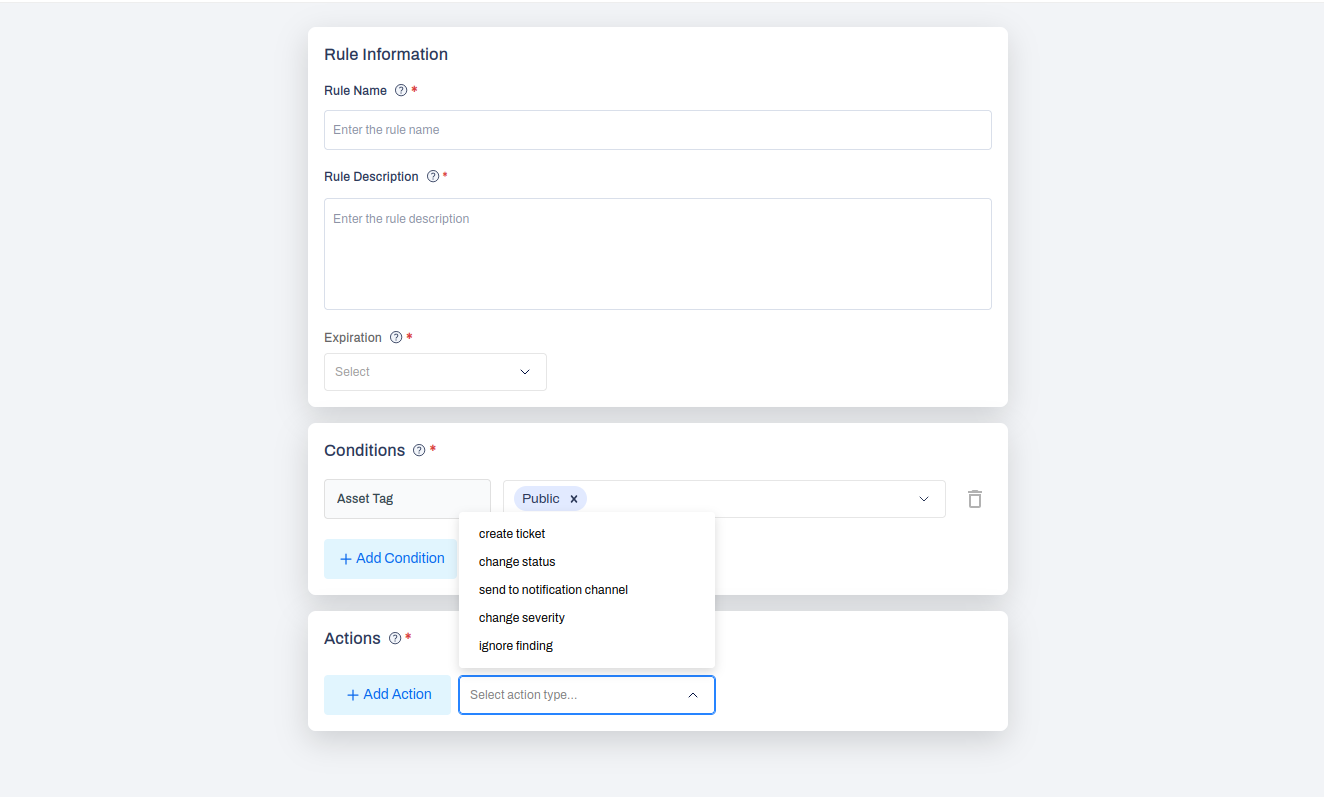
A common automation built on this is a Rule Engine entry that fires whenever a finding lands on an asset tagged Public and routes it to Slack or creates a higher-priority ticket.
GCP and Oracle Cloud coverage for this tagging logic ships in v3.6.
Rule Engine: Smart Tickets with Parent-Child Hierarchy
When the Rule Engine creates a ticket through the Jira integration, you can now group findings under a shared parent keyed off any field, most often Asset Name. The parent becomes an Epic or Story in Jira and each finding becomes a sub-task. Status, severity, and finding count on the parent update dynamically as children are remediated.
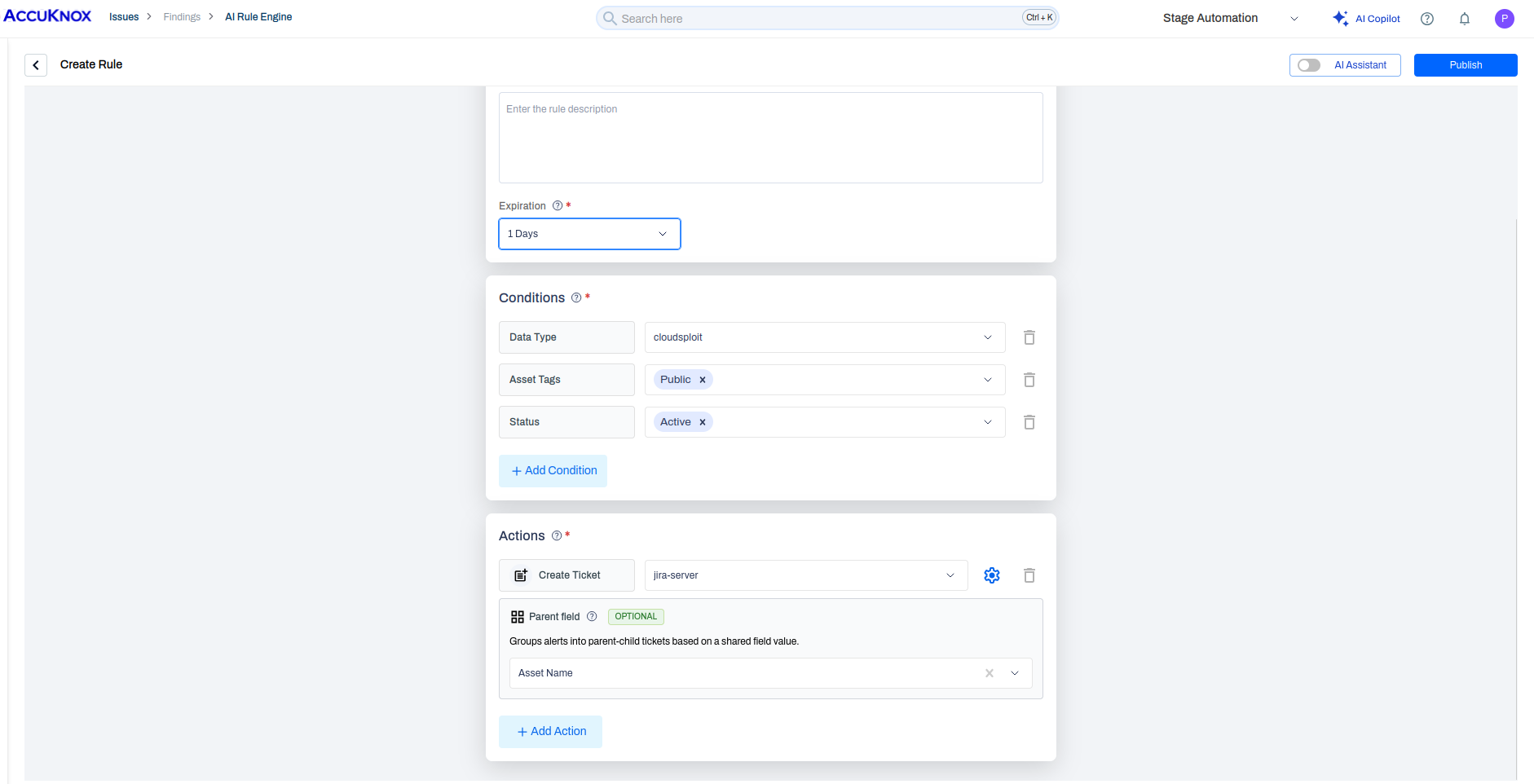
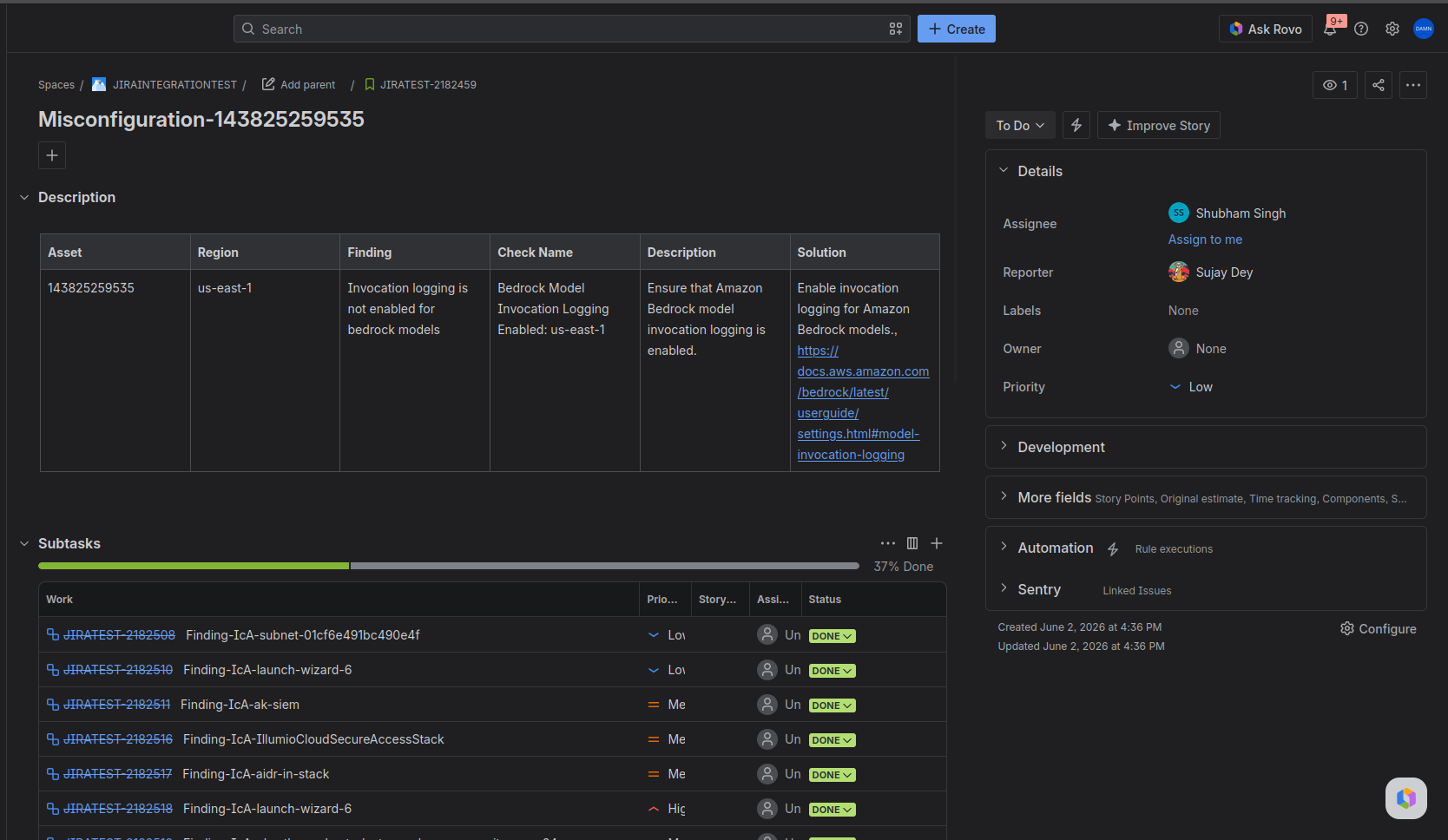
This replaces the older flow where every finding produced an independent ticket, which made bulk remediation hard to coordinate.
Rule Engine: Not Seen In Condition
A new Not Seen In condition closes the loop on stale findings. When an asset is removed from a cloud account but AccuKnox keeps the historical finding open (because the asset is no longer scanned), the condition fires after a configurable window such as 15 days. Paired with Change Status, you can sweep phantom findings into Accepted Risk or a custom Decommissioned status automatically.
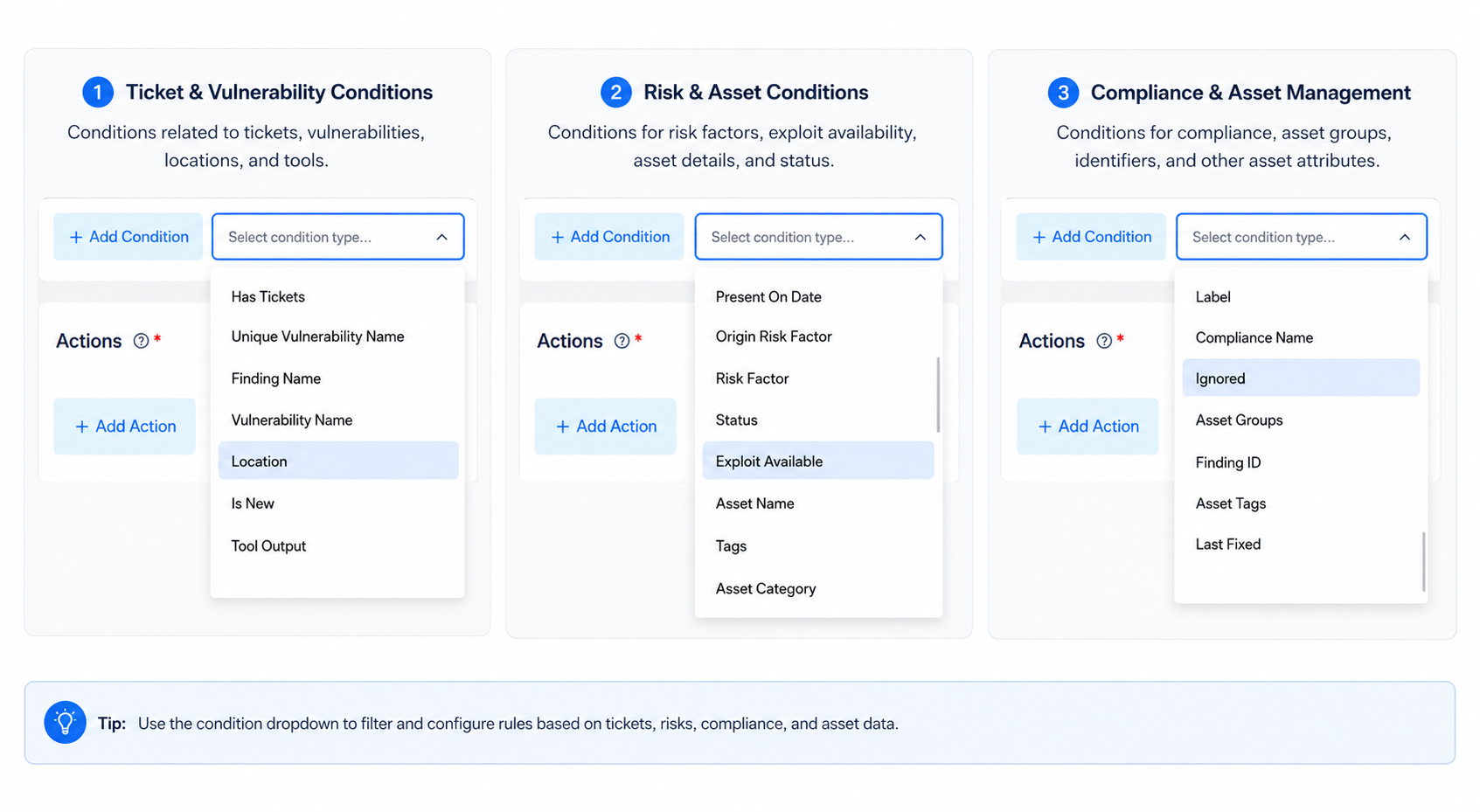
The condition list is also broader and dynamically scoped to the selected data type. For cloud findings, the dropdown now includes Origin Risk Factor, Exploit Available, Compliance Name, Asset Tags, Last Fixed, Is New, and Tool Output, among others.
Custom Finding Statuses
Administrators can define custom statuses beyond the built-in Active, Potential, and Fixed set. Custom statuses are configured at the back end and scoped to the AccuKnox UI, so they do not bleed into Jira or ServiceNow ticket fields. Useful for organization-specific workflows such as Awaiting Vendor Patch or Compensating Control Applied.
Finding SLAs
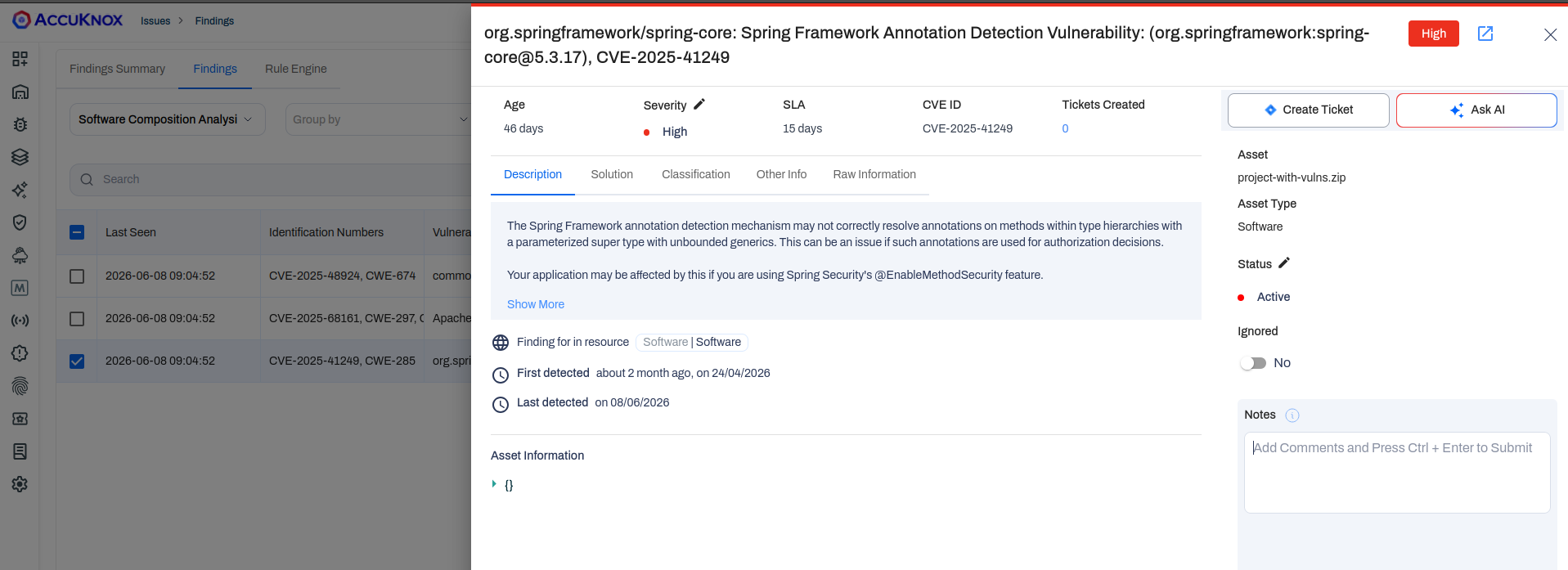
Finding detail views now show an SLA timer next to severity. Targets are configurable per environment (Critical, High, Medium, Low) and serve as a remediation guideline that surfaces consistently across the finding list and the detail panel.
AI Widget Builder on Dashboard V3
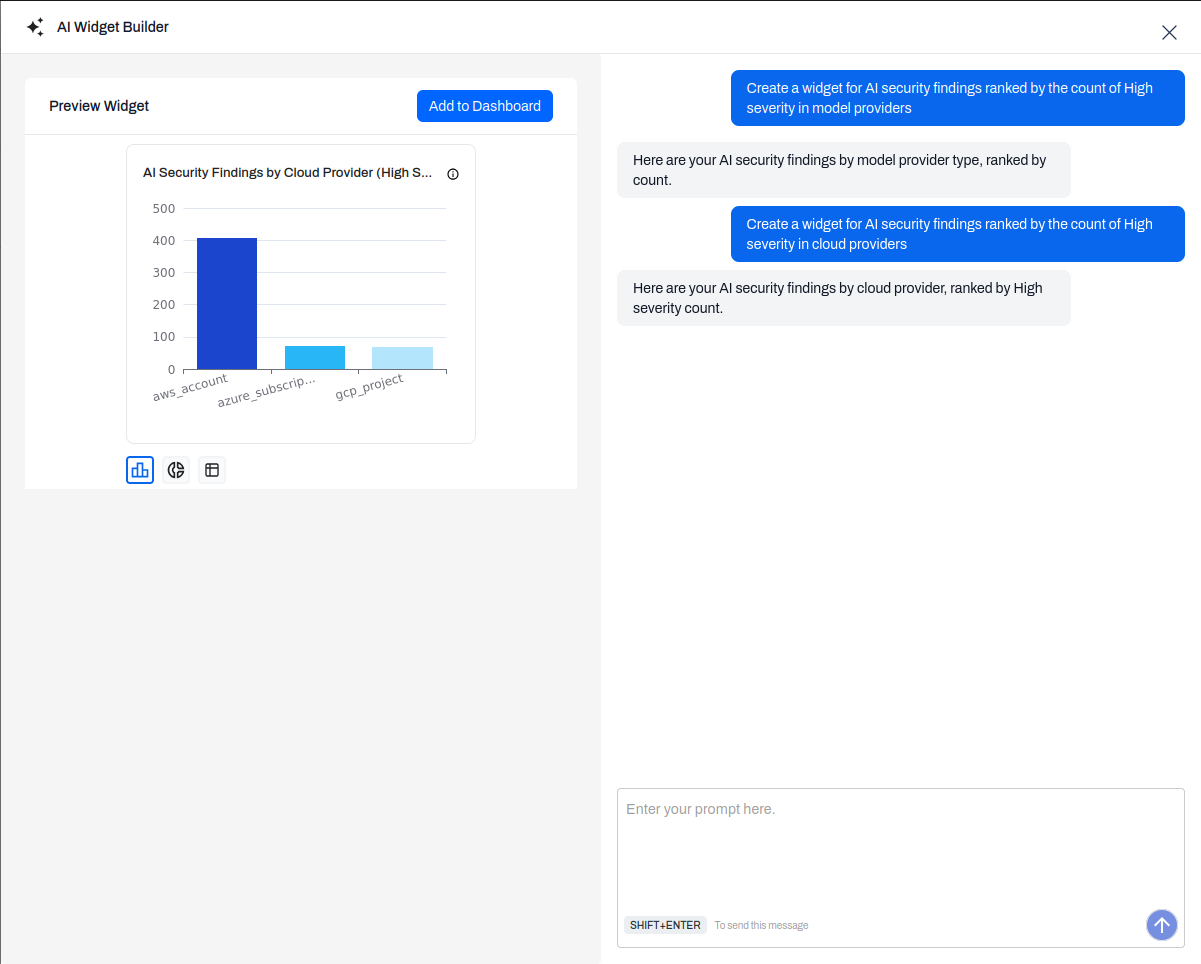
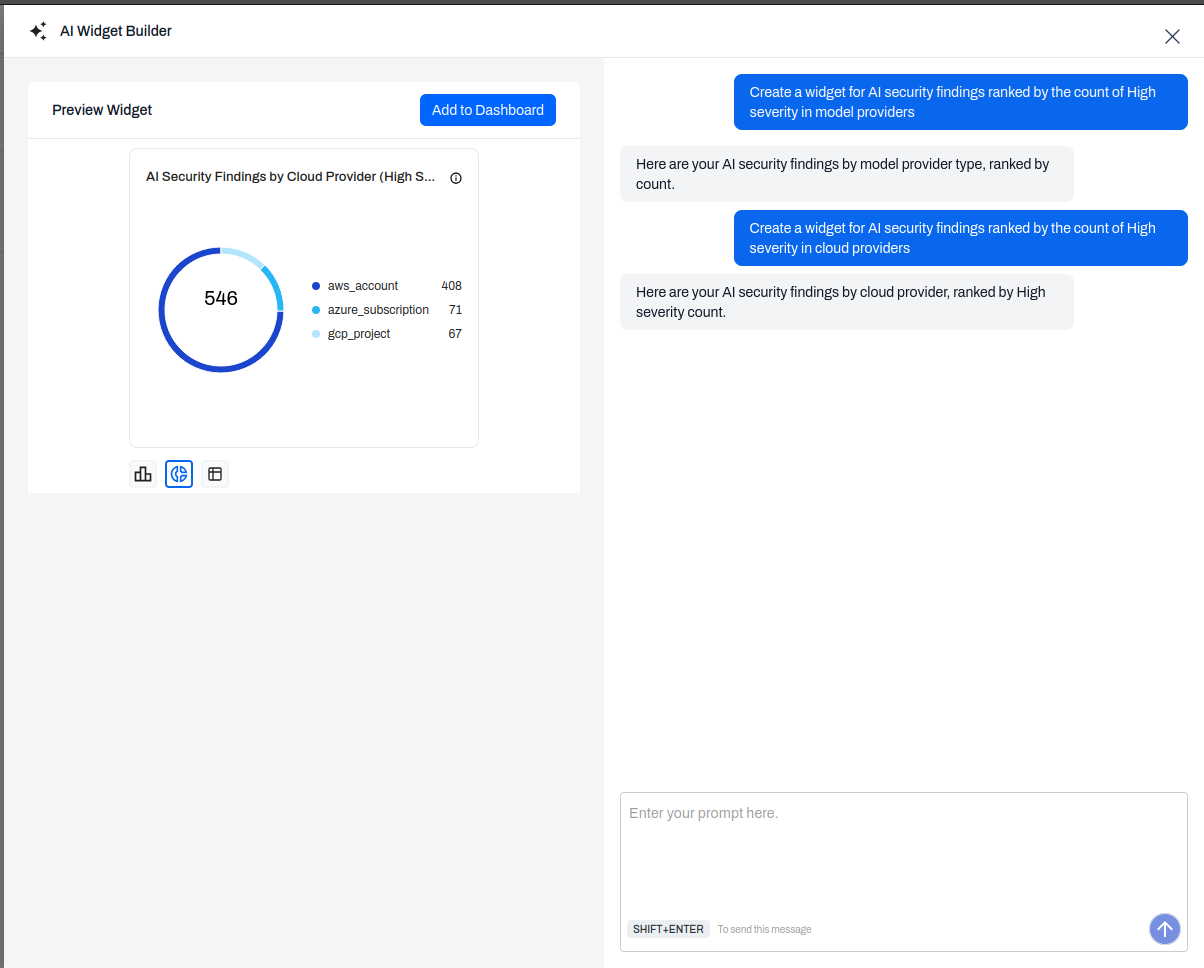
Dashboard V3 ships a conversational widget builder. Open Add Widget, switch to AI Widget Builder, and describe what you want in plain English. The model translates the request into an AccuKnox query through the MCP layer, returns a preview, and lets you flip between bar, donut, and table representations before adding the widget.
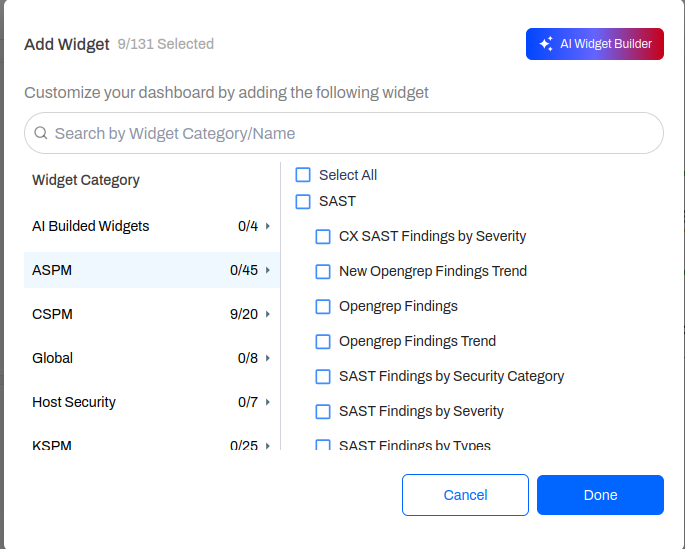
A query such as "AI security findings ranked by High severity across cloud providers" produces a bar chart broken down by AWS account, Azure subscription, and GCP project.
Switching the same widget to donut form is one click; the underlying query stays live so data refreshes automatically once added.
Container Image Findings Grouped by Cluster
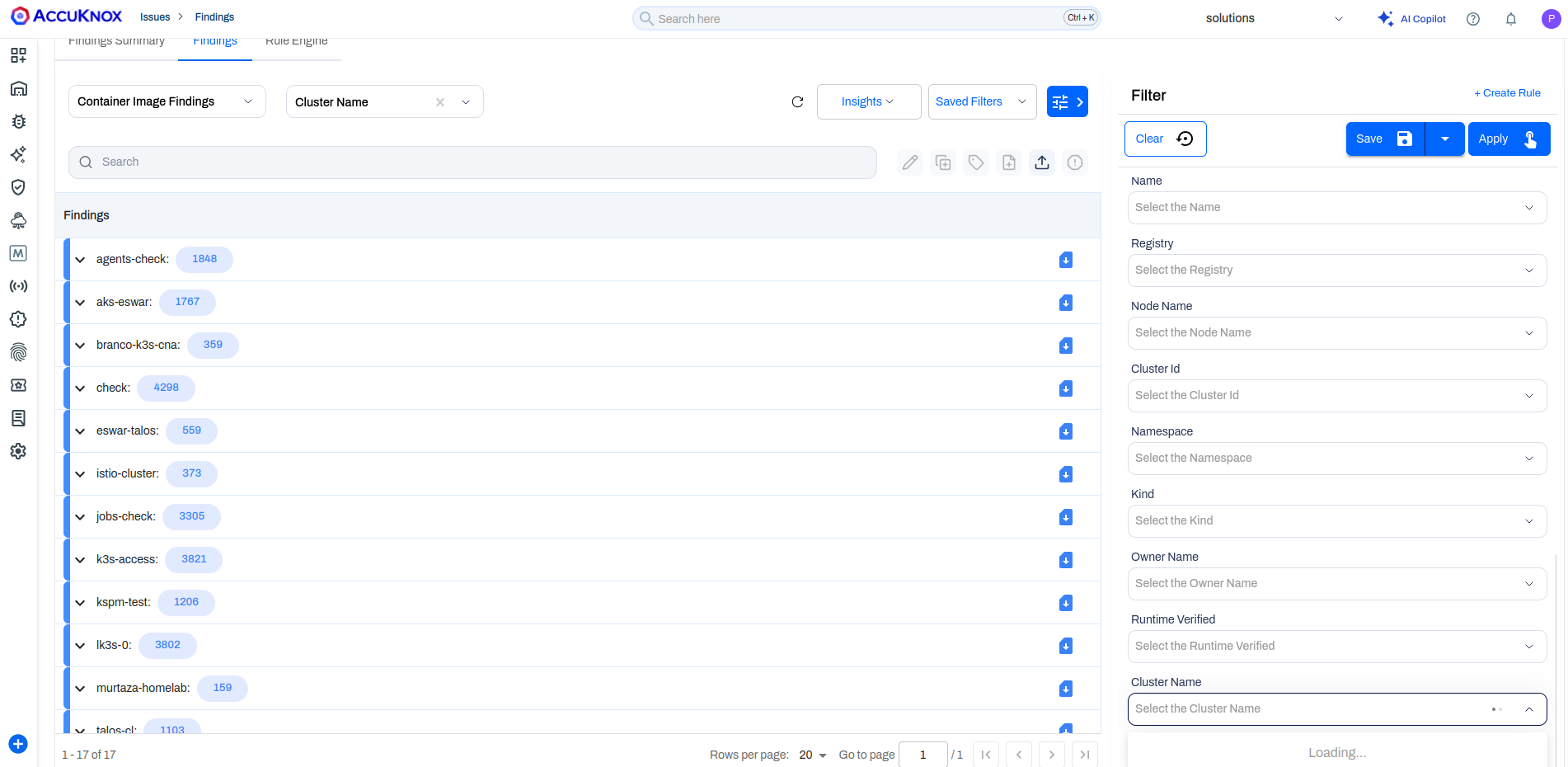
In-VM and in-cluster image scans now write a Cluster Name field into every container image finding. The Findings page groups results by this field for clean drill-down, and the same field is available as a filter alongside Namespace, Node Name, Registry, and Runtime Verified.
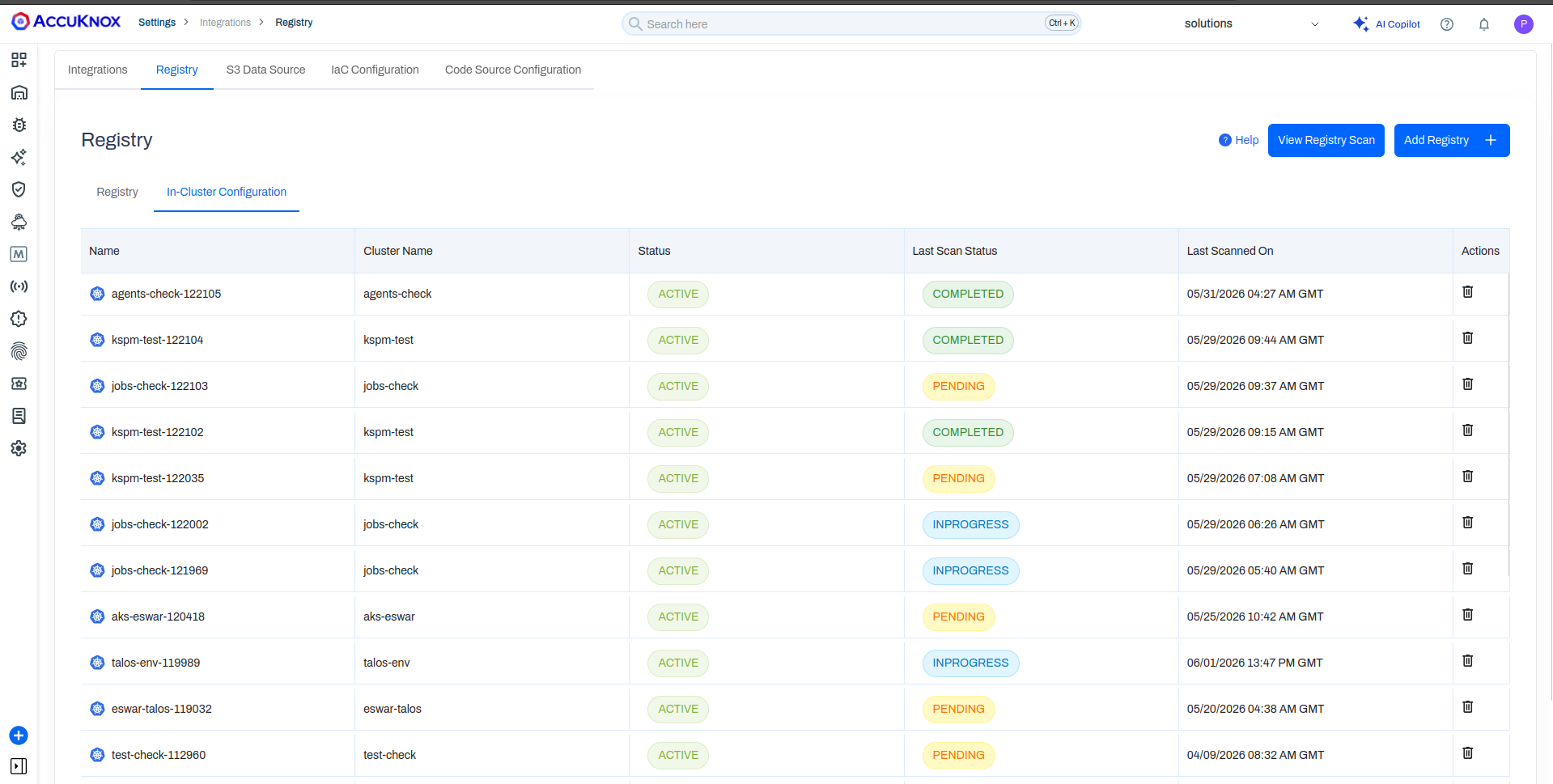
A new In-Cluster Configuration sub-tab under Settings → Integrations → Registry lists every cluster configured for image scanning, with status, last scan status, and timestamp. Removing a row offboards the cluster.
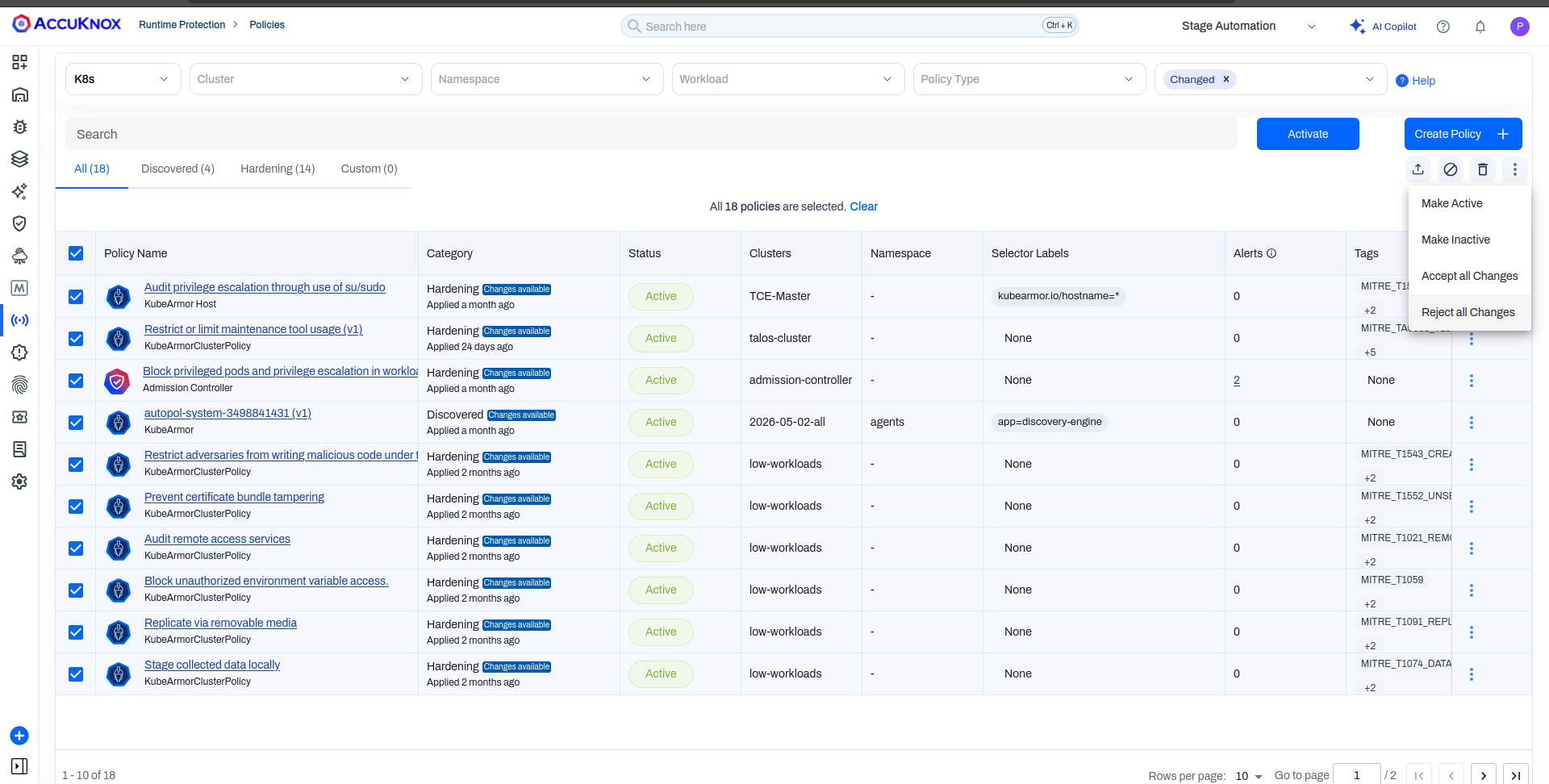
Bulk Updates for Auto-Discovered Policies
When a workload change causes the discovery engine to suggest the same edit across hundreds of policies, multi-select policies and Accept All Changes or Reject All Changes in one action. Previously every policy had to be opened, reviewed, and approved one at a time.
CWPP: Talos Linux Support
KubeArmor and the AccuKnox CWPP stack now run on Talos Linux clusters with full coverage, CIS Kubernetes benchmarks, in-cluster image scanning, KIEM, runtime security posture management, and KubeArmor jobs. Talos joins the existing list of supported providers including AKS, EKS, and GKE Autopilot.
CWPP: GKE Autopilot Support
AccuKnox CWPP supports deployment on GKE Autopilot clusters via the GKE partner workload allowlist. KubeArmor maintains a per-release allowlist that enables privileged workloads (such as those requiring SYS_ADMIN or hostPath mounts) to run within Autopilot's security constraints.
- Apply the
AllowlistSynchronizermanifest to pull the KubeArmor allowlist from the GKE partner repository. - Install KubeArmor via Helm with
environment.name=autopilot. - Onboard the cluster to the AccuKnox Platform with a standard join token.
- Enforce Block or Audit mode policies post-onboarding; violations surface in the Alerts section.
- Monitor egress, ingress, and graphical behaviour views per workload from the platform.
Set up CWPP on GKE Autopilot →
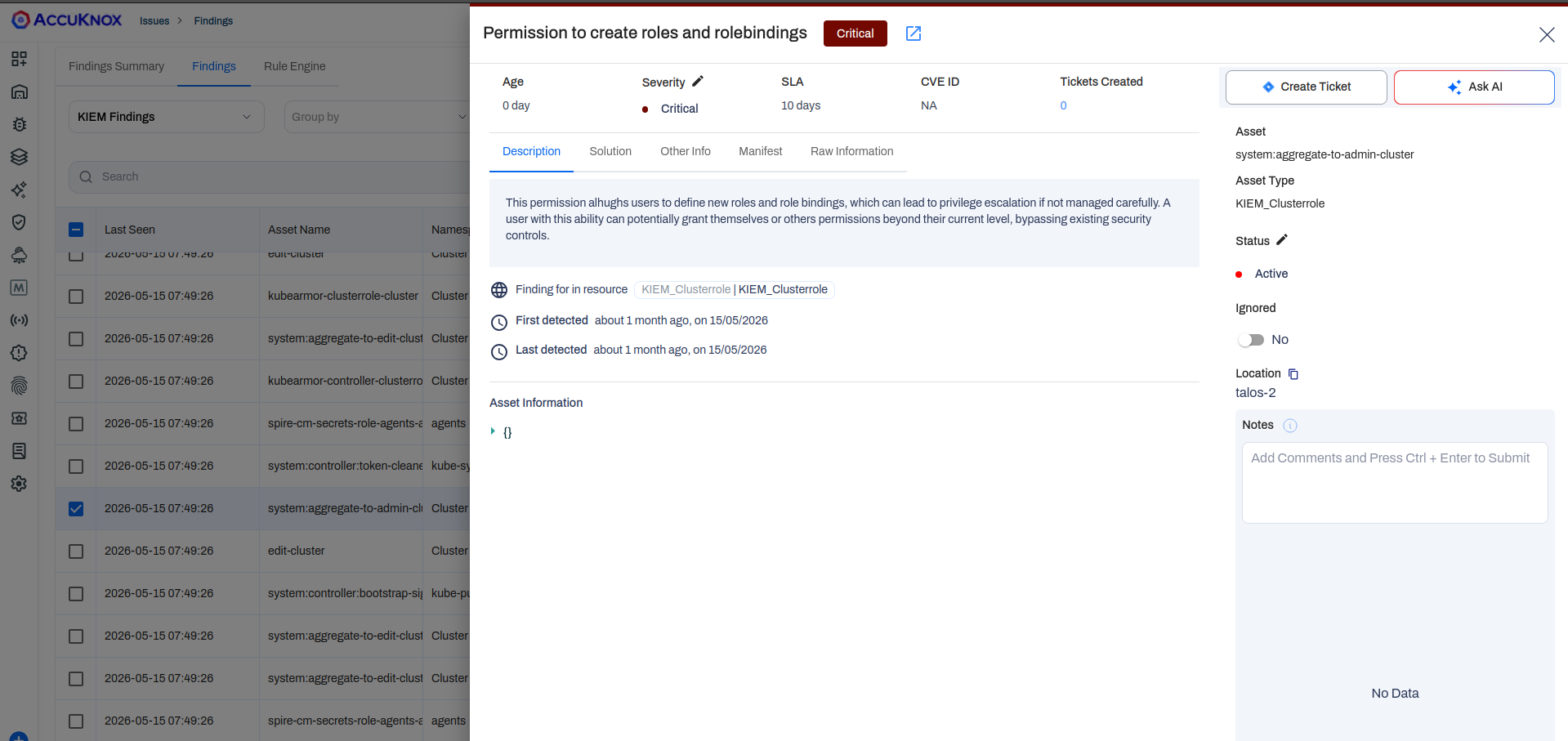
KIEM Findings
KIEM (Kubernetes Identity and Entitlement Management) findings now show full RBAC context in the detail panel, including the raw rule that triggered the violation, the affected ServiceAccount or role binding, and the compliance frameworks the rule maps to.
KubeArmor: Per-Node CRI Auto-Detection
KubeArmor now detects the container runtime on each node independently. In clusters where nodes run different runtimes (containerd, CRI-O, and others), each node gets the correct KubeArmor daemonset pod for its runtime automatically. No onboarding or configuration change is required.
KubeArmor PTS Rule Support
KubeArmor policies now accept a pts field that controls whether the policy applies inside pseudo-terminal sessions. Setting pts: false on a restrictive policy blocks the action when attempted from a pseudo terminal. This gives you separate enforcement behavior for interactive shell access versus programmatic execution paths.
KubeArmor Network Enforcement
KubeArmor now enforces network security policies at L3/L4, covering both ingress and egress traffic. Rules can target IP addresses, ports, and protocols per workload. Violations surface in the Alerts section.
DNS-based egress rules are also supported. You can restrict a workload's outbound connections to a declared list of allowed domains; connections to any unlisted domain are blocked. Subdomain-level enforcement ships in a future release.
See the KubeArmor network policy specification and network policy examples for the full policy schema.
CSPM: Multi-Account Compliance Reports
CSPM Cloud Compliance reports now accept either a single cloud account scanned against multiple compliance frameworks (one AWS account against HIPAA, AWS CIS v1.4, and APRA 234 in one run) or a single framework scanned across multiple cloud accounts. The mode toggles with a single radio in the report config.
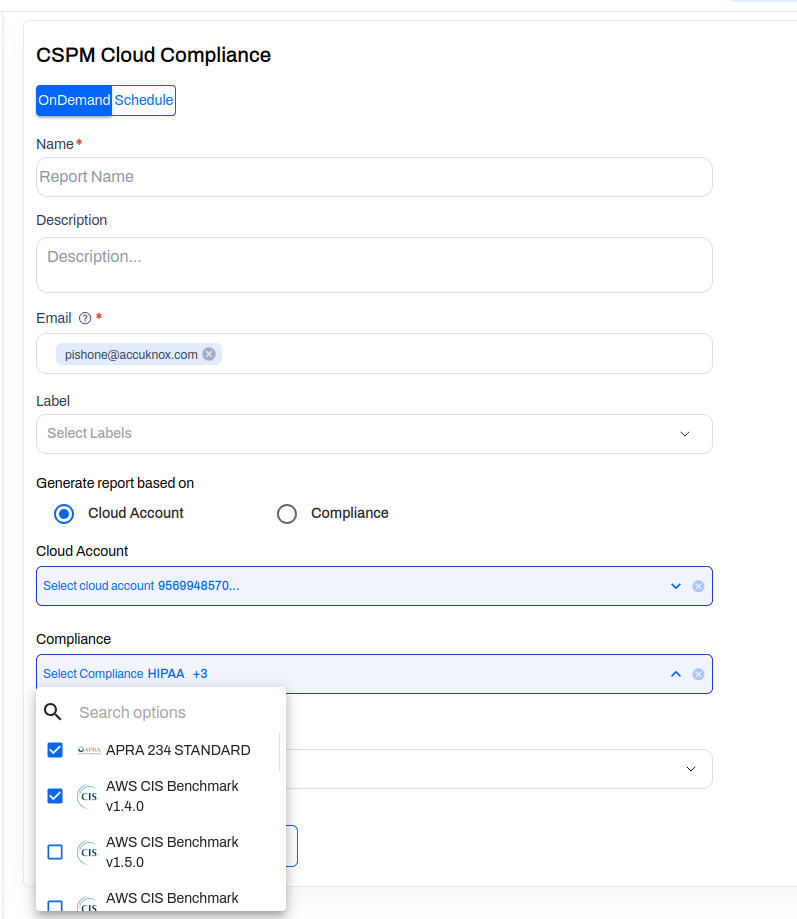
This removes the previous flow of running one report per account-framework pair and stitching outputs together by hand.
Tags Page Revamp
Each tag now opens into a panel that shows associated Findings and Assets side by side, with the same tag count surfacing in both contexts. A Source column distinguishes tags created inside AccuKnox from tags imported from a cloud provider (for example, native GCP labels), so it is clear at a glance whether a tag is governed by AccuKnox automations or by upstream cloud governance.
API Security: Policy-Based Rate Limiting
Rate limiting can now be defined as policy with conditions scoped to endpoints, geofences, or user context. Violations surface in the Alerts section. The UI policy builder is still in progress; for v3.5, policies are applied by editing YAML directly in the API Security cluster. Reach out to your AccuKnox contact for the policy template.
Localization: Japanese and Korean
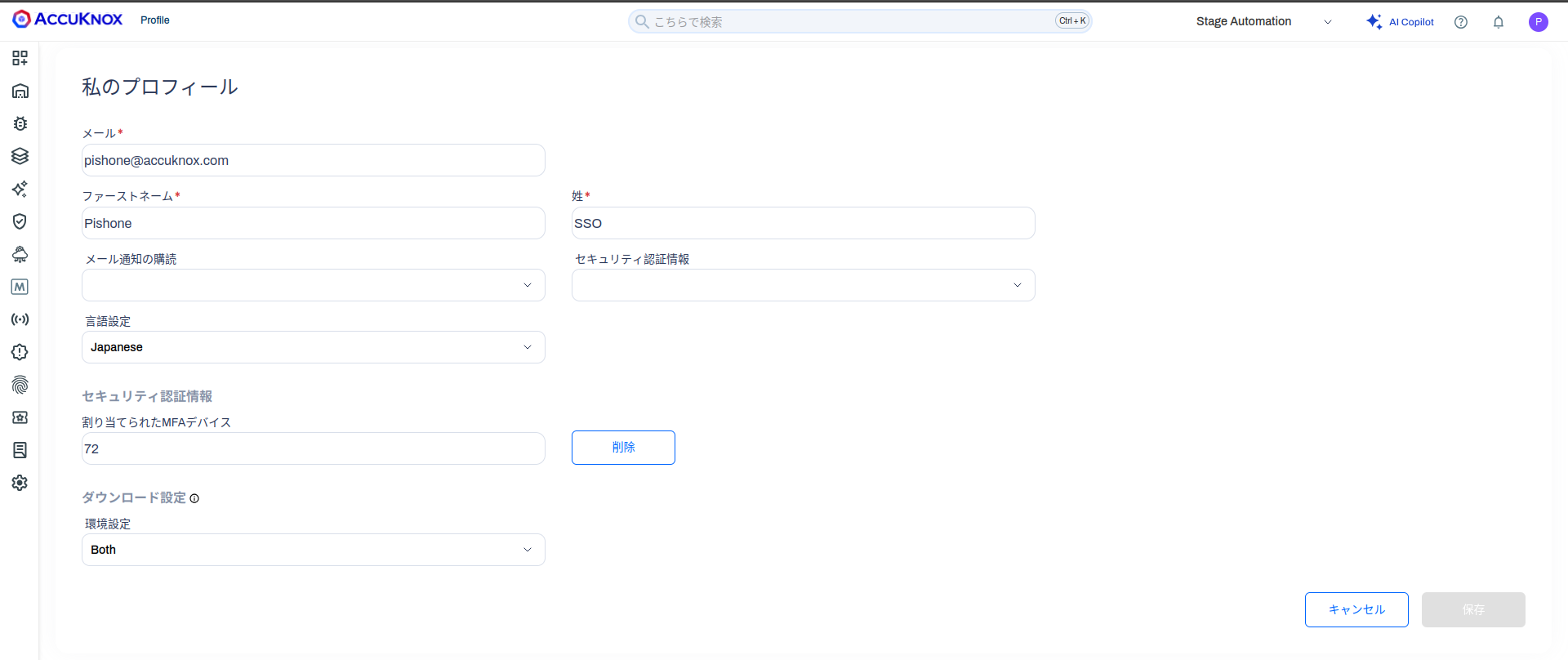
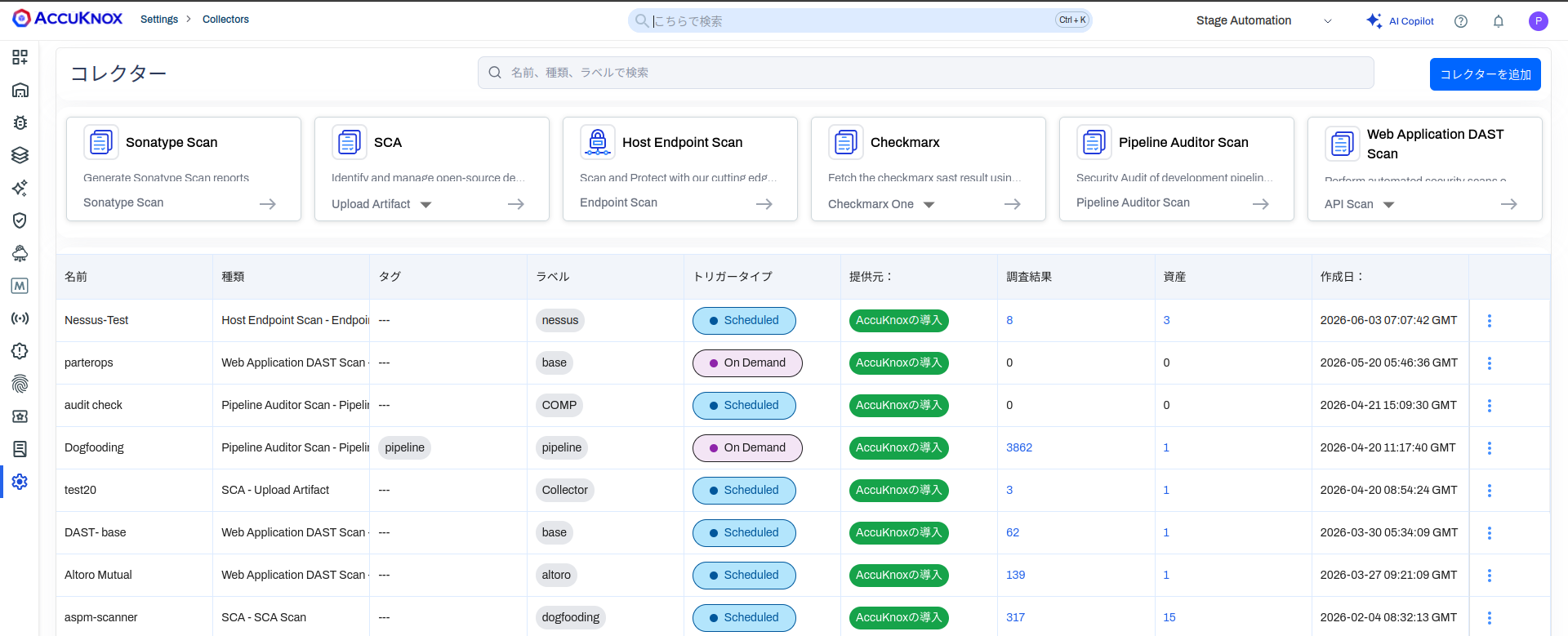
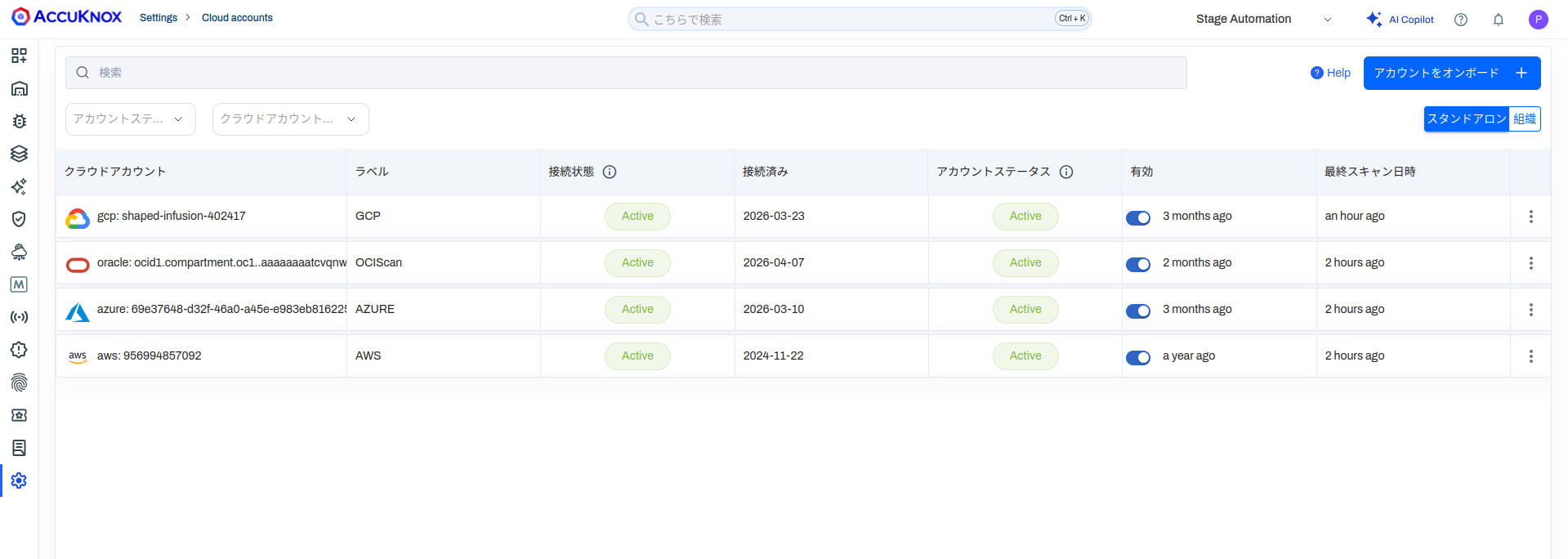
The platform ships with Japanese and Korean translations across most workflows. Switch language under Profile and the change applies immediately to navigation, collectors, cloud accounts, settings, and finding metadata rendered from static UI strings.
Note
Localization in v3.5 covers static UI text. Dynamic content returned by upstream APIs (finding descriptions, CVE summaries) is displayed as received.
xBOM: Software, Cryptographic, and AI Bill of Materials
v3.5 introduces xBOM, a unified framework for generating and managing Bills of Materials across three supply chain layers:
| BOM Type | Covers |
|---|---|
| SBOM | Software packages and dependencies |
| CBOM | Cryptographic algorithms and libraries |
| AIBOM | AI/ML models and their provenance |
xBOM supports compliance with EO 14028 and the EU AI Act and is accessible via three generation methods:
- knoxctl, which scans filesystems, container images, and AI/ML models interactively from a local UI and pushes results directly to your AccuKnox tenant.
- Container Image Scan Action, which integrates AccuKnox's GitHub Action into your CI/CD pipeline to automatically generate SBOMs on every push or pull request.
- xBOM Scan Action, which generates SBOM, CBOM, and AIBOM from source code, container images, or AI/ML model sources within GitHub Actions workflows.
Generated BOMs are automatically scanned for known CVEs, license issues, and outdated components. Results surface in SBOM > Projects with vulnerability details, remediation tracking, and export support.
SBOM Enhancements
- Dependency graph refresh with cleaner cross-package linking.
- SBOM Compare ships with a diff filter so you can isolate added, removed, or upgraded components between two scans.
- CERT-In API integration for regulated SBOM reporting workflows.
- New SBOM metadata fields, updated findings drawer, and ad-hoc scan support for SBOM collectors.
AccuKnox v3.5 sharpens coverage where security teams spend the most time, pipelines, cloud assets, ticketing hygiene, and AI workloads, while opening the platform to Japanese and Korean speakers.