AccuKnox Secrets Manager - Deployment Guide
AccuKnox Secrets Manager is a secure secrets management solution that stores encrypted secrets, issues short-lived dynamic secrets, and gives identity-based access control with full audit logs. It is a drop-in replacement for HashiCorp Vault. This guide covers installing it on Kubernetes using the Helm chart provided in accuknoxsecretmanager.tar.
Prerequisites
System Requirements
- 1 vCPU and 512Mi memory minimum (single node)
- 10Gi of persistent storage
Kubernetes Requirements
- Kubernetes 1.30 or later, with a default StorageClass
- Helm 3
- kubectl configured to talk to your cluster
Check these before you start:
kubectl version
kubectl get storageclass
helm version
Architecture Diagram
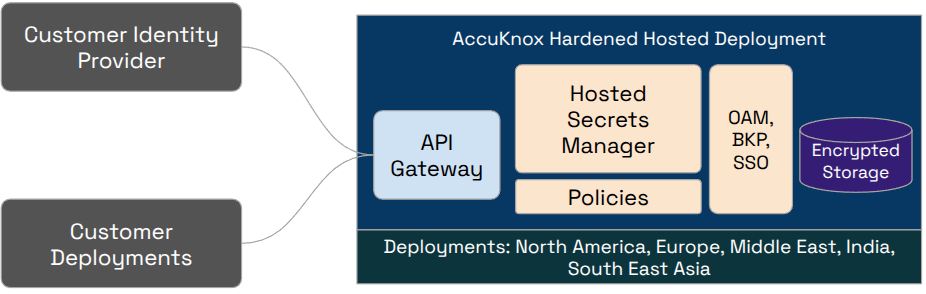
Installing through Helm Chart
1. Extract the chart
tar xf accuknoxsecretmanager.tar
cd accuknoxsecretmanager
2. Install with Helm
helm upgrade --install vault .
This installs the Secrets Manager server and the Agent Injector into the default namespace, using the settings in values.yaml.
To install into your own namespace:
kubectl create namespace accuknox
helm upgrade --install vault . -n accuknox
3. Initialize and unseal
The server starts sealed and uninitialized. Initialize it once:
kubectl exec vault-accuknoxsecretmanager-0 -- vault operator init
This prints 5 unseal keys and a root token. Save these in a safe place; they are shown only once.
Unseal the server using any 3 of the 5 keys:
kubectl exec vault-accuknoxsecretmanager-0 -- vault operator unseal <unseal_key_1>
kubectl exec vault-accuknoxsecretmanager-0 -- vault operator unseal <unseal_key_2>
kubectl exec vault-accuknoxsecretmanager-0 -- vault operator unseal <unseal_key_3>
The pod becomes 1/1 Ready after the third key is entered.
If the pod restarts, it will be sealed again and needs to be unsealed with 3 of your saved keys.
Other Installation Options in the Chart
The chart includes a few alternate setups, controlled through values files and flags. Use the one that matches your environment.
OpenShift: ships with a separate values.openshift.yaml (security context constraints, routes, etc.):
helm upgrade --install vault . -f values.openshift.yaml
CSI Provider mode: mounts secrets into pods as volumes using the Secrets Store CSI Driver (install it separately first):
helm upgrade --install vault . --set csi.enabled=true
Custom configuration: override any setting in values.yaml with --set or your own values file:
helm upgrade --install vault . -f my-values.yaml
Verifying the Installation
kubectl get pods
kubectl exec vault-accuknoxsecretmanager-0 -- vault status
kubectl get pvc