xBOM (SBOM + CBOM + AIBOM) for Jenkins
Run all three AccuKnox bills of materials in one pipeline:
- SBOM: Software Bill of Materials. Packages and versions.
- CBOM: Cryptographic Bill of Materials. Algorithms, key sizes, protocols, libraries.
- AIBOM: AI/ML Bill of Materials. Model metadata pulled from HuggingFace.
Running all three against the same codebase gives complete supply-chain visibility: what is in your dependencies, what crypto you use, and what AI models you consume. Each BOM uploads to its own AccuKnox project.
Prerequisites
- Jenkins
2.426.3or newer, already deployed. - Admin access to Jenkins.
- An AccuKnox SaaS tenant with admin login.
- A Git repo (public or private) to scan.
- A HuggingFace account with a Read access token (for AIBOM). For gated models like Meta Llama, your account must have accepted the model license on huggingface.co.
- The AccuKnox xBOM plugin
.hpifile.
Step 1: Deploy the .hpi to Jenkins
- Download the plugin:
accuknox-sbom.hpi -
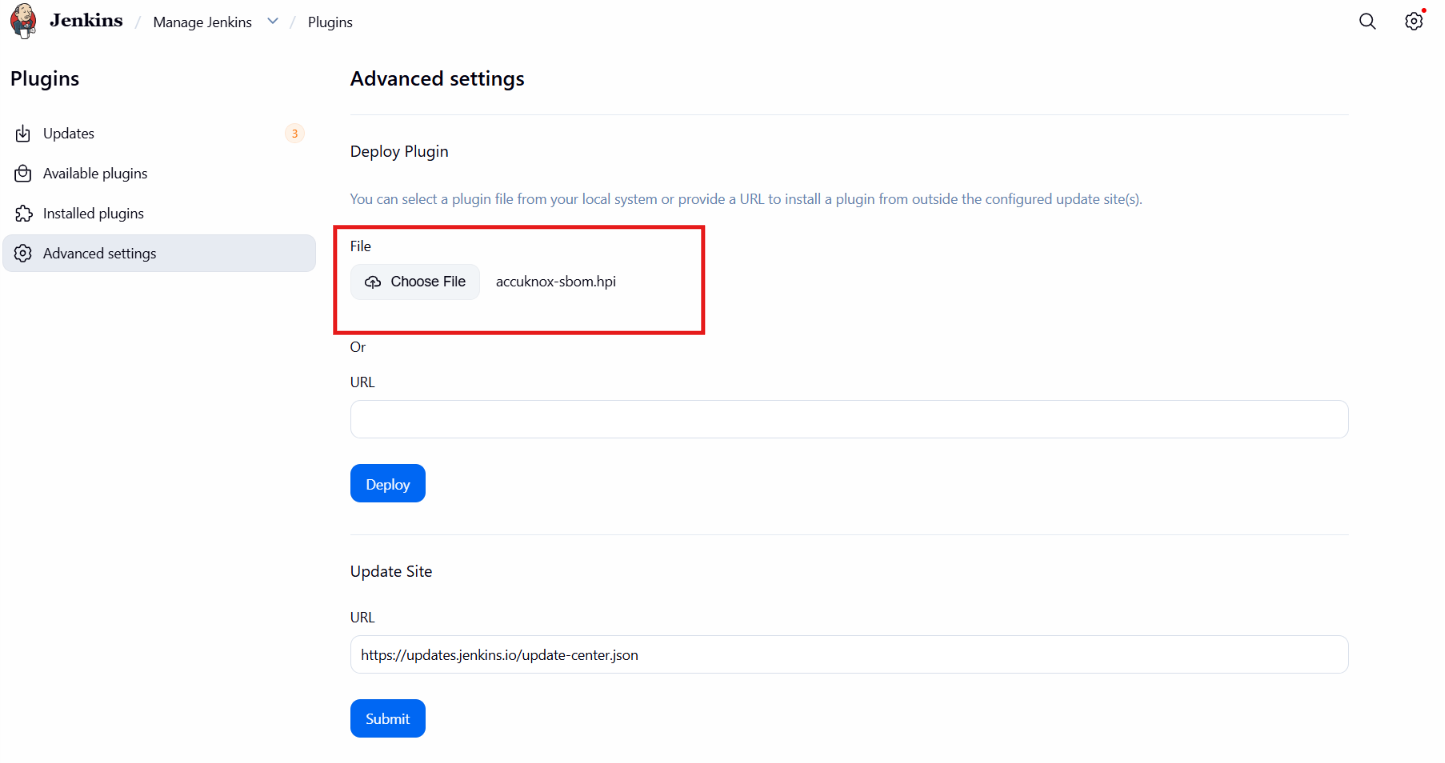
Log into Jenkins and navigate to Manage Jenkins → Plugins → Advanced settings tab.
-
Under Deploy Plugin, choose the
accuknox-sbom.hpifile you downloaded and click Deploy. - Restart Jenkins when the upload finishes so the new steps register.
-
Verify at Manage Jenkins → Plugins → Installed plugins by searching
AccuKnox.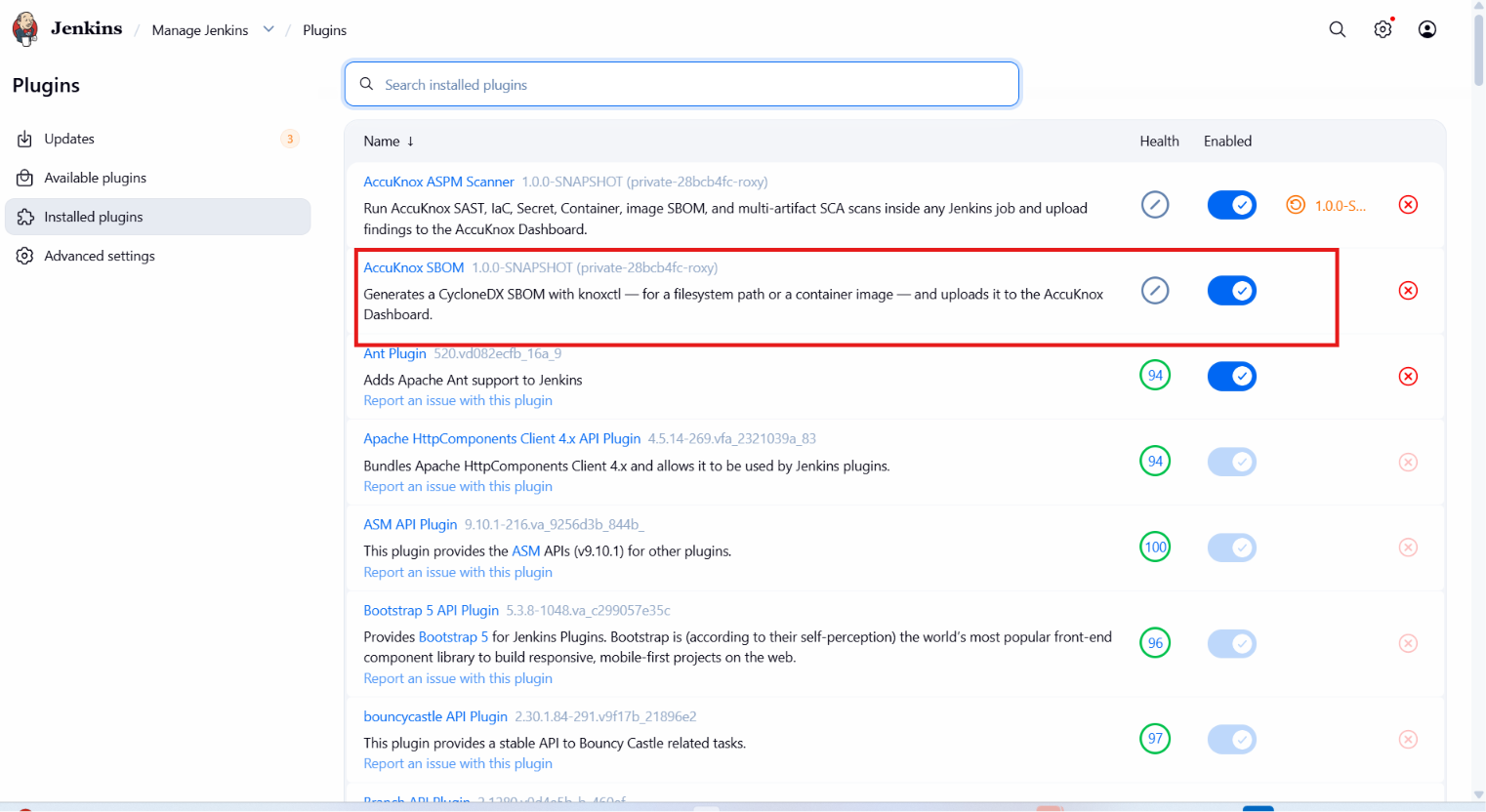
Step 2: Generate an AccuKnox API Token
Log into your AccuKnox SaaS tenant. Navigate to Settings → Tokens → Create Token. Copy the value shown on screen. It is shown only once.
Step 3: Create a Label
Navigate to Settings → Labels → Add Label. Name it something like jenkinstest. Every BOM this pipeline uploads is tagged with this label.
Step 4: Create Three AccuKnox Projects
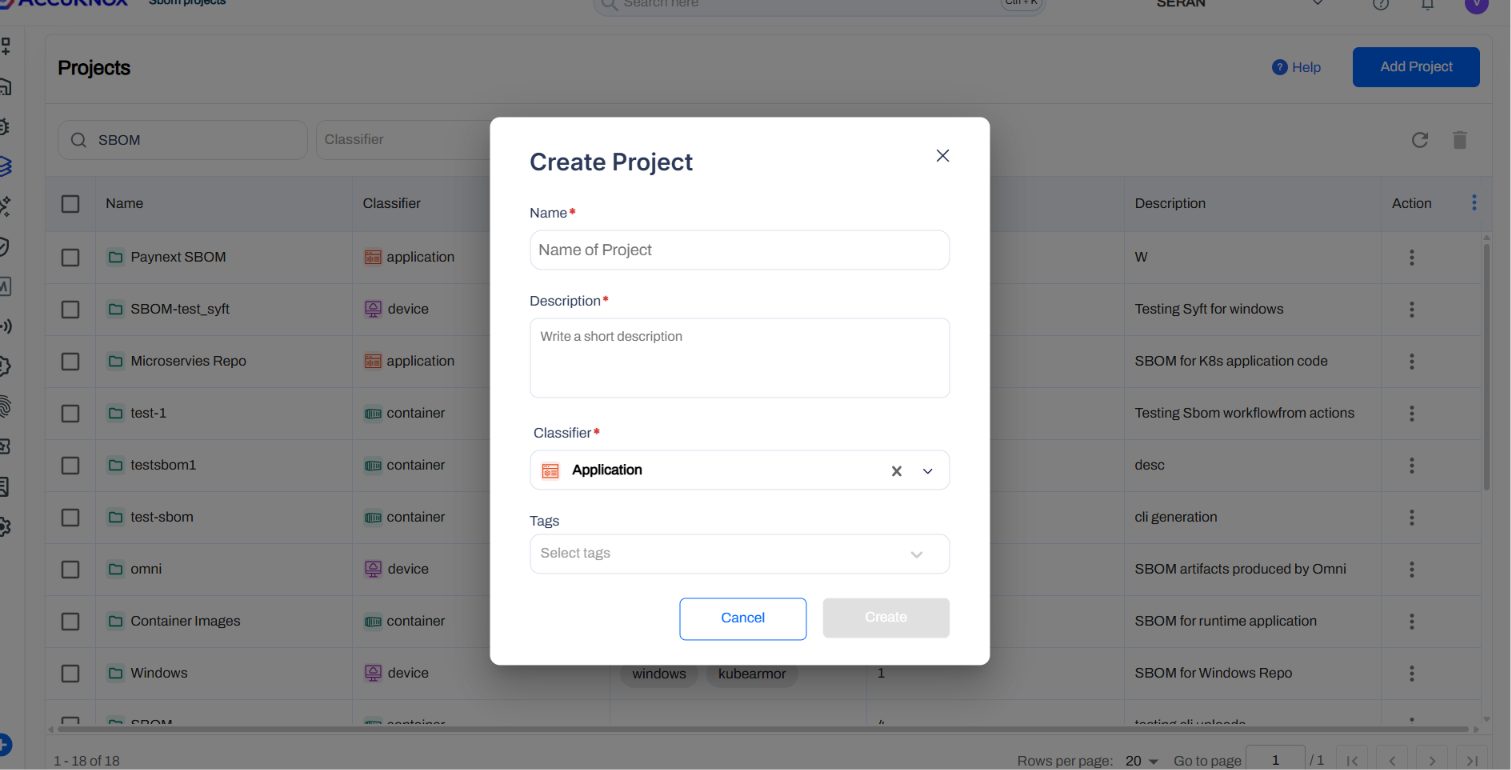
xBOM uploads to three separate projects, one per BOM type. Navigate to SBOM → Projects and create:
| Project name | Classifier |
|---|---|
SBOM |
application |
CBOM |
application |
AIBOM |
application |
Step 5: Generate a HuggingFace Token
For AIBOM, you need a HuggingFace token so knoxctl can query model metadata. Create a Read access token at huggingface.co/settings/tokens.
Step 6: Generate a GitHub PAT (Only If Scanning a Private Repo)
For SBOM and CBOM, scanning a private repository requires a GitHub Personal Access Token with repo read access.
Step 7: Store All Credentials in Jenkins
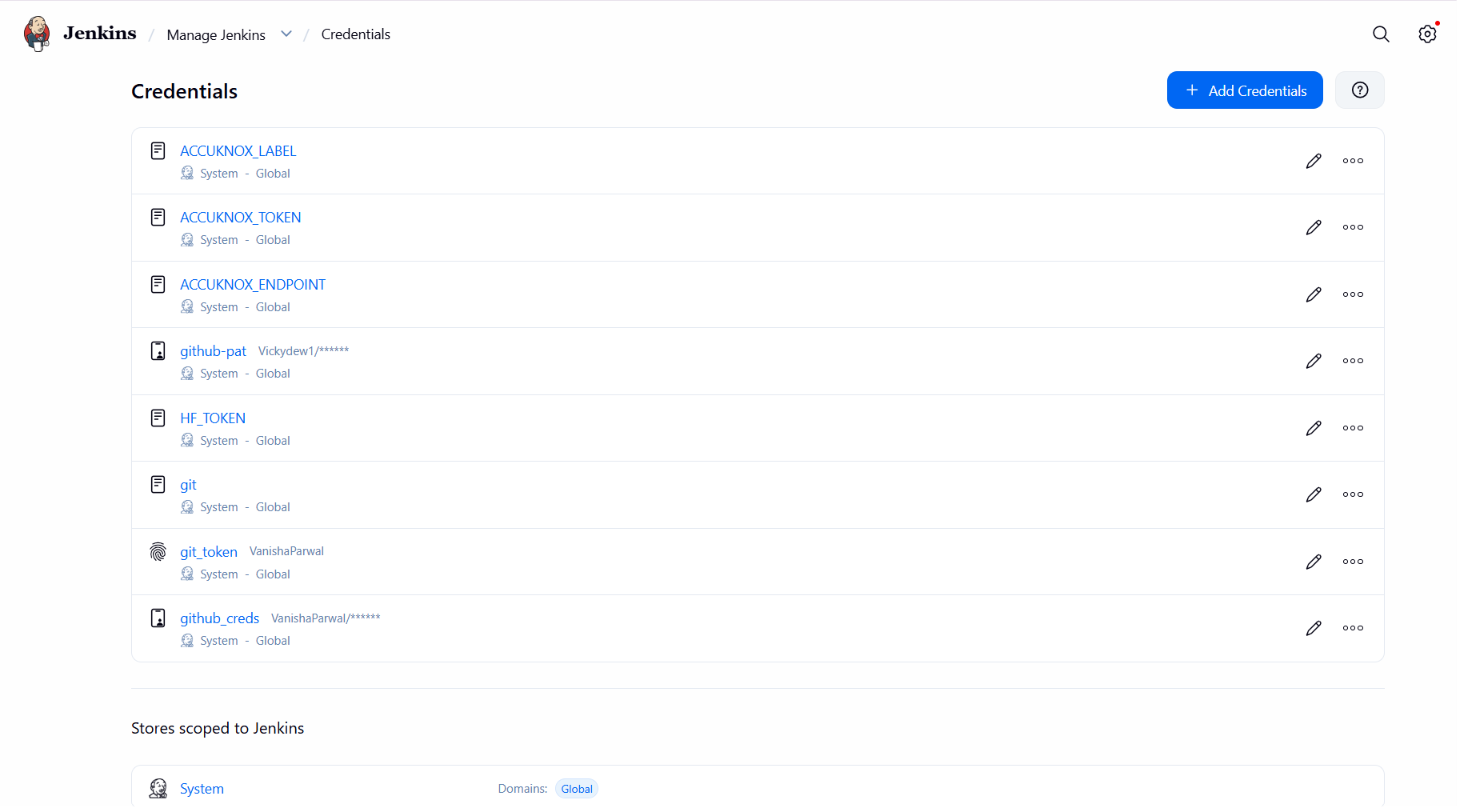
Navigate to Manage Jenkins → Credentials → System → Global credentials (unrestricted). Add three credentials (or two if your repo is public):
- AccuKnox token: Kind
Secret text, Secret is the AccuKnox token from Step 2, IDACCUKNOX_TOKEN - HuggingFace token: Kind
Secret text, Secret is thehf_...token from Step 5, IDHF_TOKEN - GitHub PAT (private repos only): Kind
Username with password, Username is your GitHub username, Password is theghp_...token from Step 6, IDgithub_creds
Step 8: Configure the Plugin Globally
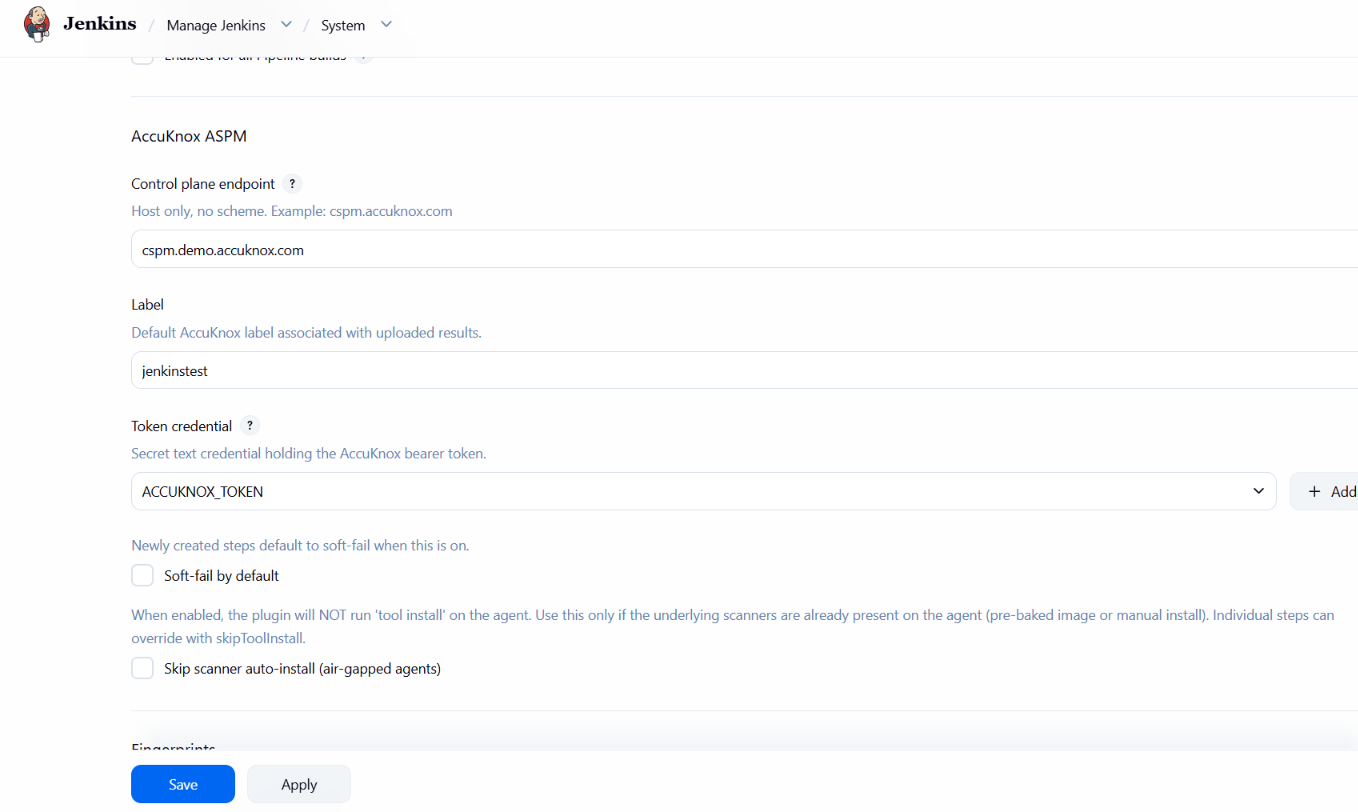
Navigate to Manage Jenkins → System and scroll to the AccuKnox ASPM section.
- Control plane endpoint: your AccuKnox host (e.g.
cspm.demo.accuknox.com). - Label:
<your-label>. - Token credential: select
<your-token>. - Click Save.
Step 9: Create the Pipeline Job
Dashboard → New Item. Name it xbom-pipeline, select Pipeline, click OK. Scroll to the Pipeline section, set Definition to Pipeline script, and paste the Jenkinsfile below.
// AccuKnox xBOM generation, standalone Jenkinsfile.
//
// Generates SBOM, CBOM, and AIBOM for a codebase and uploads each to its
// own AccuKnox project.

pipeline {
  agent any

  parameters {
    string(name: 'REPO_URL',
           defaultValue: 'https://github.com/YOUR_USER/YOUR_REPO.git',
           description: 'Git repo for SBOM and CBOM. Public or private.')

    booleanParam(name: 'REPO_IS_PRIVATE',
                 defaultValue: false,
                 description: 'Tick if the repo is private.')

    string(name: 'REPO_BRANCH',
           defaultValue: 'main',
           description: 'Branch to clone.')

    booleanParam(name: 'RUN_SBOM',  defaultValue: true, description: 'Software BOM.')
    booleanParam(name: 'RUN_CBOM',  defaultValue: true, description: 'Cryptographic BOM.')
    booleanParam(name: 'RUN_AIBOM', defaultValue: true, description: 'AI/ML BOM.')

    string(name: 'SBOM_PROJECT',  defaultValue: 'SBOM',   description: "Classifier 'application'.")
    string(name: 'CBOM_PROJECT',  defaultValue: 'CBOM',   description: "Classifier 'application'.")
    string(name: 'AIBOM_PROJECT', defaultValue: 'AIBOM',  description: "Classifier 'application'.")

    string(name: 'AIBOM_MODEL',
           defaultValue: 'meta-llama/Meta-Llama-3-8B',
           description: 'HuggingFace model ID.')

    booleanParam(name: 'HF_MODEL_IS_GATED',
                 defaultValue: true,
                 description: 'Tick if the HF model is gated.')

    string(name: 'ENDPOINT',
           defaultValue: 'cspm.demo.accuknox.com',
           description: 'AccuKnox control plane host, no scheme.')

    string(name: 'LABEL',
           defaultValue: 'jenkinstest',
           description: 'Label to tag the BOMs with.')

    string(name: 'ACCUKNOX_CREDENTIAL',
           defaultValue: 'ACCUKNOX_TOKEN',
           description: 'Jenkins credential ID for AccuKnox token.')

    string(name: 'GITHUB_CREDENTIAL',
           defaultValue: 'github_creds',
           description: 'Jenkins credential ID for GitHub PAT.')

    string(name: 'HF_CREDENTIAL',
           defaultValue: 'HF_TOKEN',
           description: 'Jenkins credential ID for HuggingFace token.')
  }

  options {
    timestamps()
    timeout(time: 45, unit: 'MINUTES')
    disableConcurrentBuilds()
  }

  environment {
    REPO_DIR = "${params.REPO_URL.tokenize('/').last() - '.git'}"
  }

  stages {
    stage('Checkout - public repo') {
      when { expression { (params.RUN_SBOM || params.RUN_CBOM) && !params.REPO_IS_PRIVATE } }
      steps {
        sh """
          set -eu
          rm -rf "${env.REPO_DIR}"
          git clone --depth=1 --branch "${params.REPO_BRANCH}" "${params.REPO_URL}" "${env.REPO_DIR}"
        """
      }
    }

    stage('Checkout - private repo') {
      when { expression { (params.RUN_SBOM || params.RUN_CBOM) && params.REPO_IS_PRIVATE } }
      steps {
        script { sh "rm -rf ${env.REPO_DIR}" }
        dir(env.REPO_DIR) {
          git branch: params.REPO_BRANCH,
              url: params.REPO_URL,
              credentialsId: params.GITHUB_CREDENTIAL
        }
      }
    }

    stage('SBOM') {
      when { expression { params.RUN_SBOM } }
      steps {
        dir(env.REPO_DIR) {
          knoxctlSbom(path: '.',
                      projectName: params.SBOM_PROJECT,
                      endpoint: params.ENDPOINT,
                      label: params.LABEL,
                      credentialsId: params.ACCUKNOX_CREDENTIAL)
        }
      }
    }

    stage('CBOM') {
      when { expression { params.RUN_CBOM } }
      steps {
        dir(env.REPO_DIR) {
          knoxctlCbom(path: '.',
                      projectName: params.CBOM_PROJECT,
                      endpoint: params.ENDPOINT,
                      label: params.LABEL,
                      credentialsId: params.ACCUKNOX_CREDENTIAL)
        }
      }
    }

    stage('AIBOM - HuggingFace public') {
      when { expression { params.RUN_AIBOM && !params.HF_MODEL_IS_GATED } }
      steps {
        knoxctlAibom(source: 'huggingface',
                     model: params.AIBOM_MODEL,
                     projectName: params.AIBOM_PROJECT,
                     endpoint: params.ENDPOINT,
                     label: params.LABEL,
                     credentialsId: params.ACCUKNOX_CREDENTIAL)
      }
    }

    stage('AIBOM - HuggingFace gated') {
      when { expression { params.RUN_AIBOM && params.HF_MODEL_IS_GATED } }
      steps {
        withCredentials([string(credentialsId: params.HF_CREDENTIAL, variable: 'HF_TOKEN')]) {
          knoxctlAibom(source: 'huggingface',
                       model: params.AIBOM_MODEL,
                       projectName: params.AIBOM_PROJECT,
                       endpoint: params.ENDPOINT,
                       label: params.LABEL,
                       credentialsId: params.ACCUKNOX_CREDENTIAL)
        }
      }
    }
  }

  post {
    always {
      echo "BOMs attached: SBOM (if run), CBOM (if run), AIBOM (if run)."
    }
  }
}
Click Save.
Pipeline Parameters Reference
Every parameter, its default value, and whether you need to change it before running.
| Parameter | Default | Change | Notes |
|---|---|---|---|
REPO_URL |
https://github.com/YOUR_USER/YOUR_REPO.git |
Yes, always | Git repo to scan for SBOM and CBOM. |
REPO_IS_PRIVATE |
false |
Only if private | Tick when scanning a private repo, uses GITHUB_CREDENTIAL. |
REPO_BRANCH |
main |
Only if different | Change to master or your actual branch if not main. |
| Parameter | Default | Notes |
|---|---|---|
RUN_SBOM |
true |
Untick to skip the SBOM stage. |
RUN_CBOM |
true |
Untick to skip the CBOM stage. |
RUN_AIBOM |
true |
Untick to skip the AIBOM stage. |
| Parameter | Default | Notes |
|---|---|---|
SBOM_PROJECT |
SBOM |
Must match project in AccuKnox (classifier application). |
CBOM_PROJECT |
CBOM |
Must match project in AccuKnox (classifier application). |
AIBOM_PROJECT |
AIBOM |
Must match project in AccuKnox (classifier application). |
| Parameter | Default | Change | Notes |
|---|---|---|---|
AIBOM_MODEL |
meta-llama/Meta-Llama-3-8B |
If scanning a different model | HuggingFace model ID. Confirmed working with HF_TOKEN. |
HF_MODEL_IS_GATED |
true |
Untick for public models | Ticked routes through the gated stage (uses HF_CREDENTIAL). |
| Parameter | Default | Notes |
|---|---|---|
ENDPOINT |
cspm.demo.accuknox.com |
Use your tenant's control-plane host, no scheme. |
LABEL |
jenkinstest |
Must match the label created in AccuKnox. |
| Parameter | Default | Notes |
|---|---|---|
ACCUKNOX_CREDENTIAL |
ACCUKNOX_TOKEN |
Case-sensitive, must match Jenkins credential ID exactly. |
GITHUB_CREDENTIAL |
github_creds |
Used only when REPO_IS_PRIVATE=true. |
HF_CREDENTIAL |
HF_TOKEN |
Used only when HF_MODEL_IS_GATED=true. |
Step 10: Run the Pipeline
Click Build with Parameters in the left sidebar. Update the parameters marked Yes, always in the tables above. Leave the rest as defaults. Click Build.
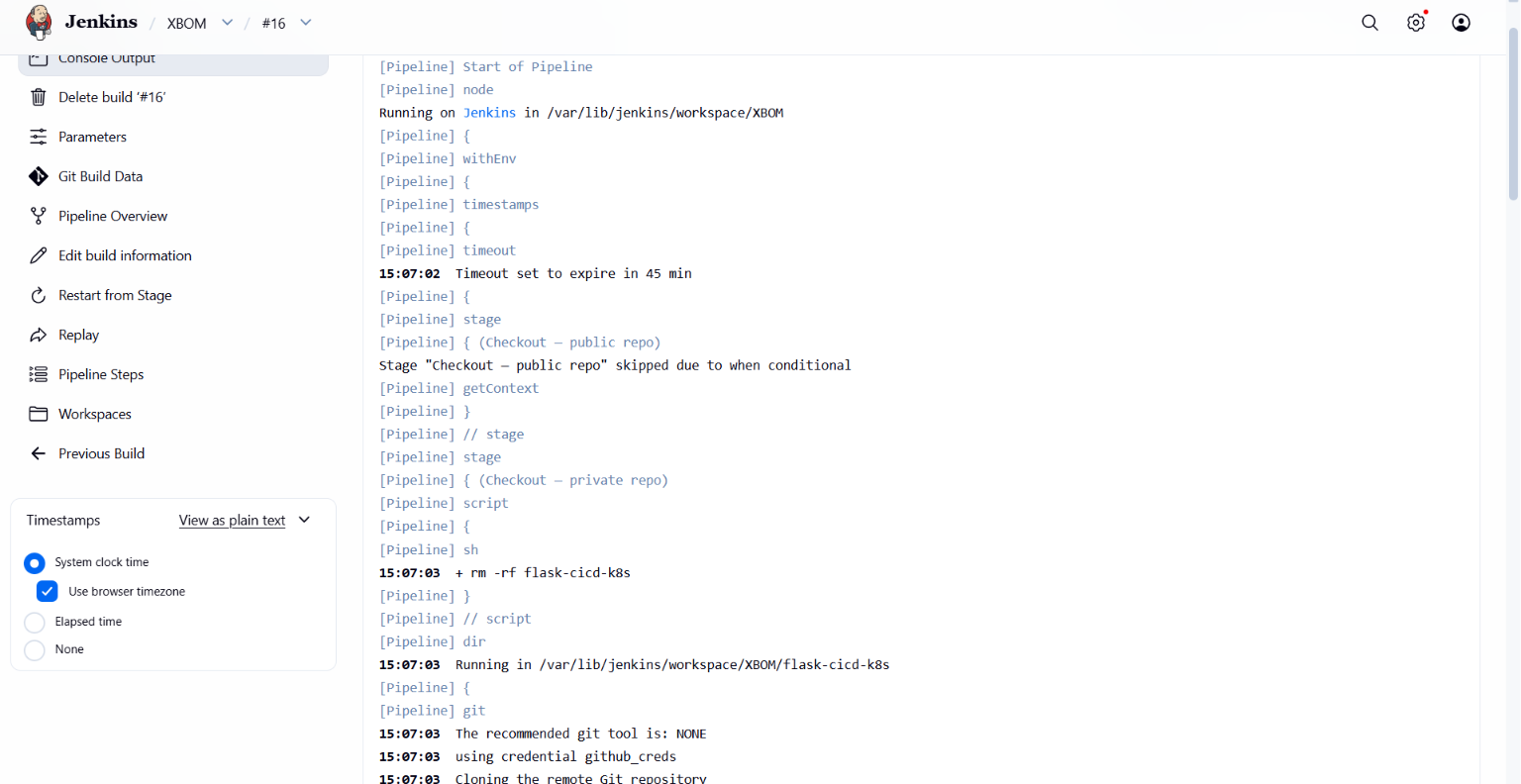
Watch Console Output and the Stage View for:
- Checkout completing
- SBOM generated → HTTP 200 upload
- CBOM generated → HTTP 200 upload
- AIBOM generated → HTTP 200 upload
Finished: SUCCESS
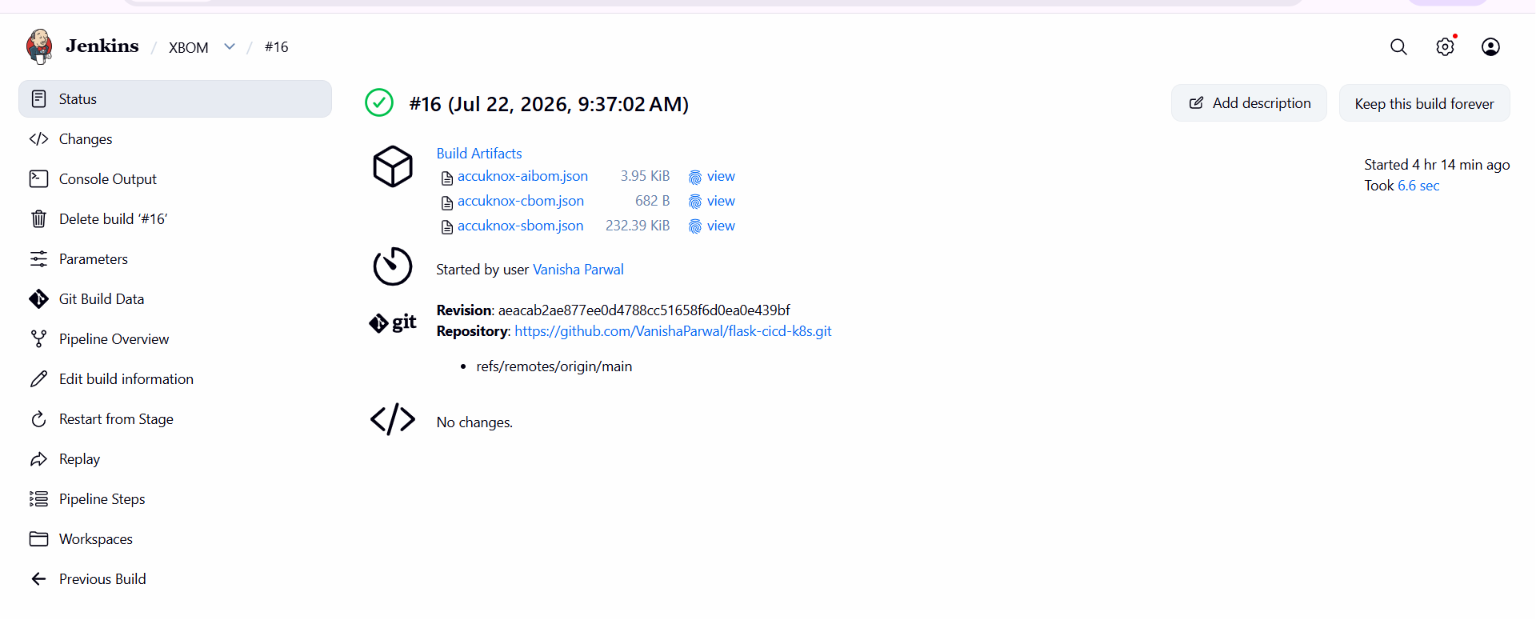
Step 11: Verify in AccuKnox
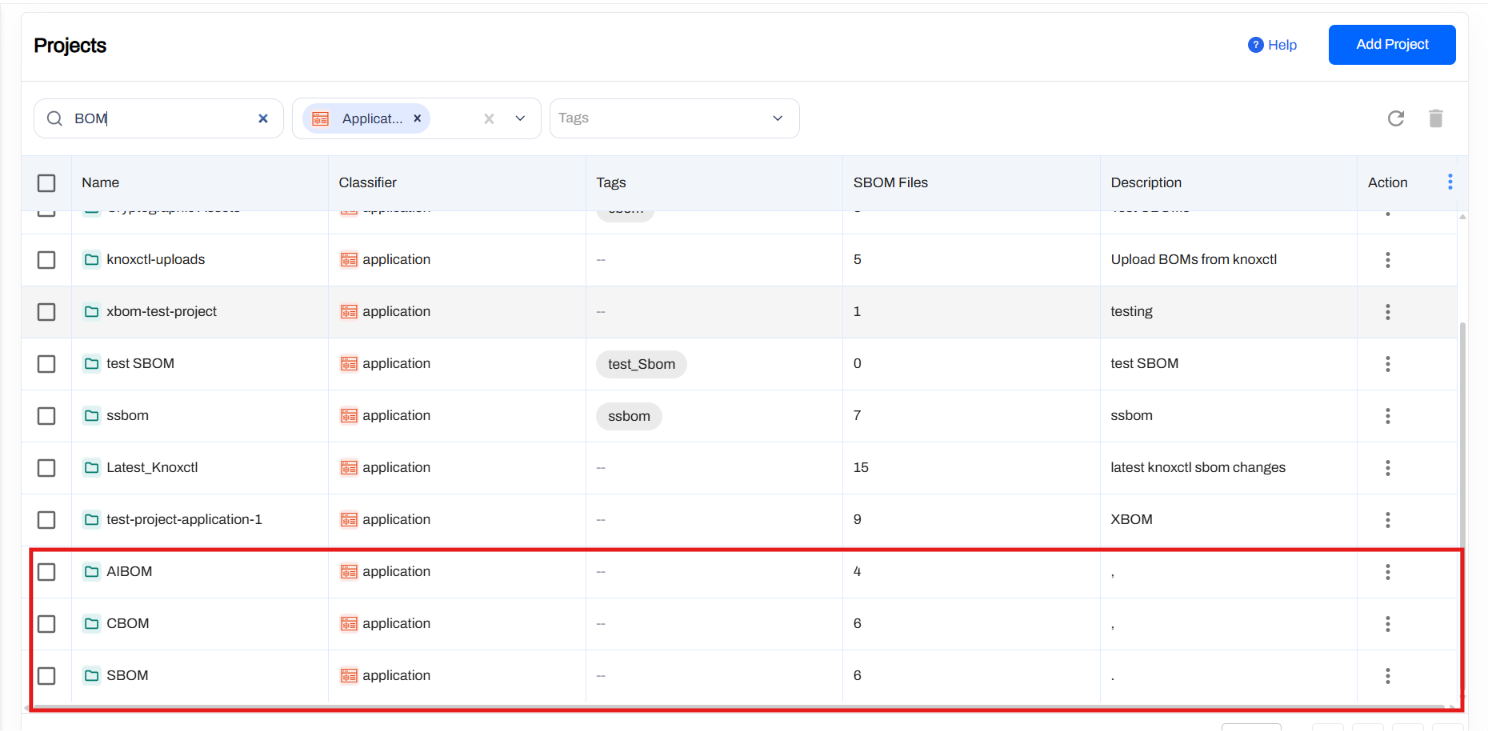
Log into AccuKnox SaaS and navigate to SBOM. Filter by classifier application. You will see three entries, one for each BOM type. Click any entry to inspect components:
- SBOM: all packages from lockfiles, with CVEs.
- CBOM: every crypto algorithm, key size, and library detected in source.
- AIBOM: the AI model card, with provenance, size, and license.
Conclusion
Wiring xBOM generation into Jenkins gives you SBOM, CBOM, and AIBOM from a single pipeline run, covering supply chain, cryptography, and AI/ML models without stitching together separate tools. Combine it with the other scan types (SAST, IaC, Secret, Container, SCA) to get full-coverage ASPM directly from your pipelines.