Running Unified Scans with AccuKnox in a GitLab CI/CD Pipeline
Overview
This guide demonstrates how to integrate the AccuKnox Unified Scan component into a GitLab CI/CD pipeline. Unlike the individual per-scan GitLab components, Unified Scan runs any combination of ASPM scans, SAST, SCA, Secrets, IaC, ML, and SBOM, from a single component, and forwards the results to AccuKnox for centralized security analysis and remediation.
Prerequisites
- A GitLab repository with CI/CD enabled.
- An AccuKnox SaaS account.
Integration Steps
Step 1: Generate an AccuKnox API Token
- Log in to AccuKnox and navigate to Settings → Tokens.
- Create an API token for forwarding scan results.
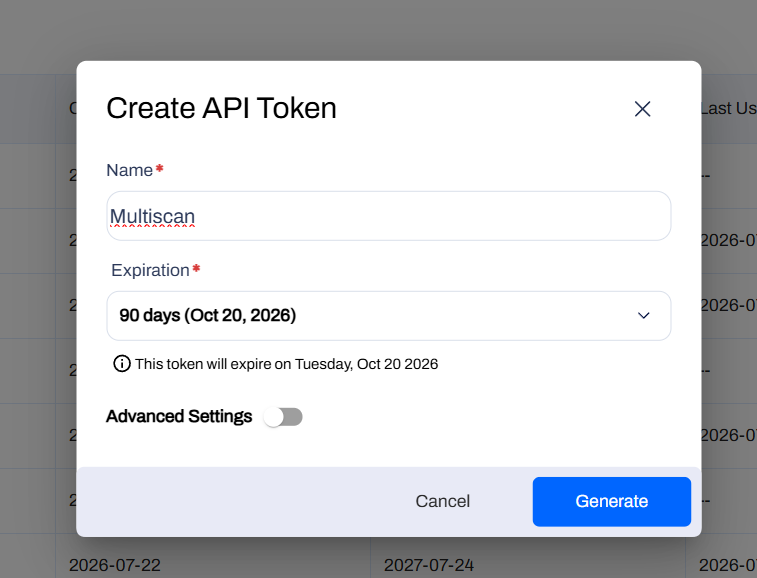
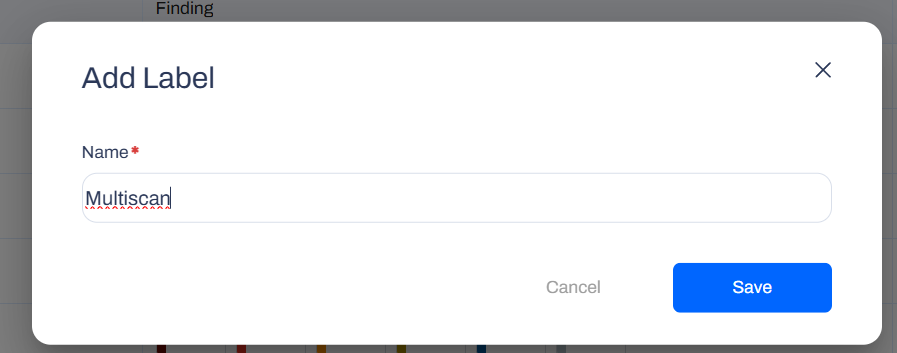
Step 2: Create an AccuKnox Label
Navigate to Dashboard → Labels and create a label, you'll use this value for the ACCUKNOX_LABEL CI/CD variable.
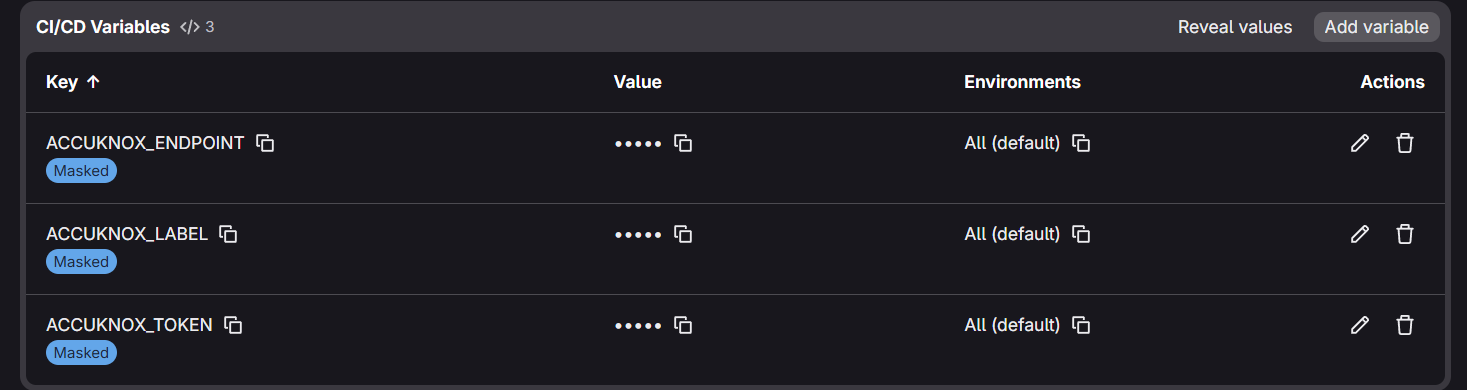
Step 3: Configure GitLab CI/CD Variables
Define the following variables under Settings → CI/CD → Variables:
| Variable | Description |
|---|---|
ACCUKNOX_TOKEN |
AccuKnox API token for authorization |
ACCUKNOX_ENDPOINT |
The AccuKnox API URL (for example cspm.demo.accuknox.com) |
ACCUKNOX_LABEL |
The label created above |
Note
The Unified Scan component reads these three variables automatically from the environment. Do not pass them as component inputs in your pipeline.
Inputs for AccuKnox Unified Scan
| Parameter | Description |
|---|---|
SCAN_TYPE |
Comma or space separated list of scans to run: sast, sca, secret, iac, ml, sbom. Required. |
STAGE |
Pipeline stage in which the scan job runs. |
SOFT_FAIL |
Do not fail the job if a scan finds issues (applies to all scans). |
SAST_SEVERITY |
SAST: comma-separated severities to report (LOW, MEDIUM, HIGH, CRITICAL). |
SCA_COMMAND |
SCA: command text (for example fs .). |
SECRET_COMMAND |
Secret: base command (for example git file://.). |
ML_COMMAND |
ML: command text (for example scan -p . -r json). |
SBOM_SCAN_TYPE |
SBOM: target type, image or filesystem. |
SBOM_IMAGE_REF |
SBOM: registry image reference (required when SBOM_SCAN_TYPE is image). |
SBOM_SCAN_PATH |
SBOM: filesystem path (used when SBOM_SCAN_TYPE is filesystem). |
SBOM_PROJECT_NAME |
SBOM: AccuKnox project name. Required for sbom. |
ACCUKNOX_TOKEN |
Token for authenticating with the AccuKnox Console. Provide as a CI/CD variable. |
ACCUKNOX_ENDPOINT |
URL of the AccuKnox Console to push results to. |
ACCUKNOX_LABEL |
Label in AccuKnox SaaS for associating scan results. |
Step 4: Define the GitLab CI/CD Pipeline
Create (or update) .gitlab-ci.yml at the root of your repository:
stages:
  - test

variables:
  GIT_DEPTH: 0

include:
  - component: $CI_SERVER_FQDN/accu-knox/accuknox-code-analysis/unified-scan@~latest
    inputs:
      SCAN_TYPE: "sast, sca, secret, iac, ml, sbom"
      SOFT_FAIL: true
      SAST_SEVERITY: "HIGH,CRITICAL"
      SBOM_SCAN_TYPE: "filesystem"
      SBOM_SCAN_PATH: "."
      SBOM_PROJECT_NAME: "my-project"
Only the inputs relevant to the scans listed in SCAN_TYPE are used, everything else is ignored, so pipelines can stay minimal.
Example Configurations
Each block below is a complete .gitlab-ci.yml. All examples assume ACCUKNOX_TOKEN, ACCUKNOX_ENDPOINT, and ACCUKNOX_LABEL are already configured as CI/CD variables.
1. SAST
stages:
  - test

include:
  - component: $CI_SERVER_FQDN/accu-knox/accuknox-code-analysis/unified-scan@~latest
    inputs:
      SCAN_TYPE: "sast"
      SAST_SEVERITY: "HIGH,CRITICAL"
      SOFT_FAIL: true
2. SCA
stages:
  - test

include:
  - component: $CI_SERVER_FQDN/accu-knox/accuknox-code-analysis/unified-scan@~latest
    inputs:
      SCAN_TYPE: "sca"
      SCA_COMMAND: "fs ."
      SCA_SEVERITY: "HIGH,CRITICAL"
      SOFT_FAIL: true
3. Secret Scan
Secret scanning reads git history, set GIT_DEPTH: 0 since GitLab clones shallow by default.
stages:
  - test

variables:
  GIT_DEPTH: 0

include:
  - component: $CI_SERVER_FQDN/accu-knox/accuknox-code-analysis/unified-scan@~latest
    inputs:
      SCAN_TYPE: "secret"
      SECRET_COMMAND: "git file://."
      SOFT_FAIL: true
4. IaC Scan
stages:
  - test

include:
  - component: $CI_SERVER_FQDN/accu-knox/accuknox-code-analysis/unified-scan@~latest
    inputs:
      SCAN_TYPE: "iac"
      IAC_DIRECTORY: "."
      SOFT_FAIL: true
5. ML Static Scan
stages:
  - test

include:
  - component: $CI_SERVER_FQDN/accu-knox/accuknox-code-analysis/unified-scan@~latest
    inputs:
      SCAN_TYPE: "ml"
      ML_COMMAND: "scan -p . -r json"
      SOFT_FAIL: true
6. SBOM
Note
Prerequisite: create a Project. To tie SBOM data to the right entity, create a Project in the AccuKnox Console first. Go to SBOM → Projects → New Project, and choose Container as the classifier for an image SBOM, or Application for a filesystem SBOM.
stages:
  - test

include:
  - component: $CI_SERVER_FQDN/accu-knox/accuknox-code-analysis/unified-scan@~latest
    inputs:
      SCAN_TYPE: "sbom"
      SBOM_SCAN_TYPE: "filesystem"
      SBOM_SCAN_PATH: "."
      SBOM_PROJECT_NAME: "my-project"
      SOFT_FAIL: true
For an image SBOM, set SBOM_SCAN_TYPE: "image" and SBOM_IMAGE_REF instead (pull or build the image earlier in the pipeline):
stages:
  - test

include:
  - component: $CI_SERVER_FQDN/accu-knox/accuknox-code-analysis/unified-scan@~latest
    inputs:
      SCAN_TYPE: "sbom"
      SBOM_SCAN_TYPE: "image"
      SBOM_IMAGE_REF: "registry.example.com/app:latest"
      SBOM_PROJECT_NAME: "my-project"   # required for SBOM
      SOFT_FAIL: true
7. Unified Scan, All Scans in One Job
stages:
  - test

variables:
  GIT_DEPTH: 0

include:
  - component: $CI_SERVER_FQDN/accu-knox/accuknox-code-analysis/unified-scan@~latest
    inputs:
      SCAN_TYPE: "sast, sca, secret, iac, ml, sbom"
      SOFT_FAIL: true
      SAST_SEVERITY: "HIGH,CRITICAL"
      SBOM_SCAN_TYPE: "filesystem"
      SBOM_SCAN_PATH: "."
      SBOM_PROJECT_NAME: "my-project"
Pipeline Execution
Before AccuKnox Integration
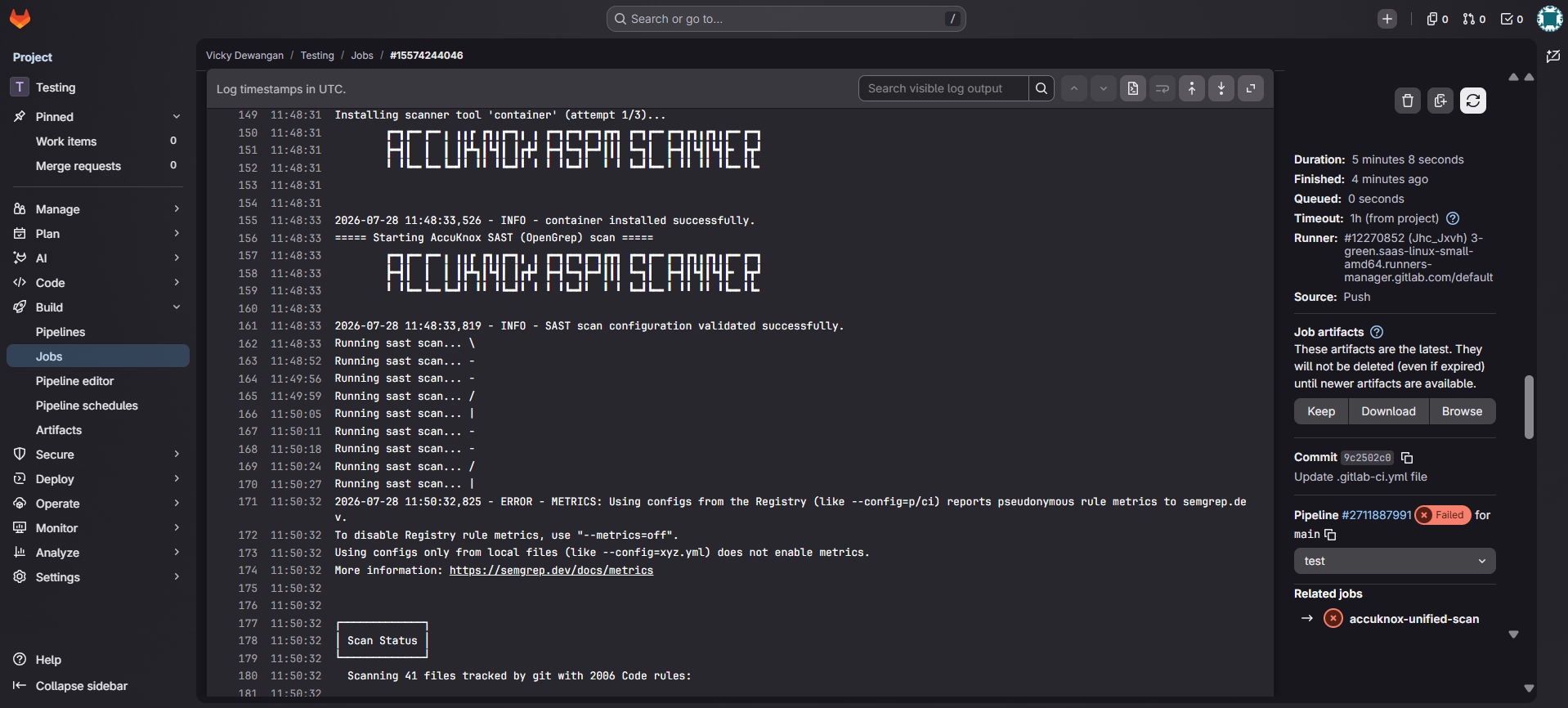
Initially, there are no centralized security checks in place, and even where individual scans are integrated, vulnerabilities can go unnoticed since they must be reviewed manually within pipeline logs.
After AccuKnox Integration
With Unified Scan integrated, results from every selected scan type are automatically forwarded to AccuKnox for centralized risk assessment, prioritization, and remediation tracking.
Viewing Results in AccuKnox
Step 1: Log in to the AccuKnox SaaS dashboard.
Step 2: Go to Issues → Findings and select the finding type that matches the scan you ran (for example, Opengrep Findings for SAST, or the equivalent view for SCA, Secret, IaC, or ML). For SBOM, go to SBOM → Projects and open the project named in SBOM_PROJECT_NAME.
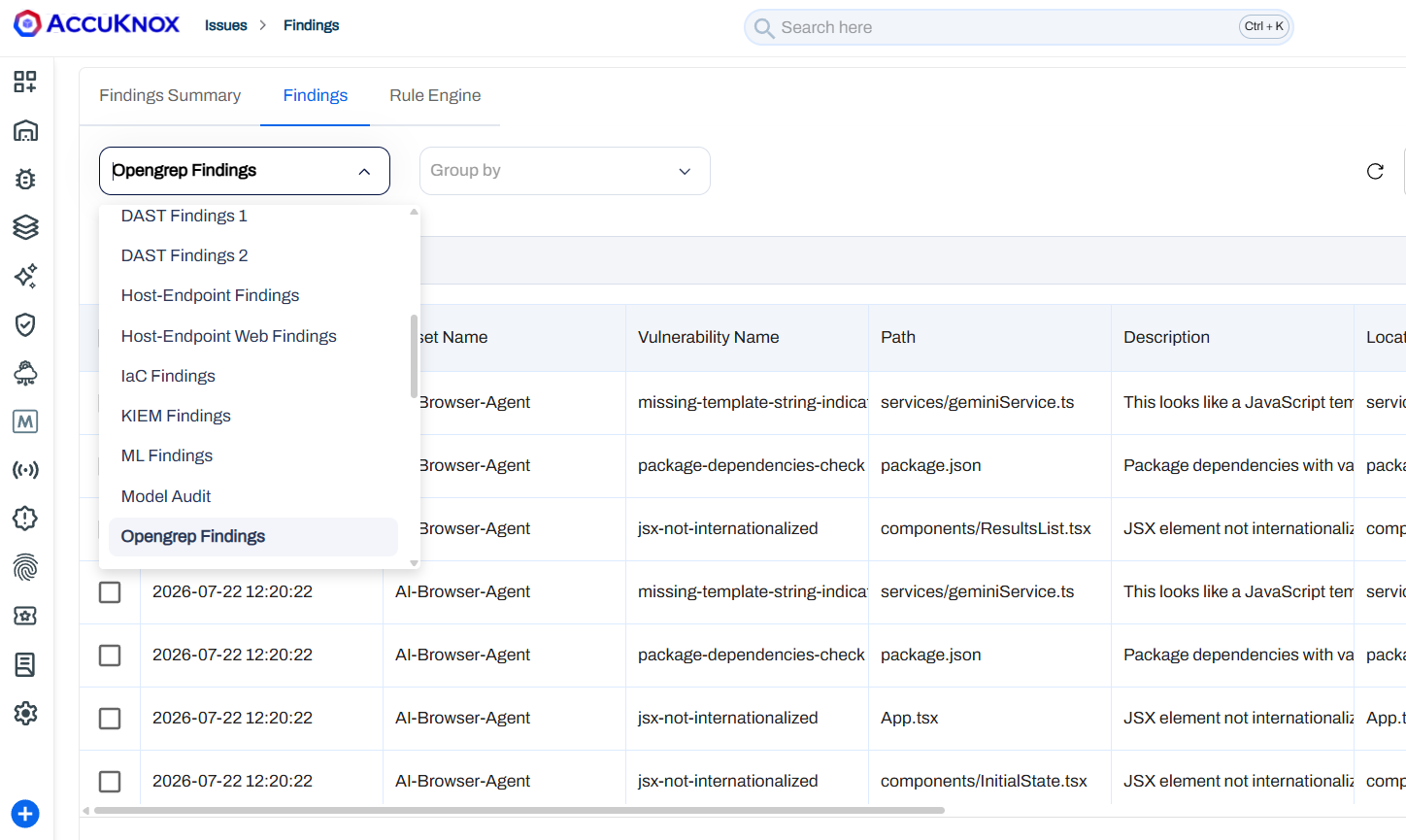
Step 3: Click on a finding to see the full detail.
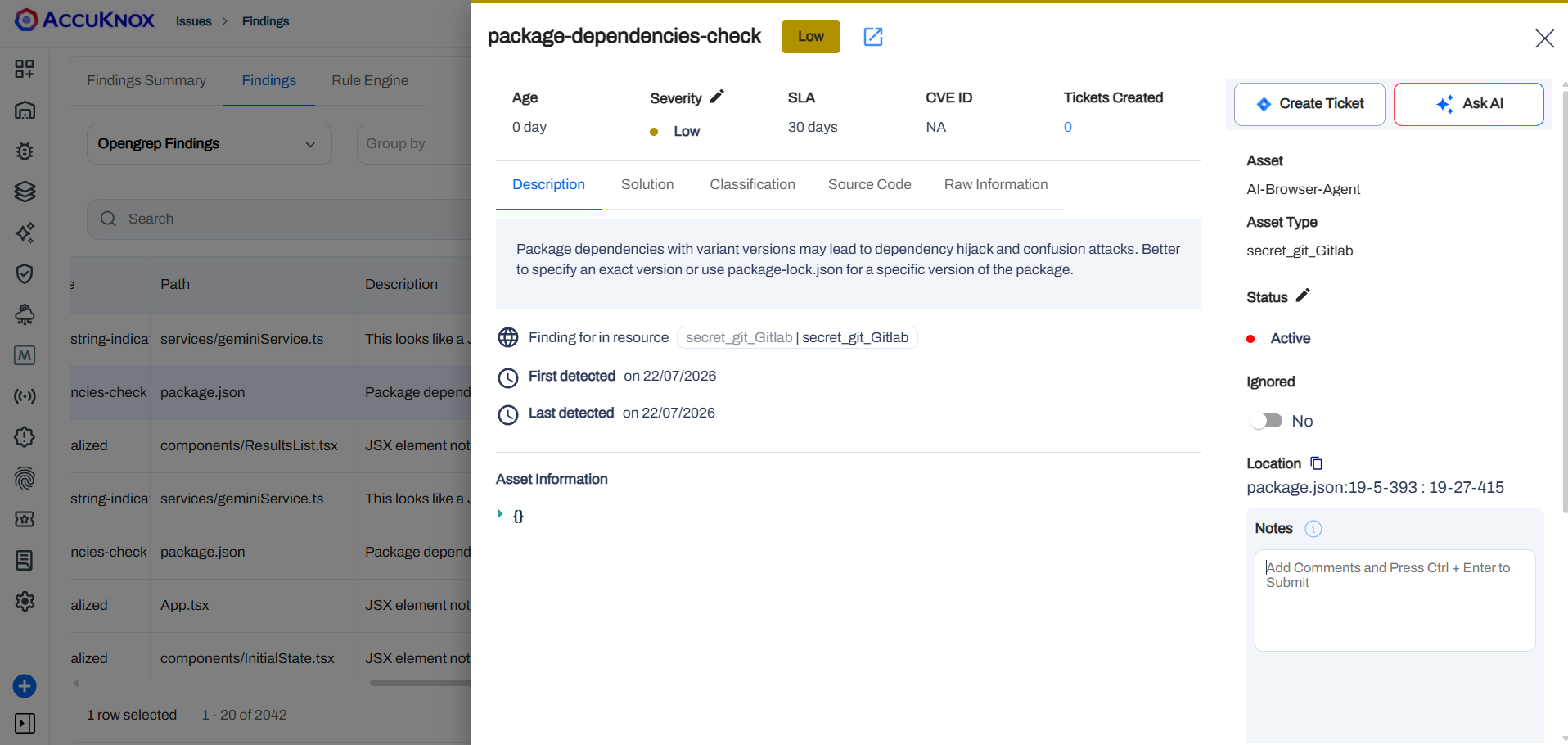
Step 4: Fix the finding using the instructions in the Solutions tab, or use Ask AI for a suggested fix.
Step 5: Create a ticket in your issue tracking system to assign and track the fix.
Step 6: Review the updated results. After the fix ships, rerun your GitLab pipeline, then check the AccuKnox SaaS dashboard to confirm the finding is resolved.
Conclusion
Integrating Unified Scan with AccuKnox in GitLab CI/CD consolidates SAST, SCA, Secrets, IaC, ML, and SBOM scanning into a single component. You get centralized monitoring, early detection across the full application security surface, and actionable findings you can act on before code ships.