CDR for GCP Setup Guide
Remediation Setup
For remediation setup for AWS, Azure and GCP CDR please refer to the following links:
Introduction
AccuKnox CDR for GCP is deployed using Terraform scripts. The scripts deploy the following resources:
| Resource | Purpose |
|---|---|
| Log Sink | Routes Logs to a Sink |
| Pub/Sub Topic | Receives logs from Log Sink |
| Pub/Sub Subscription | Consumers subscribe to the logs sent by the Log Sink |
| Service Account | Service account to subscribe to the Pub/Sub subscription |
In addition, the scripts will enable the following API's if they are disabled:
- pubsub.googleapis.com
- iam.googleapis.com
- logging.googleapis.com
The terraform script will be provided to you by AccuKnox team in the onboarding phase.
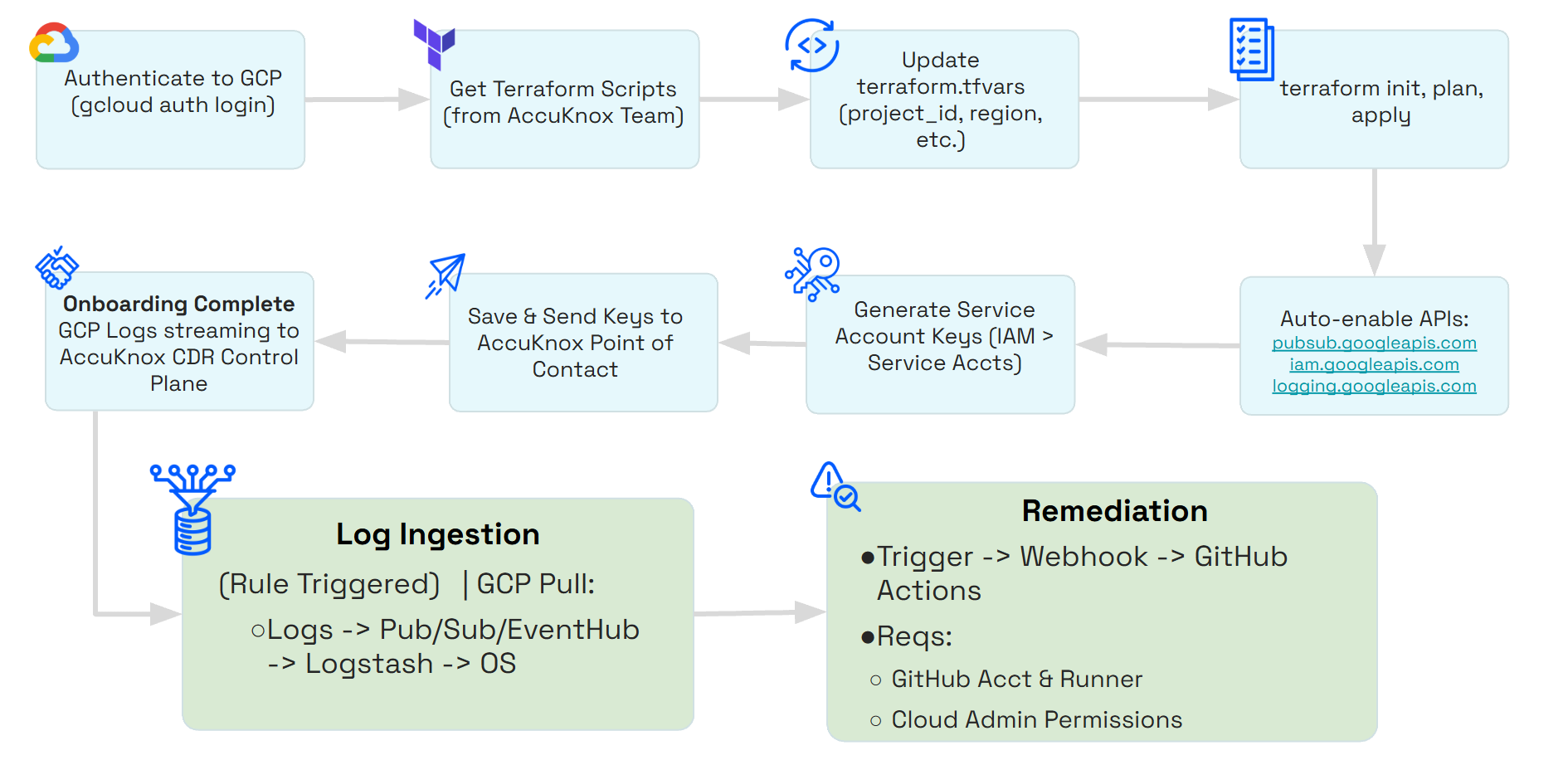
Setup
To setup the integration please follow the steps below
Step 1: Deploy the resources
In this step we assume you are authenticated to GCP via CLI. You can authenticate using this command.
gcloud auth application-default login
Before applying the terraform scripts, please update the terraform.tfvars with the appropriate values
| Variable | Description | Default Value | Requirement |
|---|---|---|---|
project_id |
GCP project ID to create the resources in. | Mandatory | |
projects |
GCP projects to monitor | Mandatory | |
org_id |
GCP organization ID | Mandatory | |
region |
Any valid GCP region (required by the Terraform provider) | Mandatory | |
pubsub_topic_name |
Pub/Sub Topic name | accuknox-siem |
Optional |
subscription_name |
Pub/Sub Subscription name | accuknox-siem-sub |
Optional |
service_account_id |
Service Account name | accuknox-cdr-pubsub-reader |
Optional |
sink_name |
Log Sink name | accuknox-audit-logs-to-pubsub |
Optional |
Please run the following commands to deploy the required resources:
terraform init
terraform plan
terraform apply
Step 2: Generate Service account keys
- Navigate to Service Accounts under IAM & Admin > Service Accounts
- Click on the Service Account Email (highlighted in blue)
- Generate Keys under Keys > Add Key
Save the generated keys in a safe place and transmit them as well to your AccuKnox Point of Contact to start the onboarding process