Cloud Based VM Scanning (Agentless)
Agent-less VM scanning is supported for AWS, GCP, Azure, and OpenShift. Support for OCI and Nutanix is planned.
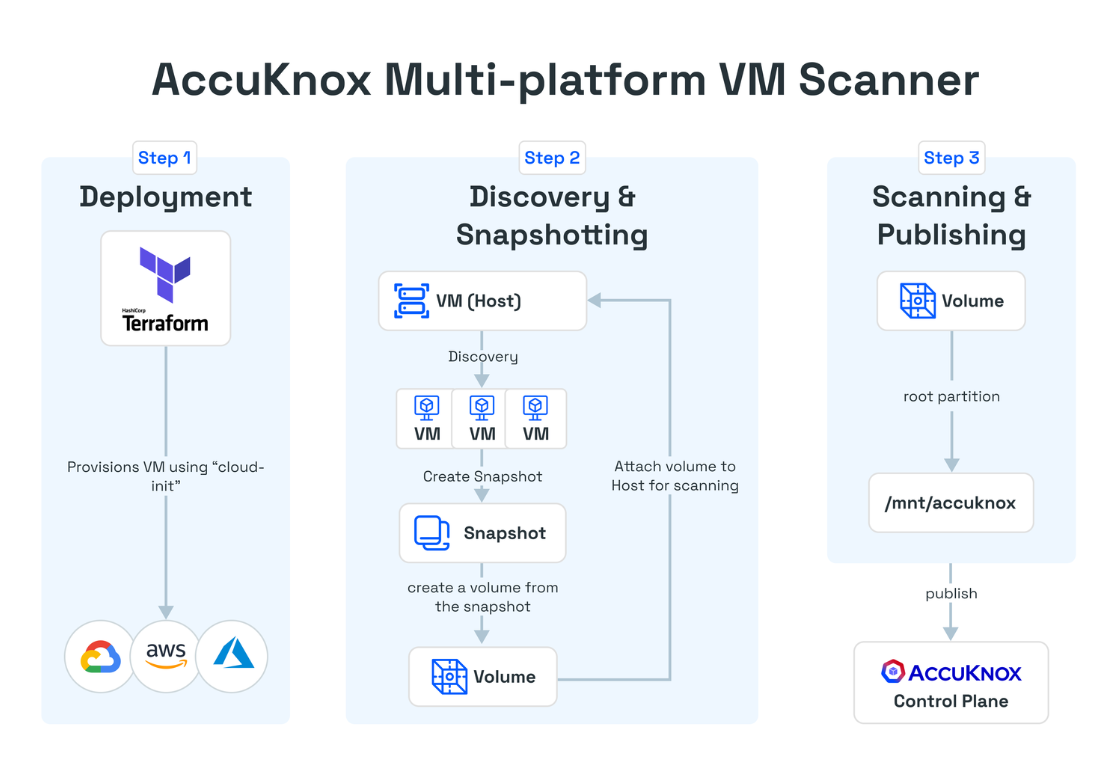
Public Clouds - AWS, GCP, Azure
This guide assumes that Terraform and the respective cloud provider CLI are installed. You should have received the Terraform code from AccuKnox.
terraform/
├── aws
│   ├── cloud-init.yaml -> ../cloud-init.yaml
│   ├── main.tf
│   ├── otel-collector-config.yaml -> ../otel-collector-config.yaml
│   ├── provider.tf
│   ├── terraform.tfvars.example
│   └── variables.tf
├── azure
│   ├── cloud-init.yaml -> ../cloud-init.yaml
│   ├── main.tf
│   ├── otel-collector-config.yaml -> ../otel-collector-config.yaml
│   ├── provider.tf
│   ├── terraform.tfvars.example
│   └── variables.tf
├── cloud-init.yaml
├── gcp
│   ├── cloud-init.yaml -> ../cloud-init.yaml
│   ├── main.tf
│   ├── otel-collector-config.yaml -> ../otel-collector-config.yaml
│   ├── provider.tf
│   ├── terraform.tfvars.example
│   └── variables.tf
└── otel-collector-config.yaml
Each cloud provider directory includes a terraform.tfvars.example file.
Update the file according to your requirements and save it as
terraform.tfvars.
cd aws
cp terraform.tfvars.example terraform.tfvars
- Artifact API tokens can be created under Settings -> Tokens.
- Labels can be created under Settings -> Labels.
After configuration, run terraform apply to provision the required
infrastructure in the corresponding cloud account.
terraform apply