High Availability, Backup and Day 2 Operations
Three Secrets Manager nodes keep serving secrets when any one of them fails. A snapshot agent copies the data to object storage every 15 minutes, so you can rebuild the cluster from a known point. Both features ship in the Helm chart and are off by default.
Three Nodes Survive One Failure
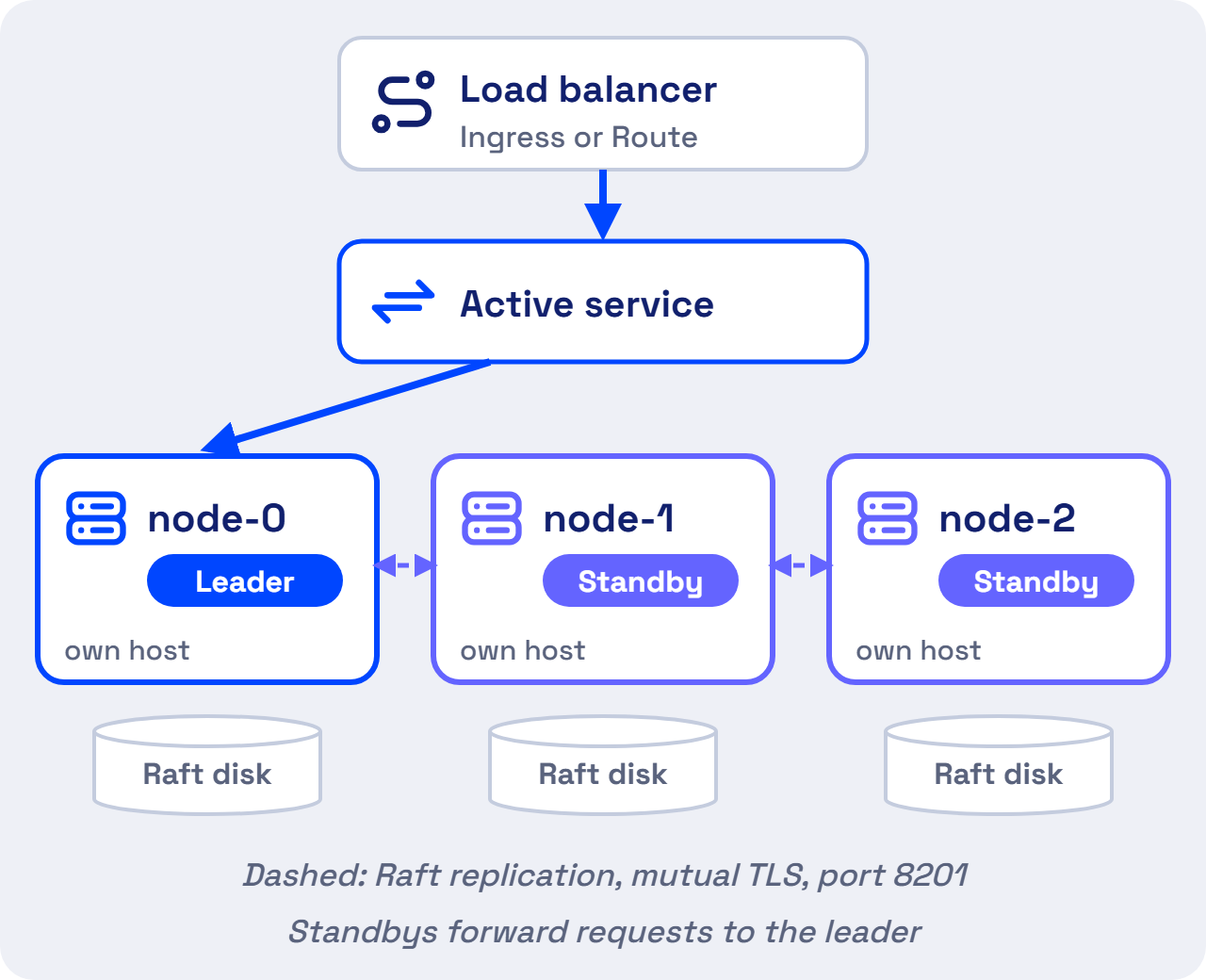
- One leader writes. Standby nodes forward requests to the leader over mutual TLS, on the cluster port 8201.
- A majority keeps the cluster up. Three nodes survive the loss of one. Five nodes survive the loss of two.
- Leader election is automatic. When the leader fails, a standby takes over.
- Applications keep working through a short outage. A Kubernetes secret synced by the External Secrets Operator stays in place, and an SDK application keeps the value it already read. New logins wait until a leader is back.
A restarted node comes back sealed
A node that restarts rejoins only after you unseal it with 3 of the 5 unseal keys. Keep the key holders reachable. Without 3 keys the data cannot be recovered.
High availability protects against outages. It does not add throughput, because every write goes through the leader.
Enable HA Mode With Three Replicas
Install the chart with HA and Raft storage turned on.
helm upgrade --install vault . -n accuknox \
  --set server.ha.enabled=true \
  --set server.ha.raft.enabled=true \
  --set server.ha.replicas=3
Initialize and unseal the first node, vault-accuknoxsecretmanager-0, as the Deployment Guide shows. Then join each other node to it and unseal that node too.
kubectl exec vault-accuknoxsecretmanager-1 -n accuknox -- \
  vault operator raft join http://vault-accuknoxsecretmanager-0.vault-accuknoxsecretmanager-internal:8200
[Confirm the join and unseal sequence for HA on v2.5.4.]
Run each pod on its own host. The chart leaves server.affinity empty, so set a pod anti-affinity rule on the hostname. The PodDisruptionBudget, on by default in HA mode, stops node maintenance from taking down a majority.
Snapshots Save the Cluster Every 15 Minutes
The snapshot agent is a CronJob. It logs in with the Kubernetes auth method, takes a Raft snapshot from the leader, and uploads it to an S3-compatible bucket, which can run on-premises.
Setting in values.yaml |
Default | Meaning |
|---|---|---|
snapshotAgent.enabled |
false |
Turns the agent on |
snapshotAgent.schedule |
*/15 * * * * |
Runs every 15 minutes |
snapshotAgent.config.s3ExpireDays |
14 |
Deletes snapshots after 14 days |
snapshotAgent.config.baoRole |
snapshot |
The role the agent logs in with |
snapshotAgent.s3CredentialsSecret |
my-s3-credentials |
The Kubernetes secret holding AWS_ACCESS_KEY_ID and AWS_SECRET_ACCESS_KEY |
Set s3Host, s3Bucket and s3Uri under snapshotAgent.config to point at your bucket. With the default schedule, a restore loses at most 15 minutes of secret changes.
Restore From a Snapshot
Load the snapshot into a running cluster, then unseal it with the original unseal keys.
kubectl exec vault-accuknoxsecretmanager-0 -n accuknox -- vault operator raft snapshot restore <snapshot-file>
A snapshot holds encrypted data. The file alone exposes no secrets, and a restore needs the unseal keys.
[Add the disaster recovery design across data centers, with RTO and RPO targets and the failover and failback runbook.]
Six Routine Jobs After Go-Live
| Job | What to do |
|---|---|
| Unseal after a restart | Any 3 of the 5 key holders unseal the node |
| Check backups | Confirm the snapshot CronJob succeeds and the bucket holds 14 days of files |
| Watch health | Turn on serverTelemetry.serviceMonitor, prometheusRules and grafanaDashboard for seal and HA status |
| Keep the audit log | Turn on server.auditStorage and forward the log to your SIEM. [Confirm the SIEM forwarding method.] |
| Upgrade one pod at a time | The StatefulSet uses the OnDelete update strategy. Delete the standby pods first, then the leader |
| Keep access tight | Retire the root token after you create the first admin. Revoke a token under Access → Tokens |
Two Raft commands help with node problems. vault operator raft list-peers shows the cluster members, and vault operator raft remove-peer <node-id> drops a dead node.