External Secrets Operator Integration
The External Secrets Operator is an open-source Kubernetes operator. It reads a value from AccuKnox Secrets Manager and writes it into a Kubernetes secret, then keeps the two in step on a schedule. Your application reads the Kubernetes secret it already uses, so its code does not change.
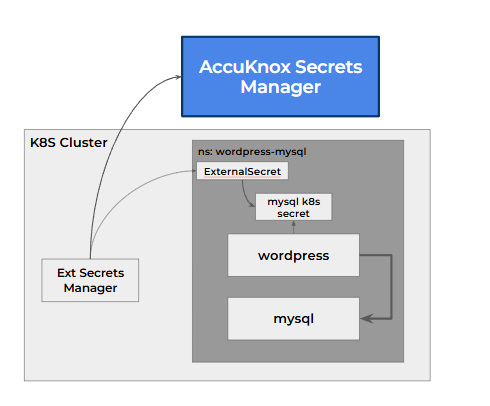
The setup works on any Kubernetes cluster. Secrets Manager runs as its own control plane, and the operator runs in the application cluster.
Three Objects Do the Work
| Object | Scope | Job |
|---|---|---|
ClusterSecretStore |
The whole cluster | Tells the operator where Secrets Manager is and how to log in |
SecretStore |
One namespace | Does the same job for one namespace, with its own role |
ExternalSecret |
One namespace | Names the secret to fetch, the Kubernetes secret to write, and how often to refresh |
1. Install the Operator
Install the operator with Helm, following the External Secrets installation guide.
helm repo add external-secrets https://charts.external-secrets.io
helm install external-secrets external-secrets/external-secrets \
  -n external-secrets --create-namespace
[Confirm the operator version tested with Secrets Manager v2.5.4.]
2. Give the Operator Its Own Login
The operator logs in through the Kubernetes auth method, as its own service account. In Secrets Manager, set up three things:
- A Kubernetes auth method that trusts your application cluster. The examples use the mount path
k8s-demo-cluster. [Add the steps to configure the Kubernetes auth method for a remote cluster.] - A policy that reads only the paths the operator needs.
- A role that binds the operator's service account to that policy.
This policy lets the role read one secret, demo/mysql, and nothing else.
path "secret/data/demo/mysql" {
  capabilities = ["read"]
}
The role demo-access binds the service account external-secrets in namespace external-secrets to that policy. See Sharing Secrets Within an Organisation for how policies work.
3. Point the Cluster at Secrets Manager
A ClusterSecretStore holds the connection: the server address, the KV path and version, and the login.
apiVersion: external-secrets.io/v1
kind: ClusterSecretStore
metadata:
  name: vault-backend-demo
spec:
  provider:
    vault:
      server: "https://<your-secrets-manager-address>"
      path: "secret"
      version: "v2"
      auth:
        kubernetes:
          mountPath: "k8s-demo-cluster"
          role: "demo-access"
          serviceAccountRef:
            name: "external-secrets"
            namespace: "external-secrets"
Check that the store is ready with kubectl describe clustersecretstore vault-backend-demo. A working store reports store validated and Ready.
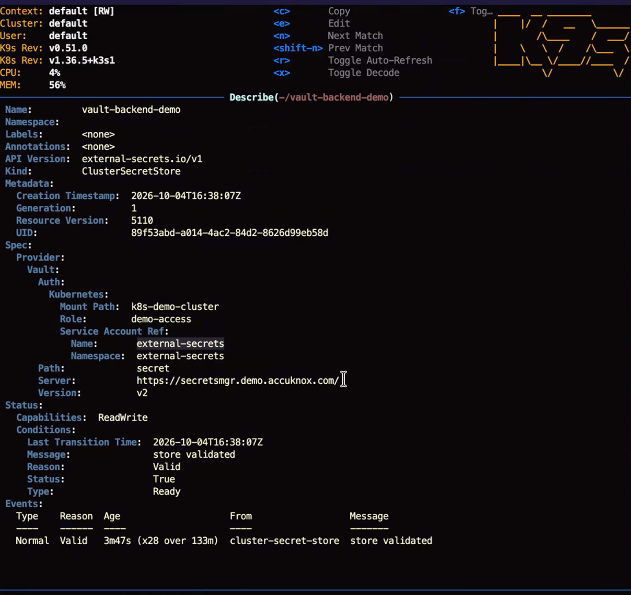
ReadWrite in the status is a label
The store reports Capabilities: ReadWrite by default. That label grants nothing. The role's policy decides what the operator can read or write.
4. Ask for the Secret
An ExternalSecret names the secret in Secrets Manager and the Kubernetes secret to create.
apiVersion: external-secrets.io/v1
kind: ExternalSecret
metadata:
  name: mysql-pass
spec:
  refreshInterval: "10s"
  secretStoreRef:
    name: vault-backend-demo
    kind: ClusterSecretStore
  target:
    name: mysql-pass
  data:
  - secretKey: password
    remoteRef:
      key: demo/mysql
      property: password
Apply it, and the operator creates the Kubernetes secret mysql-pass with the key password. Every 10 seconds it checks Secrets Manager and updates mysql-pass when the value changes.
5. Read the Secret in the Application
The application reads the Kubernetes secret through secretKeyRef, exactly as it would read any other secret.
env:
  - name: WORDPRESS_DB_PASSWORD
    valueFrom:
      secretKeyRef:
        name: mysql-pass
        key: password
Restart the application to load a new value
The operator updates the Kubernetes secret, but a running pod keeps the value it read at startup. Restart the deployment after a change, for example with kubectl rollout restart deployment/<name>.
One Role per Store
A ClusterSecretStore uses one role for the whole cluster. When a second application needs a different role or a narrower scope, give it a namespace-scoped SecretStore with its own role instead. Each team then reads only its own paths.
What This Method Does Not Do
- It leaves a copy of the secret in the Kubernetes secret. Anyone with read access to that namespace can read it. Use the SDK for a secret that must stay out of the namespace.
- It does not reload a running application.
- It works on Kubernetes only. For an application on a virtual machine, use the SDK.
See the full flow on a live cluster in the WordPress and MySQL walkthrough.