REST API Reference
Every action in the Secrets Manager UI and CLI is an HTTPS call to the REST API. Send each call to https://<secrets-manager-host>:8200/v1/<path> with your token in the X-Vault-Token header. The API is compatible with the HashiCorp Vault HTTP API, so Vault client libraries and scripts work unchanged.
Download the Full API Document From Your Server
Your own server is the full API reference. Secrets Manager generates an OpenAPI 3 document that lists every path mounted on it, with the mount names you chose. The document covers the paths your token can reach, so a scoped token returns a scoped document.
curl -s --header "X-Vault-Token: <token>" \
  "$VAULT_ADDR/v1/sys/internal/specs/openapi" -o secrets-manager-openapi.json
Load secrets-manager-openapi.json into Swagger UI, Postman or any OpenAPI tool to browse and try each endpoint. Three extensions mark special paths.
| Extension | Meaning |
|---|---|
x-vault-sudo |
The path needs sudo in the policy |
x-vault-unauthenticated |
The path needs no token |
x-vault-create-supported |
The path creates new items as well as updating them |
Authenticate, Then Send the Token
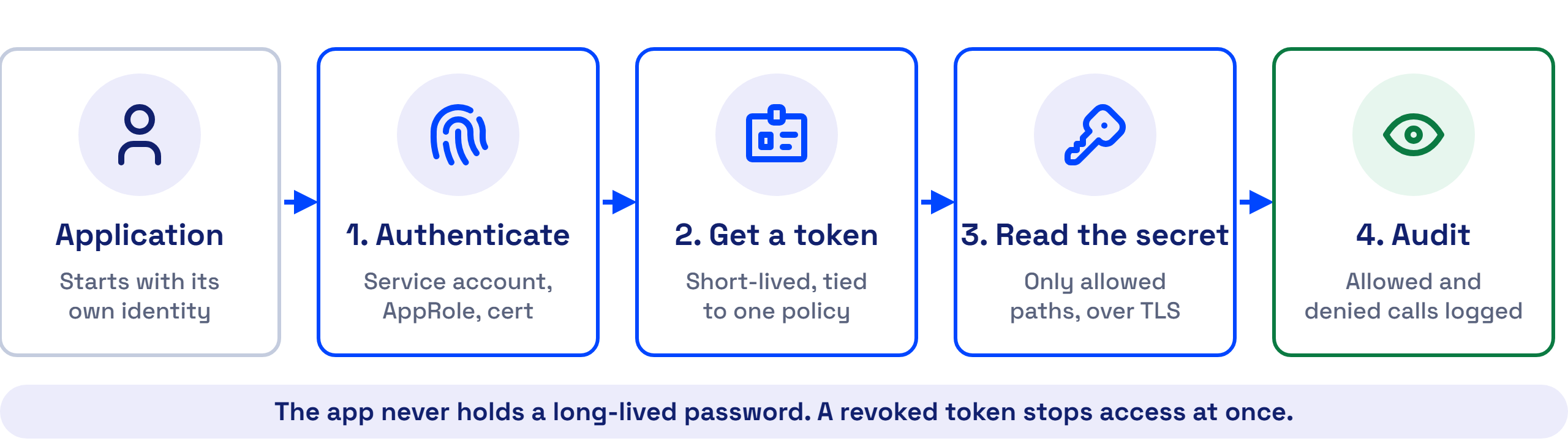
A call without a token fails, except for the health, seal status and login endpoints. Log in with the auth method that fits the caller, then read auth.client_token from the response.
curl -s --request POST \
  --data '{"role_id": "<role-id>", "secret_id": "<secret-id>"}' \
  "$VAULT_ADDR/v1/auth/approle/login"
Send the token on every later call.
curl -s --header "X-Vault-Token: <client-token>" \
  "$VAULT_ADDR/v1/secret/data/demo/mysql"
The token expires after its time to live. Log in again, or renew the token, before it expires.
The Endpoints You Will Use Most
Each path below starts with /v1/. A mount path such as secret/ or transit/ is the path you chose when you enabled the engine.
| Method | Path | Does |
|---|---|---|
GET |
sys/health |
Returns the health of the node. Load balancers use it, and it needs no token |
GET |
sys/seal-status |
Shows whether the node is sealed and the unseal progress |
POST |
sys/unseal |
Submits one unseal key share |
POST |
sys/seal |
Seals the node. Needs root privileges |
GET |
sys/storage/raft/snapshot |
Downloads a Raft snapshot |
| Method | Path | Does |
|---|---|---|
POST |
auth/approle/login |
Logs in a VM, job or script with a role ID and a secret ID |
POST |
auth/<kubernetes-mount>/login |
Logs in a pod with its service account token |
POST |
auth/userpass/login/<username> |
Logs in a person with a username and password |
POST |
auth/token/renew-self |
Renews the token in the header |
POST |
auth/token/revoke-self |
Revokes the token in the header |
| Method | Path | Does |
|---|---|---|
GET |
secret/data/<path> |
Reads the latest version of a secret |
GET |
secret/data/<path>?version=<n> |
Reads one version |
POST |
secret/data/<path> |
Writes a new version |
GET |
secret/metadata/<path> |
Lists the versions and their dates |
DELETE |
secret/metadata/<path> |
Deletes the secret and every version |
| Method | Path | Does |
|---|---|---|
POST |
transit/keys/<key-name> |
Creates an encryption key |
POST |
transit/encrypt/<key-name> |
Encrypts base64 plaintext and returns ciphertext |
POST |
transit/decrypt/<key-name> |
Decrypts ciphertext and returns base64 plaintext |
| Method | Path | Does |
|---|---|---|
POST |
totp/keys/<key-name> |
Creates a TOTP key |
LIST |
totp/keys |
Lists the TOTP keys |
GET |
totp/code/<key-name> |
Generates the current code |
POST |
totp/code/<key-name> |
Validates a code |
| Method | Path | Does |
|---|---|---|
LIST |
sys/policies/acl |
Lists the ACL policies |
GET |
sys/policies/acl/<name> |
Reads a policy |
POST |
sys/policies/acl/<name> |
Creates or updates a policy |
DELETE |
sys/policies/acl/<name> |
Deletes a policy |
A LIST call also works as GET with ?list=true, for clients that cannot send a custom method.
Each Error Code Points to Its Fix
| Status | Meaning | Fix |
|---|---|---|
400 |
The request body is wrong | Check the JSON field names |
403 |
The token is missing, expired, or its policy does not allow the path | Log in again, or add the path to the policy |
404 |
Nothing exists at the path | Check the mount path with GET /v1/sys/mounts |
429 |
The node hit a rate limit | Wait, then retry |
503 |
The node is sealed | Unseal it with 3 of 5 key shares |
A managed shared instance has API request limits. A managed dedicated instance has none. See the deployment models on accuknox.com.
Use a Client Library Instead of Raw Calls
Any HashiCorp Vault client library works against Secrets Manager. See Direct SDK and REST API for Python, Java, .NET and Node.js examples.