AccuKnox Secrets Manager
AccuKnox Secrets Manager gives you one secure place to store, manage, and read sensitive data. It holds passwords, API keys, tokens, certificates, and other credentials.
It stops hardcoded secrets and secret sprawl. You get central storage, controlled access, encryption, authentication, and full audit logs.
A separate product from the AccuKnox CNAPP platform
Secrets Manager ships and installs on its own. You do not need an AccuKnox CNAPP subscription to run it. Contact your AccuKnox point of contact for the Helm chart.
Key Capabilities
-
Secure secret storage
Stores secrets in an encrypted, versioned Key/Value store with rollback.
-
Dynamic credentials
Issues short-lived credentials for AWS, Kubernetes, and databases.
-
Encryption services
Transit APIs encrypt, decrypt, sign, and verify data without exposing keys.
-
PKI and certificates
Manages certificates, including root and intermediate Certificate Authorities.
-
Authentication and access control
Supports OIDC, LDAP, Okta, Kubernetes Auth, JWT, tokens, and AppRole.
-
Audit and monitoring
Records every secret read, write, and management action.
-
Multi-tenancy
Namespaces isolate teams, applications, and environments from each other.
HashiCorp Vault Compatibility
AccuKnox Secrets Manager is a drop-in, API-compatible replacement for HashiCorp Vault. If an application already talks to Vault through standard APIs, point it at the AccuKnox endpoint. It keeps working.
These areas need no major code change:
| Area | What stays the same |
|---|---|
| KV Secrets Engine | Read, write, list, and delete paths and commands |
| Transit Engine | Encrypt, decrypt, sign, and verify calls |
| PKI Engine | CSR signing, issuing, and revocation |
| Dynamic secrets | The same workflow for roles and leases |
| Authentication methods | OIDC, LDAP, Kubernetes, JWT, AppRole, and tokens |
| Policy model | Identity and role rules that match Vault ACLs |
Migration from HashiCorp Vault
Most operational patterns stay the same, so the move is short.
- Map your existing Vault namespaces to AccuKnox namespaces.
- Reuse or translate your existing policies.
- Point your applications at the new endpoint.
- Validate your dynamic secret roles and auth configurations.
- Move production traffic across in stages.
Access and Security
Secrets Manager protects every request with these controls:
- Authentication and role-based access control for each identity.
- Policy-based, least-privilege access down to a single secret path.
- Encryption of sensitive data at rest and in transit.
- Audit logs for all secret access and management activity.
Authentication Methods
Secrets Manager authenticates users, applications, and workloads.
| Method | Purpose |
|---|---|
| User login | Users sign in to the Secrets Manager UI with assigned permissions. |
| Token | Token-based authentication for users and applications. |
| AppRole | Applications and automation authenticate with a Role ID and a Secret ID. |
| OIDC | Users sign in through an external identity provider and SSO. |
| LDAP | Secrets Manager authenticates users against an enterprise LDAP directory. |
| Okta | Users sign in through your organization's Okta identity provider. |
| Kubernetes Auth | Kubernetes workloads authenticate with their service account identity. |
| JWT | Applications and users authenticate with signed JSON Web Tokens. |
Typical Workflow
Every request follows the same five stages:
- Authenticate. The user, application, or workload proves its identity.
- Apply access policy. Secrets Manager checks which paths that identity may touch.
- Access secret. The caller reads or writes the secret at an allowed path.
- Use secret. The application uses the value it received.
- Audit activity. Secrets Manager records who did what, and when.
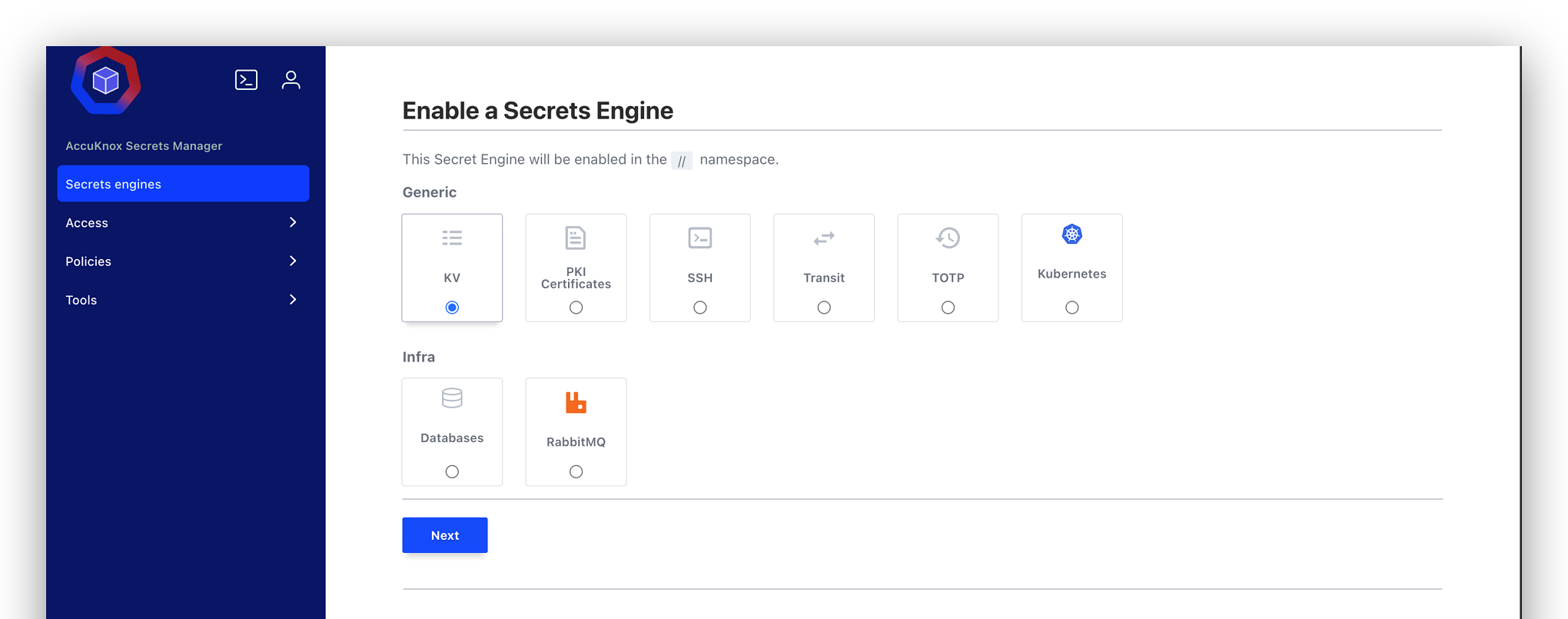
Secret Engines
Secrets Manager groups its features into engines. You enable only the engines you need.
| Engine | What it does |
|---|---|
| KV (Key/Value) | Stores static secrets such as passwords, API keys, and config values. |
| PKI Certificates | Issues digital certificates and manages their lifecycle. |
| SSH | Gives controlled access to SSH-enabled systems without long-lived keys. |
| Transit | Encrypts and decrypts data without exposing the encryption key. |
| TOTP | Generates and validates Time-based One-Time Passwords for MFA. |
| Kubernetes | Lets Kubernetes workloads read secrets without storing them in manifests. |
| Databases | Generates database credentials on demand for supported databases. |
| RabbitMQ | Manages RabbitMQ credentials and controls access to its resources. |
Where to Go Next
-
Install Secrets Manager on Kubernetes with Helm, then initialize and unseal it.
-
Storing Secrets in the KV Engine
Create, read, version, and delete a secret in the UI.
-
Encrypt and decrypt values with the Transit engine.
-
Generate and validate 6-digit MFA codes under policy control.
-
Sharing Secrets in an Organisation
Give each teammate a scoped account that reads only what they need.
-
Answers to the questions customers ask most often.
Deployment Notes
- Runs in high-availability mode.
- Supports cloud, on-premises, and air-gapped deployments.
- AccuKnox CWPP hardens every instance.
- Supports regional deployments where data residency rules apply.