AI Gateway Use Cases
AccuKnox AI Gateway gives every AI application one secure endpoint. These six use cases show where that helps most. For the concept, see the AI Gateway overview. To set it up, see Onboard an application with AI Gateway.
Secure an LLM App
Situation. A team ships a chatbot that calls an LLM. Security wants protection against prompt injection and data leaks before launch. The team cannot add a new SDK this sprint.
How AI Gateway helps.
- Onboard the application and turn on Prompt Firewall.
- Copy the Gateway Endpoint and Virtual Key from Integration Details.
- Replace the base URL and API key in the application.
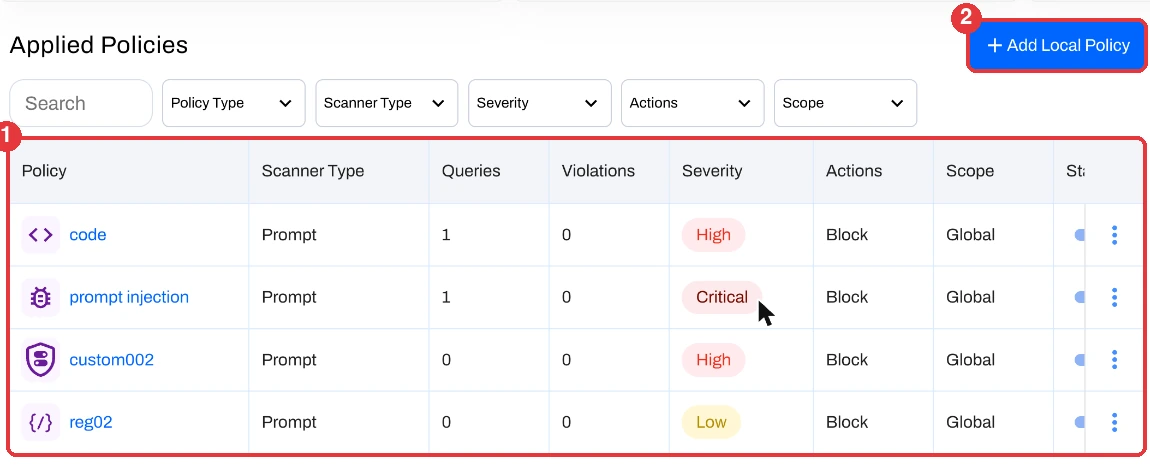
The gateway now scans each prompt and each response. Policies such as prompt injection and code detection run with the action that you set, for example Block.
Unify Many Providers
Situation. Different teams use different providers. Each team keeps its own key and its own client code. Nobody has one view of what runs where.
How AI Gateway helps.
- Onboard each application with its provider and model. The list includes Anthropic, Amazon Nova, AI21, and more.
- Give each application its own virtual key.
- Review all applications in one table at Settings > AI Gateway.
Your teams keep their provider of choice. You keep one control point.
Protect Self-Hosted Models
Situation. A team runs a model on its own infrastructure with Ollama, vLLM, or NVIDIA Triton. The model has no built-in prompt checks.
How AI Gateway helps.
- Select the provider, for example Ollama.
- Enter the model name and the Model Endpoint where your model runs.
- Turn on Prompt Firewall.
Applications call the gateway. The gateway applies your policies, then forwards safe requests to your endpoint.
Track Usage and Cost
Situation. Finance wants to know which application drives LLM spend. Engineering wants to know which one is slow.
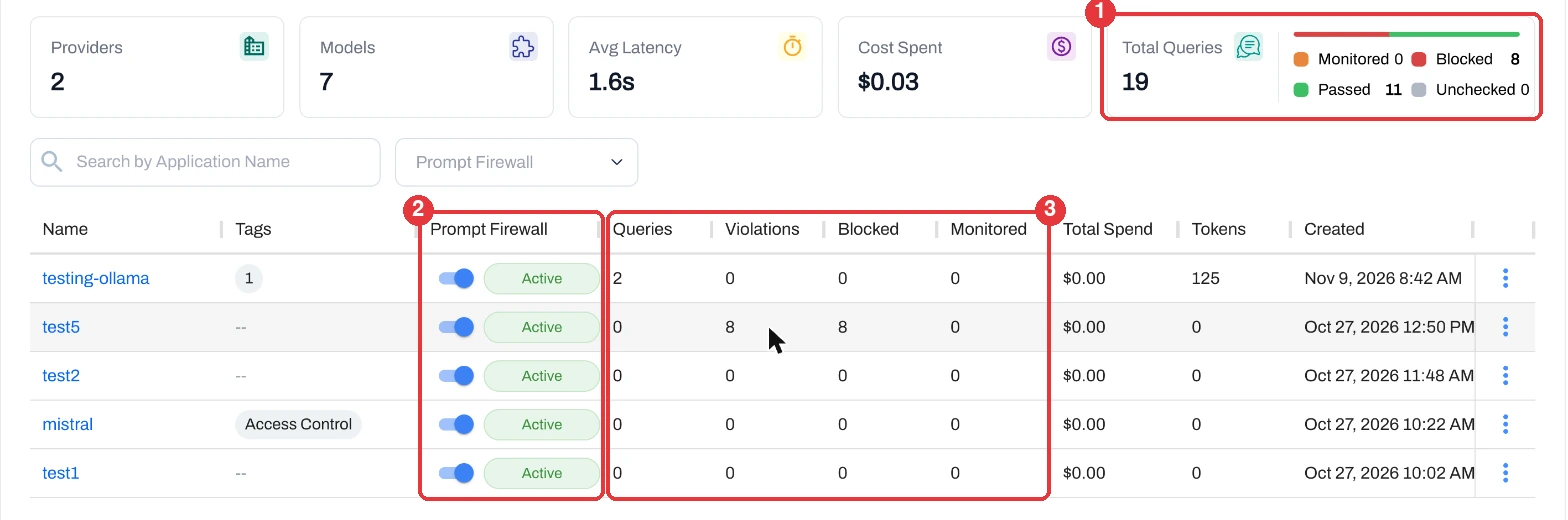
How AI Gateway helps. The AI Gateway page reports these values for the selected date range.
- Totals for Providers, Models, Average Latency, and Cost Spent.
- A Total Queries card that splits traffic into passed, blocked, monitored, and unchecked.
- For each application: Queries, Violations, Blocked, Monitored, Total Spend, and Tokens.
Govern Developer Tools
Situation. Developers use tools such as Claude Code that call an LLM from their machines. Security needs the same checks that apply to production apps.
How AI Gateway helps. Onboard the tool as an application. Tools that let you set a custom base URL and API key can send traffic through the gateway. The firewall then scans prompts for secrets and sensitive data before they reach the model.
Tool support
Claude Code is one of the integrations that AI Gateway supports. Check your tool for a setting to override the API base URL.
Keep an Audit Trail
Situation. An auditor asks who sent what to which model, and what the controls did about it.
How AI Gateway helps. Every request through the gateway is logged. You can review:
- Prompt and response logs.
- Violation reports and policy enforcement results.
- Application usage metrics and model usage.
To dig into a violation, open AI / ML Security > Prompt Firewall, select the application, and use Go To Issues.
Choose a Path
AI Gateway is one of three ways to onboard an AI application. Follow the branch that matches your situation. Select a guide to open it.